

Closed (works as designed)
Project:
Drupal core
Version:
7.x-dev
Component:
taxonomy.module
Priority:
Normal
Category:
Bug report
Assigned:
Unassigned
Reporter:
Created:
29 Jan 2008 at 04:41 UTC
Updated:
20 Nov 2011 at 13:56 UTC
Jump to comment: Most recent file


Comments
Comment #1
catchafaik, free tagging vocabularies can also be organised hierarchically.
Comment #2
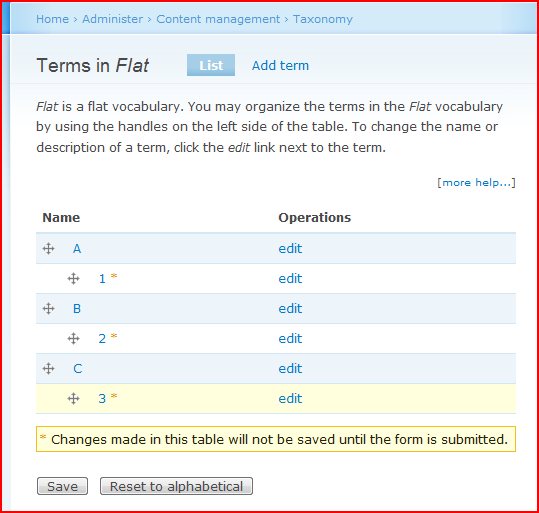
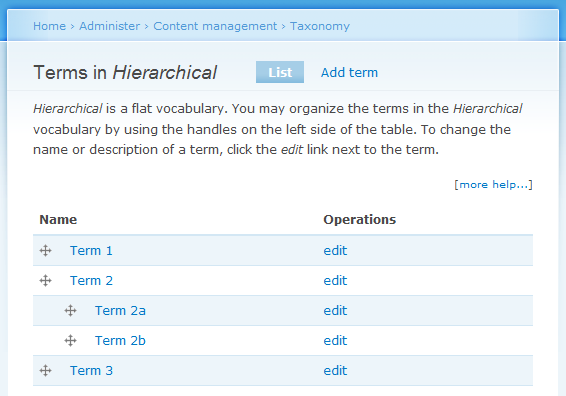
keith.smith commentedI tested this a bit today, because in the context shown in the screen shot, "flat" is confusing. But, in my testing, I could take an actual flat vocabulary with no hierarchy (the help text says "flat") and introduce hierarchy with drag-and-drop (the help text still says "flat" until the hierarchy is saved, and the "Remember to save..." box is introduced). When I save the list of terms with the hierarchy, the first sentence of the help text changes to "... is a single hierarchy vocabulary."
Is your screenshot from the period of time between when the terms are reordered with drag-and-drop and before the save button has been pressed (ie, before Drupal has adjusted the help text to the new state of the vocabulary)? Surely it isn't since I don't see any updated marks. I can't see the bottom of the screen on your shot, but you can on the one I am attaching. (Note that in my screenshot I named the vocabulary "Flat", which was probably a bad choice.)
If it is, this may be a "by design". If it isn't, then how do you reproduce this? I agree that using "flat" would avoid this problem for even that brief span of time between introducing hierarchy and pressing "Save". And, some other name besides "flat" is probably more descriptive. But I'm not sure it is worth violating string freeze over.
Comment #3
JMowery commentedI am having an issue with this saying "Flat" as well. It is extremely confusing for me and makes no sense. I have organized my taxonomy in a hierarchy, but it only says "______ is a flat vocabulary."
It is a critical bug, and I think it should be fixed immediately.
Comment #4
keith.smith commentedCan you provide a set of steps to reproduce this? I half-heartedly tried in #2 and only managed to get it to say "Flat" from the time I changed it from Flat to hierarchical to the time I saved the changes (and the string refreshed).
Comment #5
sutharsan commentedMoving all usability issues to Drupal - component usability.
Comment #6
harry slaughteri had this same thing occur after upgrading a d5 site to d6.
very confusing.
ultimately i manually changed the 'hierarchy' value to 1 in the DB for the appropriate tables to fix it.
?
Comment #7
harry slaughterActually I just had the problem re-occur.
Here's how you can reproduce it on a healthy d6 install:
1 - create a vocabulary
2 - add some terms to the vocabulary
3 - using the 'list terms' link, arrange the terms into a hierarchy and save (DB vocabulary.hierarchy value should show 1 now)
4 - edit the vocabulary, make no changes, then save it
at this point, the DB vocabulary.hierarchy value should show 0 and the message in question above will show up on the 'list terms' page.
however, you can still arrange the terms hierarchically, and everything seems to work fine.
Comment #8
harry slaughterComment #9
temp commentedAfter import vocabulary via http://drupal.org/project/taxonomy_xml i see same problem.
Comment #10
bradweikel commentedThis still exists on my current pre-alpha snapshot install of D7. Harry's steps in comment #7 are spot on -- super simple to repro.
Comment #11
xjmNo longer applicable with the new taxonomy hierarchy behaviors.