

 Come together with the global Drupal community in Rotterdam, 28 Sept – 1 Oct 2026. Sessions, contribution, connection, and Early Bird savings until 8 June.
Hi,
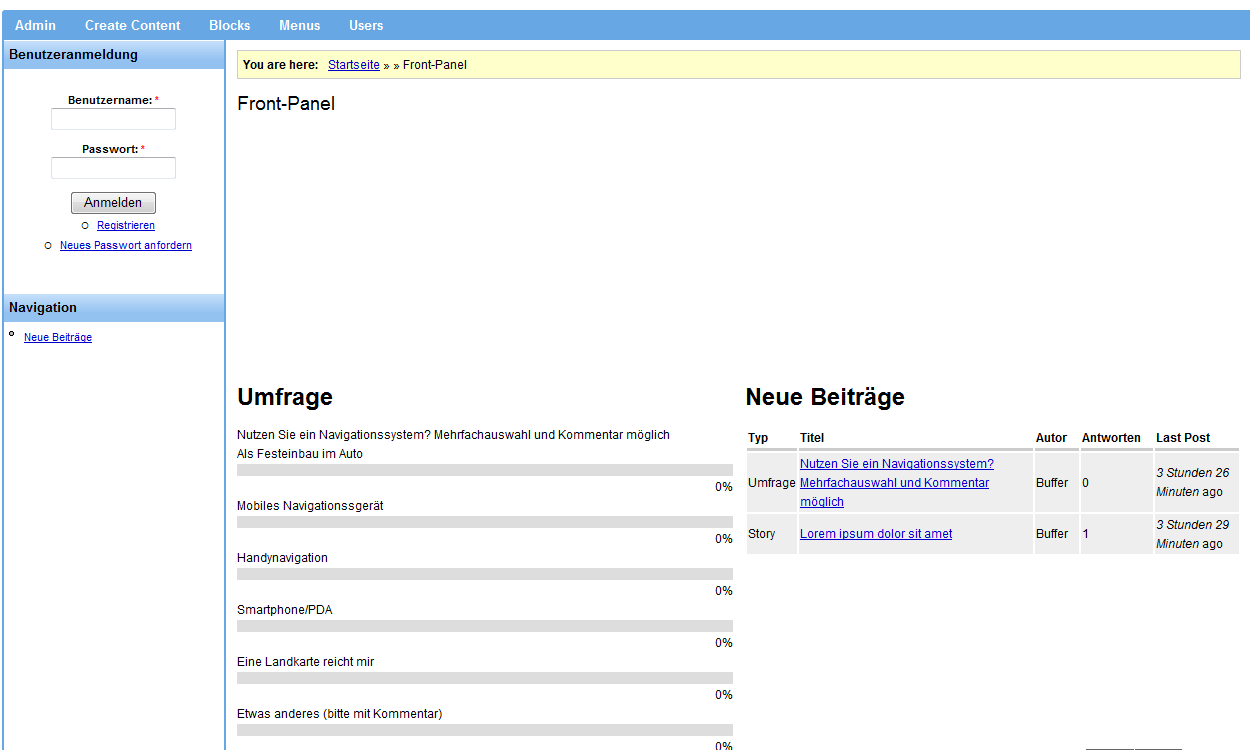
i am using the Nerdalistic Theme in Addition with the panles module. If i activate some blocks on the left side, it occurs white space as long as the blocks are!
Any Ideas to fix this?
I will Attach an image
| Comment | File | Size | Author |
|---|---|---|---|
| #4 | nerd-panels.gif | 55.32 KB | Witch |
| #3 | nerdalistic-panels.jpg | 156.35 KB | jeremycaldwell |
| error.gif | 25.92 KB | Witch |


Comments
Comment #1
merlinofchaos commentedSounds like a bug with the theme, not with panels.
Comment #2
jeremycaldwell commentedYeah it definitely looks like a clearing issue. Something has a "clear: both" attached to it and is throwing things off. I doubt it's an issue with panels but rather the content you are adding there. Maybe your div/class has a "clear: both;" or "clear: left;" applied to it and is causing the content to load below the left sidebar.
I'll try installing Panels and seeing if I can get the same clearing issue and try to figure out the fix. Thanks for pointing this out.
Comment #3
jeremycaldwell commentedI installed Panels and created a test one and wasn't able to recreate the error you displayed in the screenshot above. Have you downloaded the latest version of the theme or are you using an older one? Let me know and hopefully we can figure this out.
Comment #4
Witch commentedI am using the latest Version of Nerdalistic and Panels 5.x-2.0-beta2! Did you create a panels page? I attached an image, which shows my crerated panels page.
Comment #5
jeremycaldwell commented