

Closed (outdated)
Project:
TinyMCE
Version:
5.x-1.9
Component:
User interface
Priority:
Normal
Category:
Support request
Assigned:
Unassigned
Reporter:
Created:
5 Feb 2008 at 08:08 UTC
Updated:
14 Jan 2021 at 19:49 UTC
Jump to comment: Most recent

Comments
Comment #1
gnosis.kv commentedsame error also happens on imce demo site.
on my testing site, tinymce 2.1.3 is used.
Comment #2
gnosis.kv commentedComment #3
formatester commentedTry to switch off the SearchStatus extension in Firefox.
Comment #4
gnosis.kv commentedthanks formatester..
After disabled SearchStatus and Alexa extension in FF, it works now.
Comment #5
PhalanX commentedComment #6
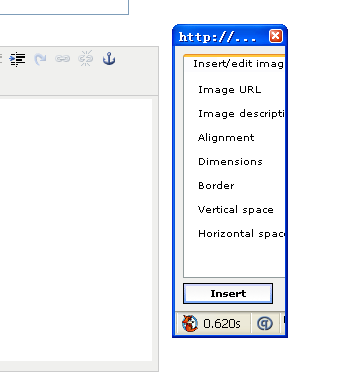
selwynpolit commentedI don't have the SearchStatus or Alexa extension in FF. I tried setting the inline popups options in the tinymce profile. It is under the buttons and plugins section. This seems to fix the problem of the window not resizing, but the window is missing the 2 other tabs. In MSIE 7, I have general, appearance and advanced tabs. In ff, there is only a general tab. Any ideas?
Here is a curiosity. It doesn't behave the same way on my desktop as it does on my laptop. On the laptop, the window resizes, but on the desktop it doesn't. I do have different extensions installed in firefox, so that could be related. I'll keep exploring
Comment #7
tenten71 commentedDoesn't do this on my MAC in Firefox, but it does on my PC. Both using FF 2. Anyone have different results in FF 3?
Comment #8
tenten71 commentedIf you use the IE Tab extension in FF 2, the problem is gone.
You just have to set your pop-ups in FF to open as new windows.
TenTen71.com
Comment #9
mupsi