Closed (fixed)
Project:
Notifications
Version:
5.x-1.x-dev
Component:
Documentation
Priority:
Normal
Category:
Support request
Assigned:
Unassigned
Reporter:
Created:
7 Feb 2008 at 01:10 UTC
Updated:
7 Apr 2008 at 11:32 UTC


I understand the templates, but I got one email (set to daily digest) and it just is not what I expected. The first thing that was funny is being addressed in another issue thread, and that is HTML markup in the title and body of the email, but without being an HTML document so that you see the markup.
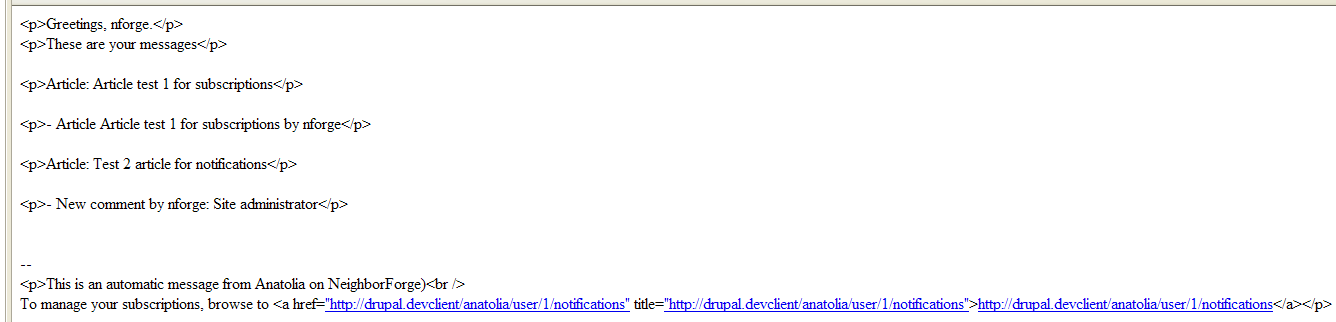
The second thing was that I expected it to look similar to other email digests with a listing of titles at the top, followed by each full node in one long mail. Is this not how this module works? Instead, I got the attached screen shot.
These are titles of nodes:
<p>Article: Article test 1 for subscriptions</p> and <p>Article: Test 2 article for notifications</p>
I'm not sure what the others are supposed to be.
| Comment | File | Size | Author |
|---|---|---|---|
| Image2.png | 15.78 KB | rconstantine |

Comments
Comment #1
jose reyero commentedThe html markup is possibly caused by the Input formats for messaging methods.
There's not a single filter set up that will work for all cases and you'll have to play with the right tokens and input formats/filters depending on your content format. The messaging_debug module may be some help for this.
Check the Filters -and the order- set up for the messaging method.
- Some filters like the 'line splitting' add html (p) so you shouldn't be using that one for the final message.
- There's a new 'Plain text' filter provided by the messaging module that trims out all html.
- Some tokens are raw and some are filtered -which means they can add/remove html, depending on each filter.
What we really need here is some help page explaining how filters/tokens/formats work together in overall Drupal and in this specific case. However the filtering chain is going to be though anyway so we'll possibly be documenting just the right set up for the use cases we come accross.
(I.e. textile 2 html 2 plaintext )
Comment #2
rconstantine commentedThanks for the info. Will try some things out.
Comment #3
HallSL commentedI'm still not managing to get the digest to include anything but this two line format with the title and then the title and author:
Greetings, Site Admin.
These are your messages
Feednode: Air quality study deemed inconclusive
- Feednode Air quality study deemed inconclusive by Site Admin
Feednode: P. Amboy can clean up tainted site
- Feednode P. Amboy can clean up tainted site by Site Admin
That looks pretty bad. At a minimum, if we could remove the duplicate line, my client might be able to live with listing the headlines and then linking to the site for followup. It would be much better to include a link to the original story. I'm using FeedAPI_mapping to take the original URL and map it to a new field, and that field does show properly in the node that is created. If I send the messages immediately (a solution that won't work for me because there will be too many items) then it will send that link as part of the e-mail. Is there any way to get that information included in the digest?
Comment #4
jose reyero commentedYup the digested messages for node creation didn't look good. It should be fixed by now.
And digests are now themeable. See theme_notifications_digest_body() in notifications.cron.inc
Now, digests for node creation should look like:
New content of type Story has been submitted
– Story One story by admin
– Story Two stories by admin
Hope you like them.
Comment #5
Anonymous (not verified) commentedAutomatically closed -- issue fixed for two weeks with no activity.