Closed (fixed)
Project:
Javascript Aggregator
Version:
5.x-0.6
Component:
Code
Priority:
Normal
Category:
Task
Assigned:
Reporter:
Created:
7 Feb 2008 at 12:35 UTC
Updated:
21 Aug 2011 at 05:47 UTC
Jump to comment: Most recent file


Hi!
This module seems to work fine, and I'm glad to see that contingency has been made for troublesome modules (who could have thought that TinyMCE would be a problem...? :p )
It strikes me though, that putting pure php code into the page template is almost entirely inappropriate. The $scripts variable is created by the phptemplate engine, and as such can be easily overridden in the template.php file.
I therefore propose that rather than have people hacking at their page.tpl.php files (naughty!) you should advise them to insert the following code into the template.php file. This should be placed in _phptemplate_variables, specifically in the 'page' section.
if(module_exists('javascript_aggregator') && $vars['scripts']) {
  $vars['scripts'] = javascript_aggregator_cache($vars['scripts']);
}
This code implements the template.php style of using the theme variables, namely $vars['phptemplate_variable'], and also includes a check to make sure there was actually a script in the first place, saving a potentially wasteful function call - very niche case admittedly!
Hope this helps. I have also tested this quite well (including with jquery_update) and it seems fine.
Nik
Web Development in Nottingham, UK by Kineta Systems
| Comment | File | Size | Author |
|---|---|---|---|
| #12 | twice JS [browser: Chrome] | 134.79 KB | ionmedia |
| #12 | Cached JS reguest method: empty [browser: Chrome] | 141.42 KB | ionmedia |
| #12 | Cached JS reguest method: GET [browser: Chrome] | 153.09 KB | ionmedia |
| #12 | JS from cache [browser: Chrome] | 134.79 KB | ionmedia |
| #12 | refreshed JS from server [browser: Chrome] | 109.1 KB | ionmedia |

![twice JS [browser: Chrome]](https://www.drupal.org/files/issues/264.jpeg)
![Cached JS reguest method: empty [browser: Chrome]](https://www.drupal.org/files/issues/261.jpeg)
![Cached JS reguest method: GET [browser: Chrome]](https://www.drupal.org/files/issues/262.jpeg)
![JS from cache [browser: Chrome]](https://www.drupal.org/files/issues/264_0.jpeg)
![refreshed JS from server [browser: Chrome]](https://www.drupal.org/files/issues/266.jpeg)

Comments
Comment #1
niklp commentedBah, forgot to add: another advantage of this is that if you have more than one page template (maybe four or five?) you'd have to update *each* of those files with the original code, whereas this is a single file update only.
Comment #2
derjochenmeyer commentedGreat! I didnt have the time to investigate this... But its however a little more complex to setup then... now its easy "copy this code there"...
Modifying the _phptemplate_variables respectively adding it if it doesnt exist could be hard for new or unskilled users..
Comment #3
derjochenmeyer commentedThis is what we would have to add (replace) in the documentation and on the description page, right?
Place the following code in your themes template.php file in the page section of the function _phptemplate_variables()
If that function does not exist in your template.php file add it by pasting the follwoing code
If your theme does not come with a template.php file create an empty text file and name it template.php them past the code above with an <?php opening tag! and save it to the directory of your theme. Check the core module garland for an example of a template.php
Comment #4
derjochenmeyer commentedComment #5
niklp commentedYou're quite correct in that it is slightly more difficult to add in the template.php file, but it's the "Drupal way", and is also general best practise.
Any themer will tell you that keeping the template files as free as possible from php markup is the Way Forward.
The content in #4 looks pretty good to me! :)
Comment #6
derjochenmeyer commentedComment #7
derjochenmeyer commentedComment #8
Anonymous (not verified) commentedAutomatically closed -- issue fixed for two weeks with no activity.
Comment #9
FranCarstens commentedI'm not sure where this should go, my template.php looks a little different:
Any suggestions?
Comment #10
Katinka commentedInstead of an if-Statement you do have a switch-Statement, but it is pretty much the same as shown in #3. Your complete code would look like this:
Comment #11
ionmedia commentedthanks a lot for complex stuf, but i have some trouble:
my
after it i have all fine with front page, but on all pages, there i am going at my drupal site i see doubling js scripts
after pushing refresh button js loaded only once, but with clicking on another link, referalling from this site, each js loaded twice
anybody know reasons or any minds about it?
disabling aggregation on perfomance page have no luck
Comment #12
ionmedia commentedi can reply for this by myself
twice js Chrome dev (see attach)
i thought what scripts loaded twice and its my mistake (Cached JS reguest method: empty [browser: Chrome], Cached JS reguest method: GET [browser: Chrome]), but chrome tell, what he had first JS with empty request and second for same js with GET
anybody can explain it?
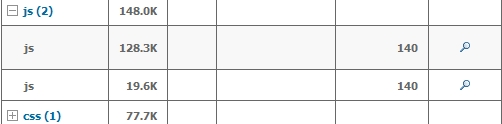
Yslow tells us what FireFox have no double requests to JS (Yslow JS Components)
all files cached (WEIGHT GRAPHS)
so, i see, what in this case module works fine and we need to understand: or it is Google chrome bug or google knows this stuff better than Yslow
Comment #13
sarav.din33 commentedthis is very useful for me....
Comment #14
Wolfflow commentedsub