

By bstrange on
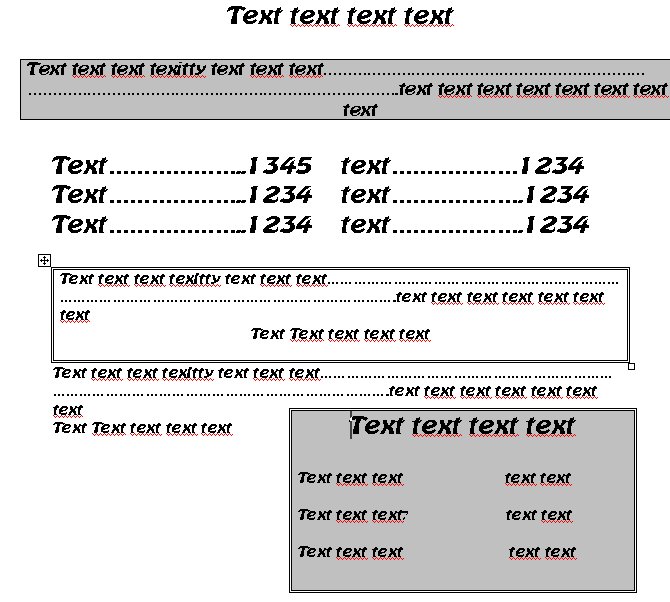
I am trying to add some 'flare' to the content pages of my site by inserting tables etc so they look similar to this: http://www.homepcpatrol.com/downloads/tables.jpg. What is the best way to achieve this?
a) Customize the background images for the content section (such as was done to some degree in the blossom theme)
b) Code the tables in CSS
c) Use raw html code in the actual page code
Or is there another way I am not even guessing?
Please give me an example of any code I should use in either css or the raw html on the page if possible.
In dreamweaver, tables etc were very easy, in joomla, you just cut and paste them out of Word.
I'm just not sure what the best way to do it in drupal is
Thanks in advance!

Comments
You may investigate content
You may investigate content templates (a standard feature in Drupal these days). You would have to do some light html coding, css, and graphics to get them like you want them...
Alternatively, you may also use phptemplate overrides (w/ css and graphics too)...
Derek
Thanks, I was afraid of
Thanks, I was afraid of that
I was hoping something along the lines of
<table border="2" cellspacing="2" cellpadding="2" width="600" align="center" style="height: 50px; background-color: #996633; border-width: 2px; border-color: #ffcc66"><tbody><tr><td style="font-size: 16px; color: #000000; font-family: Times New Roman, Times, serif"> Choose Your Dog- 10" Black Angus All Beef Dog</td></tr></tbody></table></p>would work, but nope, that would be too easy lol.
Then I thought something like I do for the text styling inserting :
but I have no idea how to create a style.css code set for the tables or even if it is possible
Are you just trying to
Are you just trying to customize one piece of content? If so your method would work.
(sorry, wouldn't let me edit
(sorry, wouldn't let me edit to add for some reason)
Maybe the above .node .my-font-style and specify a background image as part of the style?
sure you can add a bg img to
sure you can add a bg img to your design... Its simple css.
you could add: background: url('images/yourBGimage.gif') top repeat-x;
or something like that to your css and it would display it.
Well actually, I just don't
Well actually, I just don't want it to look like just plain text (one of the big downsides I see on many drupal pages).
I was hoping to put in a 1" high brown gradient bar that spans the width of the content page near the top to showcase the primary product; in this case a 10" Black Angus All Beef Dog.
I can use the .node .my-font-style to change the font to something headerlike that would be seen in my pseudo marquee, but I am having difficulty with setting up the 'table' for lack of a better word for it.
I then want to list all the regular items in the bulk of the content page, and then insert another say 3" by 3" 'table' in the bottom right hand corner to showcase the 6 speciality dogs against a brown gradient background
So do you have a content
So do you have a content type like "hot_dogs" or are these just regular pages (as in created via "create page")?
If this is a custom content type you will want to go with a content template (they really arent hard though -- relatively pianless). If they are pages, then you will have to either use phptemplate to isolate certain nodes: like a template for node/102 might look like node-102.tpl.php (see http://drupal.org/node/136647 for more info about that)
You can also just write custom code and styles into your page's "body" section and theme it as you wish.
Derek
At the moment, it is just a
At the moment, it is just a regular page. I may have to create a custom content type; however, as the node.tpl.php still does not get me tables. I can change the font styles already using the .node .my-font-style in style.css.
Sorry, I am pretty new and it just isn't sinking in. If I create a custom template for node-102(for example) is there a way to create tables in that node's css?
again, sorry... I am starting to feel more stupid than usual :(
it would probably be best to
it would probably be best to make tables in the body section of the page itself and them style them in css. You can make tables in css (I think) but its not supported in the lesser browsers (Internet Error).
I would think that if you are going to be creating many pages about hot dogs then it would be a good idea to create a custom content type and then use the built in content templates to make them display as you like.
Derek
Ok I tried a few different
Ok I tried a few different things: (you can see them at http://www.theweeneehut.com -click on "Dogs" under navigation)
1st, I created the following node in style.css
and then added the following line in content:
<span class="my-font-style-one">Choose Your Dog- 10" Black Angus All Beef Dog $5.49 </span>It looks 'fair' but I have a feeling that it might span more than one line in different browser resolutions and that would be bad. Also, the Batavia font seems to get cut off for anything subscript (hanging below the baseline), even though I set line height to 50px to make sure none of it be accidentally 'cut off'.
Then I started putting in menu items and the spacing was so eratic on different browsers etc that I decided I had to go with a table to implement at least some structure and put in the following table in the page content:
This worked well except it loads on the content page 4 inches below the 'pseudo banner' (the 10" dog on gradient background) for no apparent reason (that I can figure). I am probably going to drop the border once I get it's positioning squared away.
Then, I thought that instead of the pseudo banner created by using the style.css .node . my-font-style, I would go ahead and try placing in a table for that as well. I created the following code:
Which of course didn't work (an HTML purifer page I went to removed the BGCOLOR atribute and it worked) of course now I have no background color :P and this table is oddly spaced (down 2" from the 'pseudo banner'.
You can see everything I have been trying at http://www.theweeneehut.com then click on "dogs" out of navigation...
[boohoo]As you may have guessed, and as I fully realize, I am in way over my head here. The site is for a family member and friend of the family who my parents volunteered my services to after seeing my work on my site http://www.homepcpatrol.com and one of my client's site http://www.favedecor.com. I have been trying to get my family to recommend me to their friends and co workers (people who might actually even pay lol) for the past year and I am worried that if I blow this I won't get any more recomendations from them. I can probably switch it to a joomla CMS and then design the pages in dreamweaver or word and just paste it into their WYSIWYG editor but I have been trying to avoid "Joomla relapses" since switching to Drupal... anyways Thanks for the help you have given me already and if you don't want to waste any more time helping me, I fully understand... it's like trying to teach someone to cook by mail :P ah well [/boohoo]
I'm off to go stick my head in the oven hehe
I am in way over my head
Nah, you'll do fine. I would recommend that you draw up (on paper even) what you want the site to look like on the pages that you are unsure about and then go from there.
A personal suggestion: don't go overboard with the gradients in the tables. Your theme (which looks pretty cool) has alot of texture and movement going on there. If you put too many backgrounds and so forth in your content it may make the pages look cluttered (messy) which is not a good thing.
I like to say that space is your friend (although I am partial to open and clean layouts)...
Feel free to contact me though. I am glad to help where I can.
I see you are in Sandusky Ohio. I am in Cincy... small world eh?
Derek
Thanks again, I am actually
Thanks again,
I am actually working off one of their menus (which they want as close a replica as possible).
I will probably clean it up a bit because the menu is very condensed and very very busy; but at least I have a basic layout to follow.
I found a couple good site about how to build the classes for the tables in style.css and it is looking much better now.
I am struggling with text-align on the caption "Make it a combo" inside the content body. I am trying to use it as a mid page header without defining it as a header, seeing how I have so many extra classes already for the tables and table data etc. It works in FF but not in IE 6 or 7. To make it I set the following in style.css
Then put
<span class="my-font-style-two"><p>Make it a Combo</p></span>I have no clue why the formating doesn't apply into IE, I could find no articles saying that text-align wasn't supported.
Anyways, I appreciate the help!
Go Bearcats!