

 The 2026 Drupal Business Survey is open. Your response will help shape the future of the Drupal business ecosystem.
Hi,
this is for blogelephant.com
I dropped
if ($comment->gravatar) { print $comment->gravatar; } elseif ($picture) { print $picture; }
into comment.tpl.php
I pointed to a default picture in the interface http://blogelephant.com/files/gravatars/blogelephant_gravatar.png
That shows up for all anonymous users. Their gravatars don't work. I've tested it.
Any ideas to get this working. Or should I just remove the module. Is the module working? I know its in development. Thanks for your help.
| Comment | File | Size | Author |
|---|---|---|---|
| #3 | drupal-gravatar-account-settings.png | 17.54 KB | Narno |
| #2 | Picture 8.png | 55.38 KB | seanHodge |
| #2 | Picture 9.png | 72.29 KB | seanHodge |


Comments
Comment #1
Narno commentedHum, so strange... can you make some screen capture of the user settings page et Gravatar settings ? And, is the "user access" to Gravatar is ok ?
Comment #2
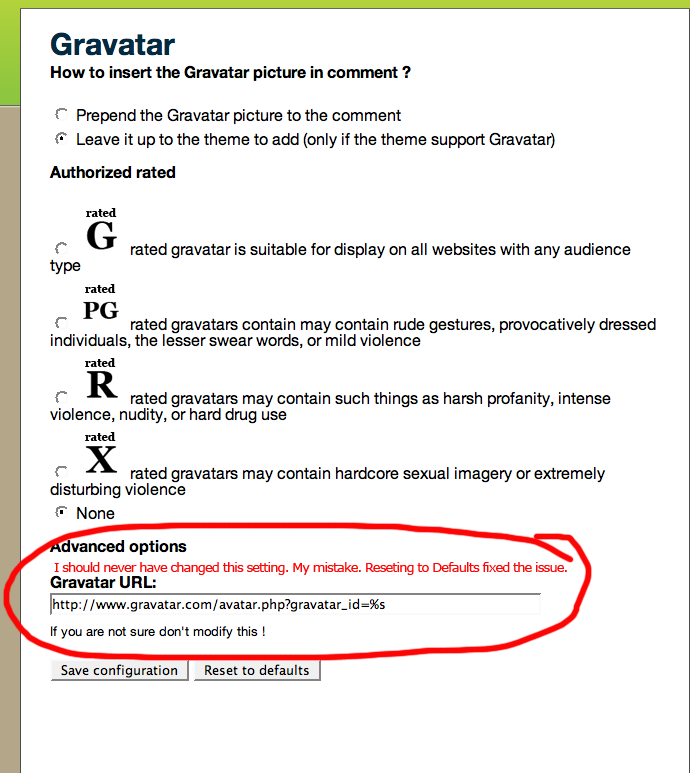
seanHodge commentedI'm really excited. The module is working. I made a change to a setting in the module I should not have. I pointed out where I made the mistake in the screenshot.
So, Gravatars work for users that have them that visit the site. I also got a default picture in for users that don't have a gravatar, which is really cool by the way. I love that feature of your module.
The only remaining issue is that my User Picture doesn't show up in comments. I attached a screenshot. I'm not sure if this is a related issue or not. I do have the code you recommend in a comment.tpl.php file:
Any thoughts on what I might try to fix this issue? Thanks.
Also, I listen to the Lullabot podcast and they gave a bunch of ways to get involved with Drupal. I'm not a php programmer so I wasn't sure how. But they mentioned that helping with documentation is often needed. If I can help out with this module that way or another way let me know. I know your doing this work volunteer and I really appreciate it.
Thx.
Comment #3
Narno commentedHi, I'm very happy you appreciate this module! :-)
About the first issue, i will fix the default configuration.
On the other hand, have you uncheck "Use my Gravatar in comments" in your user account, to display your profile picture instead of your Gravatar.
Thanks for your support!
Comment #4
ataliba commentedIn my Drupal, I fix this issue, changing this line in gravatar.module ( line 201 ) :
The original line is :
$grav_url .= "&default=" . urlencode(url($default));
The line with the fix :
$grav_url .= "&default=http://".$_SERVER['SERVER_NAME'] . urlencode(url($default));
Comment #5
Narno commentedHum... I suggest this code :
I thinks it's better ! :-P
Comment #6
Narno commented#204177: Domain should be appended to default picture
Comment #7
Narno commentedComment #8
Anonymous (not verified) commentedAutomatically closed -- issue fixed for two weeks with no activity.
Comment #9
lexx27 commentedI had the same problem and used the snippet the other way around, and it worked :)