

 Come together with the global Drupal community in Rotterdam, 28 Sept – 1 Oct 2026. Sessions, contribution, connection, and Early Bird savings until 8 June.
There is possibly a related issue, but this is not a duplicate as it deals with the default Navigation and User Login blocks specifically.
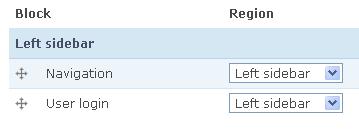
When you install a clean copy of Drupal 6, the block settings show Navigation first and User Login second. However, the block display order is reversed. This cannot be corrected by just submitting the block form. To solve it, I had to actually drag the Navigation block down and then back up to its original location then submit.
Looking at it with JS turned off, I see that the reason is the blocks both have an initial weight of 0. So, the sorting is happening differently on the block admin page from the block rendering when two blocks share the same weight. I don't know where the inconsistency is, but I imagine that should be solved itself instead of just giving these blocks different default weights. : )
See the attached screenshots.
| Comment | File | Size | Author |
|---|---|---|---|
| d6_initial_blocks_bug_actual.JPG | 12.17 KB | rszrama | |
| d6_initial_blocks_bug_settings.JPG | 7.25 KB | rszrama | |
| d6_initial_blocks_bug_settings_no_js.JPG | 8.15 KB | rszrama |



Comments
Comment #1
Folkert commentedAfter the manual switching, the weight's changes to -9 and -10 resp. Same when you ad another block to the lef sidebar.
It's not consistent to have different listing in admin and onsite with a default d6 install. +1 for that.
Looked at the block module file but don't have a solid solution as I'm just getting into 6 coming from 5
Comment #2
ricabrantes commentedIf a manual change don´t work, but if the change with JS work very well..
Comment #3
pembertona commentedThe issue here is that block.admin.inc and block.module use two different methods to retrieve and order blocks.
The administration form built in block.admin.inc uses a helper function, _block_compare, which in turn calls _block_rehash to retrieve block details. This method invokes the underlying modules exposing the blocks, retrieving the full block details and ordering the blocks based on region or disabled status, then weight, then name ('info').
The function block_list in block.module simply queries the blocks database table and orders by weight. On an initial load, the title column in the blocks table for the 'User Login' and 'Navigation' blocks is empty, as these block titles are both set in user.module (rather than the database, for theming purposes I imagine). So, the block.module doesn't have access to the fully populated block with title to order as does the block.admin.inc call.