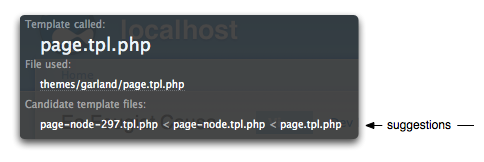
Working with template suggestions
Template suggestions are alternate templates based on existing .tpl.php files. These suggestions are used when a specific condition is met and a matching file exists. All layers from core, modules, theme engines and themes can provide the suggestions. You can think of them as naming hints telling the system to pick and choose based on the right circumstances. The idea is simple but it is a powerful feature providing another layer of customization.
Devel module showing template suggestions for the possible "page" templates.

A listing of all the suggestions for core can be found in Core templates and suggestions.
These naming suggestions are set from preprocess functions. There are plenty already provided by core. If you need to extend it further, add a preprocessor for the theming hook into your template.php file. This example add suggestions on the "page" theming hook. It can be added to any hook implemented as a template.
The prefix of "drop" should be the name of your theme.
<?php
function drop_preprocess_page(&$variables) {
global $user;
// Add a single suggestion.
if (module_invoke('throttle', 'status') && isset($user->roles[1])) {
$variables['template_file'] = 'page-busy';
}
// Add multiple suggestions.
if (!empty($user->roles)) {
foreach ($user->roles as $role) {
$filter = '![^abcdefghijklmnopqrstuvwxyz0-9-_]+!s';
$string_clean = preg_replace($filter, '-', drupal_strtolower($role));
$variables['template_files'][] = 'page-'. $string_clean;
}
}
}
?>There are two ways to add these suggestions.
- The key of '
template_file' accepts a single suggestion and it takes precedence. If the condition is met and the file exists, it will be used ignoring all others. - The key of '
template_files' (plural) can accept an array of suggestions. They are processed in FILO order (first in last out order). Adding to the array should be done with a general condition first, progressively getting more specific so it cascades based on specificity.
With the above example, Drupal will attempt to use a file named "page-busy.tpl.php" when the throttling threshold is met for anonymous users (anonymous role id typically set to 1). The others inform Drupal to look for templates based on the roles assigned to the current user, e.g., "page-authenticated-user.tpl.php". If none apply, the base template of "page.tpl.php" is used.
These are simply examples. You can set any context based on any data available to you.
A few notes:
- When adding to '
template_files', add to the array. Do not reset it since the variables are passed by reference. All the suggestions set before it in core and modules would be lost.<?php
// Do not do this:
$variables['template_files'] = array('hook-suggestion');
// Instead do this:
$variables['template_files'][] = 'hook-suggestion';
?> - Prefix the suggestion with the name of the hook it is associated with. This keeps it clear and the files grouped together. It also minimizes any chance of Drupal registering the template with a different hook.
- Use hyphens instead of underscores for consistency. The main template will never use underscores.
- Suggestions work only when it is placed in the same directory as the base template. Templates can be placed in any sub-directory of the theme. They must be paired into the same location.
- The theme registry does not have to be cleared for suggestions. It's only the base template that needs to be registered. Suggestions are discovered on the fly.

Allow template suggestion based on URL path and node type.
What I wanted to do was to have a templates based on the path. So, www.example.com/portfolio would call page-portfolio.tpl.php and page.tpl.php for the rest of the site. In addition, I wanted to specify a different template based on www.example.com/blog. Which calls the templates differently I guess because it's a node type of "blog" instead of a regular old "page"? I think?!? I'm not sure, I'm pretty new to Drupal and am just getting started.
Anyway, I learned I needed to be able to specify template based on node type in addition to path type. So, this is the script that I cobbled together from the script above and some script someone on IRC was generous to provide.
Like I said, I'm new to Drupal and PHP actually, so I'm sure there is a better way to do this. But, here it is anyways for anyone who would like to do something similar. It took me a lot of sleuthing to find all the pieces for this code! This code should go in your template.php file and your blog template should be named page-blog.tpl.php. Enjoy! =)
<?php
function phptemplate_preprocess_page(&$variables) {
global $user;
if (module_exists('path')) {
//allow template suggestions based on url paths.
$alias = drupal_get_path_alias(str_replace('/edit','',$_GET['q']));
if ($alias != $_GET['q']) {
$suggestions = array();
$template_filename = 'page';
foreach (explode('/', $alias) as $path_part) {
$template_filename = $template_filename . '-' . $path_part;
$suggestions[] = $template_filename;
}
$alias_array = explode('/', $alias);
$variables['template_files'] = $suggestions;
}
// Add a single suggestion.
if (module_invoke('throttle', 'status') && isset($user->roles[1])) {
$variables['template_file'] = 'page-busy';
}
// Add multiple suggestions.
if (!empty($user->roles)) {
foreach ($user->roles as $role) {
$filter = '![^abcdefghijklmnopqrstuvwxyz0-9-_]+!s';
$string_clean = preg_replace($filter, '-', drupal_strtolower($role));
$variables['template_files'][] = 'page-'. $string_clean;
}
if (drupal_is_front_page()) {
$variables['template_file'] = 'page-front';
}
}
}
}
?>
Thanks.. I dropped a simpler
Thanks.. I dropped a simpler function into a theme to just get page templates based on path aliases:
<?phpfunction phptemplate_engine_preprocess_page(&$variables) {
$alias = drupal_get_path_alias($_GET['q']);
if ($alias != $_GET['q']) {
$template_filename = 'page';
foreach (explode('/', $alias) as $path_part) {
$template_filename = $template_filename . '-' . $path_part;
$variables['template_files'][] = $template_filename;
}
}
}
?>
Theming a page by content type
Create a page template file for the content type you want to theme. For example, "page-node-my_content_type.tpl.php". Replace "my_content_type" with your content type obviously.
Now add the following to your template.php:
<?phpfunction my_theme_preprocess_page(&$variables) {
if ($variables['node']->type == "my_content_type") {
$variables['template_files'][] = 'page-node-my_content_type';
}
}
?>
Replace "my_theme" with the name of your theme and again, "my_content_type" with the name of your content type.
Go to Site Configuration | Performance and clear your cache. Now nodes of the specified content type will get their own page template when viewed as a page.
Theming multiple content types
Just adding onto your code for theming multiple content types:
<?phpfunction my_theme_preprocess_page(&$variables) {
if ($variables['node']->type == "my_content_type") {
$variables['template_files'][] = 'page-node-my_content_type';
} elseif ($variables['node']->type == "my_content_type_2") {
$variables['template_files'][] = 'page-node-my_content_type_2';
} elseif ($variables['node']->type == "my_content_type_3") {
$variables['template_files'][] = 'page-node-my_content_type_3';
} elseif ($variables['node']->type == "my_content_type_4") {
$variables['template_files'][] = 'page-node-my_content_type_4';
}
}
?>
In this example I have four different content types with four different themes.
exclude node add and edit pages
if ($variables['node']->type == "my_content_type" && arg(2)!='edit' && arg(1) !='add') {
$variables['template_files'][] = 'page-node-my_content_type';
}
This could help if you don't want same layout when you add/edit the page content.
Theming a page by arbitrary content types
You could improve above code to have the theme suggestion for all content types in your site.
<?phpfunction my_theme_preprocess_page(&$variables) {
if ($variables['node']->type != "") {
$variables['template_files'][] = "page-node-" . $variables['node']->type;
}
}
?>
Now just make your template in form page-node-your_content_type. If it's missing, the default page template will be used.
Works for me!
This is probably the cleanest solution I've found. Thanks a bunch all of you, especially khonggiannet. I mean, who really wants to manually add content types when you've built this slick little autodetect-type of system?
Nice work!
Ben Ahlquist
IDEaS Computers
http://www.ideascomputers.com
----------------------
Quality Forum Posts & Replies since 1996.
Content Type Agnostic
Yeah, I too opted for the type agnostic option that just adds the suggestion and can be "turned on and off" by creating the temple or removing it.
function MY-THEME_preprocess_page(&$variables) {$variables['template_files'][] = 'page-node_'.$variables['node']->type;
}
Pretty slim.
not working
I have done all these
Still this is not working for me
I am using drupal 6 version
Please help me
VBKUMAR
Try using khonggiannet's
Try using khonggiannet's solution above. Use it in your template.php by itself - temporarily take out the other code in the preprocess_page area - to test it out. In my case it was a matter of taking out everything in function atck_preprocess_page($vars)
I tried the code alone and things worked for me, then I adjusted it to match the rest of the setup on the ATCK template. I switched his $variables to $vars like everything else, and put it in the mix with the rest right before the last line to output the results.
The process went like so:
I copied the code above
<?phpfunction my_theme_preprocess_page(&$variables) {
if ($variables['node']->type != "") {
$variables['template_files'][] = "page-node-" . $variables['node']->type;
}
}
?>
and reduced it to
if ($vars['node']->type != "") {$vars['template_files'][] = "page-node-" . $vars['node']->type;
}
and slid it in to the larger block of code like this
function atck_preprocess_page($vars) {
$vars['styles'] .= atck_ie_styles();
// Determine if the page is the front page and apply pertinent classes
// if it is. Otherwise use that arg variables to construct the class and
// id names.
switch (TRUE) {
case ($vars['is_front']):
$body_id = 'id="front-page"';
$body_class[] = 'front';
break;
case (!$vars['is_front']):
$body_class[] = 'not-front';
break;
}
switch (TRUE) {
case (!arg(0)):
$body_id = 'id="error-page"';
$body_class[] = 'is-error';
break;
case (!$vars['is_front']):
$path_alias = drupal_get_path_alias(arg(0).'/'.arg(1));
$body_id = 'id="'.atck_id_safe($path_alias).'-page"';
$path_explode = explode('/', $path_alias);
$body_class[] = $path_explode[0].'-section';
break;
}
// Check the logged in state, and add the appropriate class if so.
if ($vars['logged_in']) {
$body_class[] = 'logged-in';
}
// If we are looking at a full node view, construct a class to specify
// the node type.
if (isset($vars['node'])) {
$body_class[] = 'ntype-'.atck_id_safe($vars['node']->type);
}
// If editting a node, add a special class just for that.
if (arg(2) == 'edit') {
$body_class[] = 'edit';
}
if ($vars['node']->type != "") {
$vars['template_files'][] = "page-node-" . $vars['node']->type;
}
// Now we take all those classes and ids that were created for the body
// and compile them into a single variable.
$vars['body_attributes'] = $body_id.' class="'.implode(' ', $body_class);
}
Then I made a new file in my template folder, right next to the original page.tpl.php and called it page-node-mpage.tpl.php, where mpage was my content type. Everything worked from there.
Hope this can be of help!
hello there...
i'm just wondering, hoping you can enlighten me. i'm little confuse actually... what are the codes inside your "page-node-mpage.tpl.php"? is it a custom theme for your "node" or particular "page"?
please help... i'm almost near to my deadline :(
thanks,
vsotto
its not working...
i have a content type as 'affiliate'. then created a page template as 'page-node-affiliate.tpl.php'. would you please point out what could be the reason of bellow code is not working? :(
<?phpif ($variables['node']->type == 'affiliate') {
$variables['template_files'][] = 'page-node-affiliate';
}
?>
tanks.
i'm actually using this
i'm actually using this method... but its not working for me(even if i try to clear the theme registry)... what i wanted to do is to call page template according to a particular content(node) type. i have a content type as 'affiliate', then created 'page-node-affiliate.tpl.php' to be used with the function example above.
the code is something like:
<?phpfunction my_theme_preprocess_page(&$variables) {
if ($variables['node']->type == "affiliate") {
$variables['template_files'][] = 'page-node-affiliate';
}
}
?>
what could be missing or wrong that i've done...
please help..
vsotto
how can we add a new
how can we add a new preprocess function to template.php. when I add the code to my template.php it gives error like this:
Fatal error: Cannot redeclare newswire_preprocess_page() (previously declared in C:\xampp\htdocs\yeni\themes\newswire\template.php:114) in C:\xampp\htdocs\yeni\themes\newswire\template.php on line 193
You say add, but we can not add a second one. What should we do or what is the way of adding this code to template.php for creating a new theme page by content type?
Warning
For the utterly new newbies here, README IF YOU GET A BLANK PAGE
There is another function with the same name (phptemplate_preprocess_page) in line 57 of template.php , comment it out.
Another Function
I tried for sometime to get this.
Where there is !=
I changed to ==
removed $variables['node']->type; ///at the end///
so on template page I added
<?phpfunction phptemplate_preprocess_page(&$variables) {
if ($variables['node']->type == "content_type") {
$variables['template_files'][] = "page-node-content_type";
}
}
?>
"be sure to comment out existing preprocess functions that exist"
I'm using frameworks and it had a preprocess function for the color module, which i commented out.
If someone could help here:
-if i wanted to keep the preprocess function of the color module how would i do it?
would I add this to preprocess to my content_type function declaration?
// Hook into color.module
if (module_exists('color')) {
_color_page_alter($vars);
}
}
so its
<?php
function phptemplate_preprocess_page(&$variables) {
if ($variables['node']->type == "content_type") {
$variables['template_files'][] = "page-node-content_type";
// Hook into color.module
if (module_exists('color')) {
_color_page_alter($vars);
}
}
?>
Hope I've made some sense here, i'm still quite green at this.
Thanks to all, great work **SpTks**keathmilligan, JonMB, khonggiannet***
E
Theme comment-reply page based on node type
Hi everyone,
I successfuly implemented a preprocess_page function that enables me to theme pages for every node type I create with CCK.
I would like now to be able to theme the comment-reply page for every node type as well.
So for instance, I would override page.tpl.php by:
page-comment-reply-"node-type".tpl.php
instead of the simple page-comment-reply.tpl.php, that does not enable customization based on node type.
Any idea ?
Thank you in advance
page-comment-reply?
did you actually figure that out? sorry, i had a look at comment.tpl.php and comment-wrapper.tpl.php and could not find any indication of a where the output for reply is... :-(
see also...
As mentioned earlier in this node "A listing of all the suggestions for core can be found in Core templates and suggestions." The comments on the linked page may also be helpful.
So if I wanted to change the
So if I wanted to change the page layout (strip out the left and right sidebars) based on the content type, where said content type is named "handbook", which template file do I make a copy of to modify, and how do I name it?
Thanks,
Jade
Template file
The template file is called template.php. It would be located in your themes/themename directory; ie, themes/garland/template.php. This file tells PHPTemplate that you're trying to do something special.
If your theme doesn't come with a template.php file or if you're building your own theme, you'll need to make your own. Just create a blank PHP file, copy and paste the PHP code into it, and save it as template.php in your theme's directory.
Then, you can make a copy of your page.tpl.php file, rename it page-node-handbook.php, and edit to your heart's content.
Template suggestion out of CCK-Field
Hi,
can I use template suggestion in combination with the value of a CCK-Field?
I tried different approaches to make it possible for users to select a 4-5 different styles for their blog. None of them was really great. I also tried modules - also here I found nothing, what I would use for just changing the blog theme (including the module blog-theme (which needs whole drupal-templates and not just the blog area)
I want to add a CCK multiple choice-field, with the a preview-pic of the style at the user profile-config.
Can I use template suggestions to select a tpl-file, based on the selection in the CCK-Field?
Thanks for any hints to get started with this, because I don´t know much of PHP, im without a clue, if it´s possible and where to start with this.
Thanks for help,
Marc