

 Come together with the global Drupal community in Rotterdam, 28 Sept – 1 Oct 2026. Sessions, contribution, connection, and Early Bird savings until 8 June.
Hello,
And thank you for this very promising module. It's on the way to become famous if you give it some support!
So just a few thing you will probably have noticed already:
- you inverted the 'e' and 'c' of "select" in the display of the block.
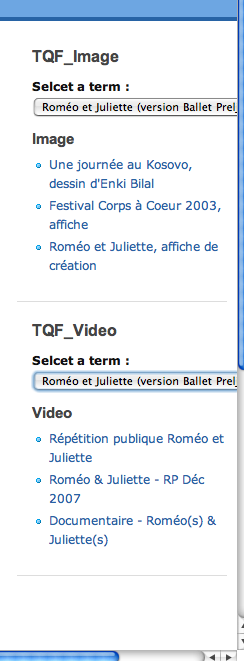
- (Mac Intel OS X 10.4.11) the drop down list is hidden by the scrolling bar/terms are too long/ sidebar aren't wide enough... I don't know much what to do except embedding the block within the page content /top/bottom areas (or panels).
-> In Safari 3.0, the list is showed on top of the scrolling bars.
-> In Opera 9.25, the list is showed on top of the scrolling bars.
-> In FF 2.0.0.12, the box looks like a text area until one click on it.
| Comment | File | Size | Author |
|---|---|---|---|
| #11 | Image 8.png | 63.58 KB | doc2@drupalfr.org |
| #7 | Image 6.png | 32.81 KB | doc2@drupalfr.org |
| #7 | Image 7.png | 62.11 KB | doc2@drupalfr.org |
| #5 | Image 2.png | 11.92 KB | doc2@drupalfr.org |
| #5 | Image 3.png | 22.72 KB | doc2@drupalfr.org |



Comments
Comment #1
nicholasthompsonThanks for the bug reports. This module is actually being developed for a members area for pponline.co.uk so these fixes and browser testing is much appreciated.
Which theme are you using?
Comment #2
doc2@drupalfr.org commentedPrecision: the list of terms is showed on top of the scrolling bars only when a user clicks on it. It remains under the scrolling bar when released. This particular point was just a remark not a real bug.
I use the Zen theme. Actually, for the one I use, line 6 of the Zen root style.css file reads:
* $Id: style.css,v 1.17.2.7 2007/01/28 21:14:01 jjeff Exp $Therefore I think that it is not the latest. I might use TQF on a more recent Zen theme if it exists and is compatible with mine (I remember having tried once with no succes.
PS.: I hope my suggestions will be useful to you and not too annoying indeed..:
#224438: A default vocabulary / hidding selecting a term / max number of nodes
Only the very first request is important to me (1- or 1.0.1 from issue #224438), while 2- or 2.0.2 seems somehow a basic feature.
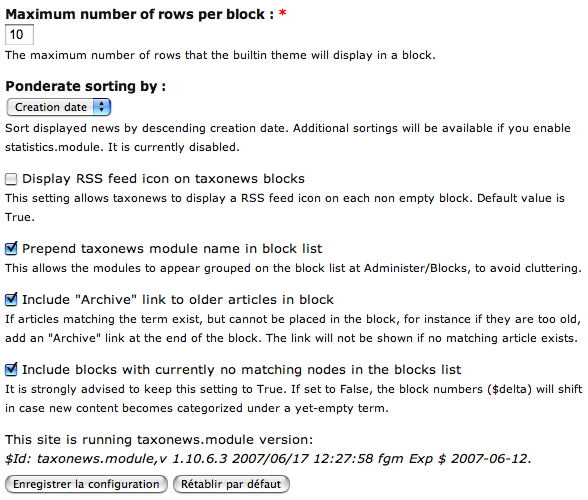
Oh, and by the way, about theming and features, you may find some inspiration with the taxo_news.module in its admin page, which allows to prepend the name of the module on the block name to avoid cluttering, shows the module version at its bottom, etc... some useful little things (see attachment)!
Oh (again), the "Free Explosive Core Training Tips" is annoying on *each* page of your client's site!
Hope this helps!
Comment #3
doc2@drupalfr.org commentedSomething I've noticed recently: You created a TQF menu element within the navigation menu that links to taxonomy_quick_find but with no title nor description. See attached image 1.
The result is a space line showing a blank element as a missing menu item in the navigation menu (in the left sidebar).... this menu is enabled by default. You might turn this off.
Comment #4
nicholasthompsonI've released a few updates today - there may be a few bugs as I didn't really get a chance to test it...
But I've implemented most of your suggestions and open to more. I'll try to fix that menu item bug later... Did I not define it as a MENU_CALLBACK? Oopsy!
Anywho - checkout the new module and see what you think. You might need to delete and redefine your blocks again - I've changed the structure... Oh yeah, the Weight feature doesn't do anything yet.
Cheers
Nick
Comment #5
doc2@drupalfr.org commentedAbout Feb. 22, 2008 version:
Great new features, mate! I've just tested creating new TQF block (the first step):
Remark 1 (image 2):
- MINOR: With the zen theme, the "add block" link partially hides the "label" underline when the mouse goes over it.
Remark 2 (image 3):
- Two (different) blocks can have the same name. I don't know whether it's a good thing or not. It shouldn't I guess. But I'm not sure about that. It's not a big problem. Though.
- I know users should pay attention to the naming of their blocks, but indeed, a lack of attention makes it a bit annoying in the admin/build/block page (image 4, TQF step 2)
- I came accross this problem by submitting (first step) my block while forgetting to add a limit to any type. Therefore I went back to the edit page with the navigator's "previous" arrow (deliberatly as I knew this is a common source of problems). I choose my types and re-submitted without changing the name. The TQF incremented but the name remained the same, of course.
New feature request:
- Theming the resulting AJAX node "views" of the blocks. For example, considering the TQF nodes appear in kind of "table view", we could add a "display image" field within the Image type result.
-> I imagine that it might be quite a bit hard to do... I've noticed the .css file within the module. I guess we can do some theming with it. Not tested yet though.
I'll test the new blocks and let you know. But having lunch first!
Greetings
Comment #6
nicholasthompsonI've just commited some more changes... I think the module is pretty much ready for a "release" now... Seems to function in all browsers that I've tested (FF2, IE 6/7, Opera 9(.25 and .26) and Safari 3.0 for OSX.
I've rewritten the Javascript and its much more robust now (for example, you cannot call select another term while its loading the previous one).
Cheers for your help getting this up and running!
If you can test and check post back with any other bugs - it'd be appreciated.
Comment #7
doc2@drupalfr.org commentedActually the block did not show up on previous version. Since then I selected only 3 vocabs which I'm sure at least one of them is used. One of them is probably not used with at least one of the nodetypes. I'll test your new version and let you know.
> Done. I've uploaded the 2nd February, 22 2008 version and installed it. Ran a cron. Emptied my server's cache before testing the new version. Tried a db update. No db update seemed necessary. By the way, I use a drupal 5.3 on this testing site (MAMP/Localhost) PHP 5.2.5, Apache 2.0, MySQL client 5.0.41.
Results: The block still doesn't display. The menu item still exists, and still leads to a blank page when enabled (taxonomy_quick_find). I've enabled this menu item back to see whether this element would get the blocks back, but it had not.
The blocks show up in the admin/build/block page (image 6 and 7 for block settings), but not in nodes anymore. I'll investigate deeper (trying default settings) and let you know.
> By the way, the choice of at least one nodetype thanks to the "limit" value isn't very clear. The choice of at least one nodetype should be made obligatory to avoid creating a block with no nodetype set for it...
Comment #8
doc2@drupalfr.org commentedSomething turned wrong with default settings: I got a blank page for an image node. Disabling the TQF module got my node back.
> Settings: The block is still for all (4) nodetypes, weight is reset to 0 (default), limit is set to 5 (nodes) for each of the 4 nodetypes, all vocabs are enabled. Block is set to show up for any page.
I red that a blank page often witnesses a server limitation or overcharge. The queries might be too greedy now. Don't you think?
> Some new settings: I give it a go for 3 nodes max (original setting of your "first" versionI tested) and block shows up only on node/* pages. Still blank pages.
Note: I have very high server (memory) limits and almost no server requests from other users... blank pages should not happen on my config...
>>> Sorry, eventhough that's a test site, it's running and is useful to a few important people. Therefore I need something working and I'll go back to the first version (the one with less features) for the weekend at least. Just let me know if you post some new release supposed to fix bugs or if you need more infos about the current version.
>>> It would be useful to be able to refer clearly to a version or another. Instead of the first one, the second one (for me, which is the first one of Feb the 22nd), the 3rd one (2nd version of feb the 22nd)... I know you know what you're doing, but I'm not myself sure of what's changed between the last 2 version, both dated from today...
Comment #9
doc2@drupalfr.org commentedComment #10
nicholasthompsonInteresting - white screens usually imply some kind of critical bug. I use apache and with apache I can do (from a terminal or SSH prompt):
tail /var/log/httpd/errors_logYour server may store its error log in a different place to me...
As for versions, you might need to investigate CVS if you want to checkout versions from specific times.
Also, you dont need to limit the block to appear on node/* pages because the module handles this internally.
It is POSSIBLE that you downloaded a tarball from a previous commit... Say, for example, I committed a change and then the site compiled a new tarball of the module and then I committed another change, but the site was still waiting for a new tarball to be generated. You may have downloaded one before the site had generated the new tarball.
Btw: This module is heavily in development, so I wouldn't advise using it on a live site until its definately ready to go, unless you're able to track down bugs yourself.
I'll have another check up on this for you...
Comment #11
doc2@drupalfr.org commentedI wish I could give you such a hand!!!
Untill I come back from the weekend, I just wanted to let you know what happened when downgrading to Feb 14th version:
- I kept my main TQF block.
- Overwritten the 22nd of Feb module with the 14th of Feb version.
- Went back to my admin/build/block/configure/taxonomy_quick_find/1?destination=admin/settings/taxonomy_quick_find page.
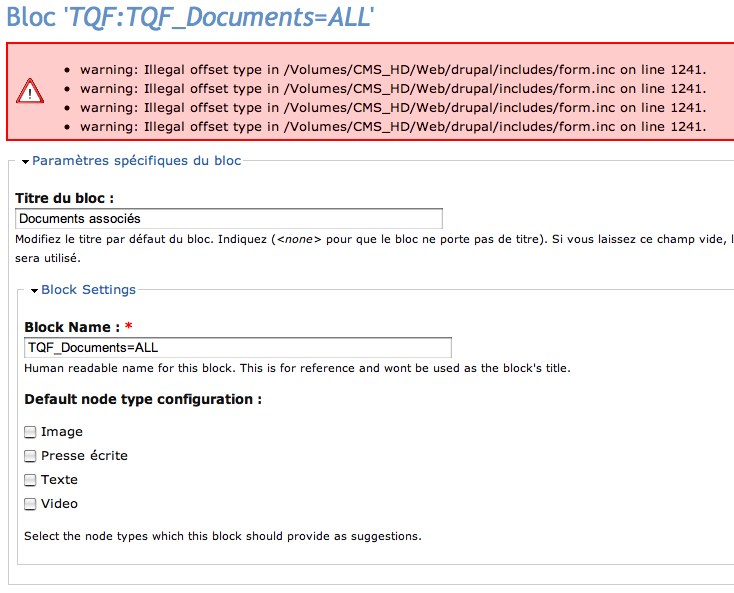
- There I got an error (see image 8)
warning: Illegal offset type in /Volumes/CMS_HD/Web/drupal/includes/form.inc on line 1241displaied 4 times which I guess means once per nodetype... all disabled.- Selected again each of my 4 nodetypes. Submitted. No error.
- Edited again to check: still no error. I keep block display settings to show up on node/* only because I remember that it was not set by default on the 14th of Feb version.
- Go to admin/build/block : my block's still there. Still set to be displayed on right sidebar. Editing block shows nothing new (normal, just checking).
- Go to a node page: Works like a charm! (except from the "Selcet a term :" label :)
I'll wait untill monday or sometimes during next week. Then I'll be sure some of your major changes will be commited to the dev tarball. I'll tell you then. I'd be glad you just keep a vague track of your changes, for example down there. Good luck with your work! I wish you (us) the best!!!
Cheers, Arsène
Comment #12
nicholasthompsonThe illegal offsets would be caused by the different array structures between versions.
Comment #13
doc2@drupalfr.org commentedNevermind about the illegal offsets. That was for your info. But as long as we're in dev version, this is normal I guess.
Some quick news on the latest version tried:
Version of the 28th of Feb. : my previous problems remains. Still tested with drupal 5.3, and the Zen theme.
>>> Nodes either show up with no block. Or they don't show up at all (no blank page this time but endless loading of the page). This problem stops as soon as the TQF module is disabed.
I have about 15 vocabs and 600 terms, and less than 200 nodes. Recall: very good server and bandwidth capacities.
Mysql Log doesn't tell anything. Last PHP Log said:
[28-Feb-2008 13:17:59] PHP Fatal error: Allowed memory size of 67108864 bytes exhausted (tried to allocate 47 bytes) in /Volumes/CMS_HD/Web/drupal/includes/common.inc on line 1380I have of few of those errors each day. I remember that some similar errors where related to the image module. Thus I don't think it is related to the TQF module. What do you think?
Comment #14
nicholasthompsonYes - you are right. I found this problem when I enabled it on our main site too. I also found a few bugs caused by me developing it on PHP5 and using techniques only allowed in PHP5...
I'll log into our server and sync up the changes and post back when done... Thanks for bearing with me.
Fyi, the memory errors are caused by doing node_loads (for some reason!) - I changed it on our server to do a simply query. FAR more efficient anyway!
Comment #15
nicholasthompsonOk - a better version is committed now. There is still more work needed - eg, getting the weighting part working.
Comment #16
doc2@drupalfr.org commentedVersion of March the 3rd tested today: works like a charm!
This is such a great work! Thank you so much!
I'm going to translate it to French. Do you know a good way to do so? Because I'm just going to change the code lines for the moment, and I guess setting up some .po files would be better. I hope that the latest solution will be easy.
By the way, if you intend to release a stable version soon, I'd prefer to translate this last one. Do you have a timeline or an idea of when that could be done?
Comment #17
nicholasthompsonWell our members-site which is using this is meant to go live tomorrow... There is a little more to do; the weight feature for example. Translation shouldn't break too much between releases - I'll try not to add any new text ;-) hehe.
I've never done any translation - I speak English and PHP. Fortunately for me, computers understand PHP and all the people I know appear to understand English... I'd love to be able to speak French (or maybe German or Spanish), but alas I am CRAP at natural language - although if I ever met a french-only speaking person I would at least be able to tell them my name ;-)
Try reading up on this...
http://drupal.org/node/11396
The 'Proper' way of doing this would certainly be appreciated.
Comment #18
doc2@drupalfr.org commentedI thought that it would have been simpler, eventhough I already had a try a few months ago. People interested in translation mya just edit this module, if you allow it. Eventhough I'm not good with PHP, I understand it a bit and I can see it's clear enough to chnage a few lines.
Basically, for end users only: Lines (for version of March the 3rd, 2008):
426
462 (I commented this line, having a block named something like "Content related to:")
506
535
I think that's about it.
Thanks for this useful link anyway. I may still have some time to jump into this in a few months.
Thanks for the comments in your code as well! And good luck for the next developments! Option for sorting results would be a good feature.
*** NEW feature request. Eventually!
> Option for displaying the vocabulary name as the term array label.
EDIT: Display nodetype "name" (human name for nodetype) instead of the nodetype "type" (machine name for nodetype). This feature has been done by a potential trainee. Code needs clean-up before we post a patch (there will be a new issue).
> Option for "ANDing" terms together would be another good feature (to be set up in block edit page). This option could be a choice between drop-down and checkboxes widgets:
With TQF terms on node pages would be displayed in rows with a check box each, instead of in a drop down (OR term content).
End users would be able to check boxes of terms to get related content. Content is related if it carries all terms selected. This would allow a great flexibility by showing up nodes tagged over different vovabs.
In my case, I could have some textes that are tagged for more precision, related to another specific content from another vocab.
I may not be the time for such developments anymore, but I try it anyways in case it be useful to you!
Bravo pour le travail! Et merci!
Comment #19
nicholasthompsonI believe all the bugs listed in this issue are fixed...
Comment #20
Anonymous (not verified) commentedAutomatically closed -- issue fixed for two weeks with no activity.