

 Come together with the global Drupal community in Rotterdam, 28 Sept – 1 Oct 2026. Sessions, contribution, connection, and Early Bird savings until 8 June.
Hello,
For some clients of mine I needed a simple backup system. Since A lot of uses (these clients too° do not have shell access, ii wanted to do this backing up with Drupals cron hook.
The attached patch introduces this. Please let me know if you think this is a good feature to have. if not,i will make it a separate module.
| Comment | File | Size | Author |
|---|---|---|---|
| #15 | dba_autobackup_0.patch | 4.1 KB | Bèr Kessels |
| #1 | dba_bck_screendump.png | 25.99 KB | Bèr Kessels |
| dba_autobackup.patch | 4.11 KB | Bèr Kessels |

Comments
Comment #1
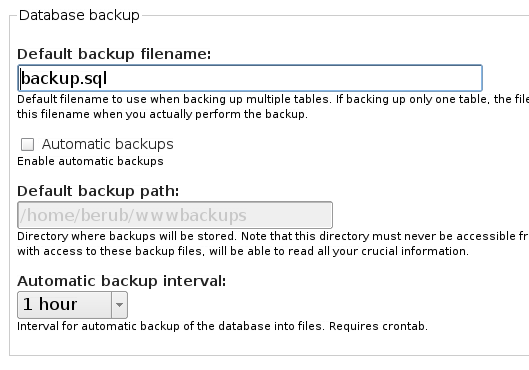
Bèr Kessels commentedAnd here is a screenshot of the UI. By default, the auto backup stuff is disabled and greyed out.
Comment #2
jeremy commentedI like the concept very much, and will merge something similar. My only concern is that the current implemenation is confusing, particular sharing a form group with "default backup filename" which is completely unrelated.
Comment #3
Bèr Kessels commentedJeremy,
thank you for getting back on me. I did some more thinking on this,and came to the conclusion that I rather make this a separate module. The reason being that I want to extend this beyond backing up databases; I want it to back up files too.
However, I will make that module depend on dba.module. in opther words: backup module will only work f dba is instaled.
I am not sure how to distribute this. ideally we would bundle these projects in a project called drupal server management or so. But then people might overlook dba too easy. But we cuold then attract more developers that add tools in this bundle. think of server/drupal monitoring (advanced watchdog), a dba module that would alow any database (not only the default one in the site) to be adminsiterred, file checkings (monitor files, on cron runs) and what more. The bundle would aim at all the really server related management in drupal. So it could eventually become a plesk-lite-on-drupal.
But for now we would cater DB mgmt and backup mgmt in this bundle; that is, if you like the idea!
got any ideas on this?
Comment #4
jeremy commentedI don't see any benefit from splitting out the backup functionality of the dba module. Its minimal code, and a logical extension of what's already provided by the module. Thus, I still intend to add this functionality.
Expanding the dba module to modify other databases beyond the drupal database is certainly possible. I didn't provide this because it seemed like a security risk, but if people found it useful, why not? The security risk is already there. Per-database permissions could be managed by Drupal. So long as this can be done without reducing the usability of the module, I'm all for it. (I rely on the module daily. When working with a new Drupal installation, the first thing I do is install and enable the dba module...)
As for backing up files, what would be great would be to have a file system manager, a counterpart to the dba module. It could be used to edit text files, upload files, download files, backup files and directories, etc. It would be quite useful for people who don't have shell access. Perhaps something like this already exists for Drupal? I'm not familiar with Plesk, is it something similar?
Comment #5
Bèr Kessels commentedyour idea of splitting it up per area sounds good too. Have the (non existing) file administrator do the file backups sounds better indeed, then a general backup module depending on all sorts of modules.
Plesk is very popular server management software on v-hosts. It is a complete (horrible, IMO) suite for managing of virtual domains on v-hosts. they can then disallow shel access and leave all the mgmt to plesk.
I think drupal, with the mutlple-site-patch could serve for such a purpose too. I.E. allow your virtual drupal sites to be managed through a central management Drupal site. That is what I meant with a plesk alike thing. Just a set of modules that allow you to manage email-addresses, databases, files and backups from withni drupal. Either for your own site only, or for a cloud of drupal sites (running on the same codebase, on he same server, i think)
Comment #6
Bèr Kessels commentedComment #7
robertdouglass commentedI came to submit a similar issue and was pleased to see that something in the direction of cron initiated backups is being done. +1 for the idea and effort thus far.
Comment #8
battochir commentedI thank Ber Kessels for his small patch to the dba.module to make it automatically do intervalled backups using Drupal's cron hook. My problem is, for some reason I keep getting an error stating that the file is not configured properly or not writable. I know file permissions on windows are always a pain, but, I'm starting to think it's more. I'm thinking it's the path. Is the path supposed to be relative or absolute? I've tried both. Nada. I just want to know which direction I should be going. Automatic backups are a beautiful thing. Also, in my attempts to get the backups to work and in receiving these errors, I have lost mucho space on my c drive. In other words, these files are being created and stored somewhere on my drive, just not in the file I want because I can't get permissions to work. I have searched allover using backup.sql, the files' default name. Nothing. Where are these files being stored? How can I find them? I've rebooted the system twice and cleared out all Temp files. By the way, I know that it's the backups that are doing this, I've tested it. Any help is appreciated. Thanks again.
Wim
Comment #9
Bèr Kessels commentedChanging this back to "feature request".
Yes, the path must be absolute. Relative would mean a database dump is publically accessible, and thus all the passwords etc are accessible.
You /must/ store it anywhere on the filesystem where it is not accessible fom the web.
About permissions; both the directory and the files must be read and writable by the apache/server "user".
Comment #10
Bèr Kessels commentedits a patch
Comment #11
Bèr Kessels commentedits a patch
Comment #12
IamPter commentedWhat about a method where the user can set an email address for the backup to be sent? Have dba to also gzip the file as well. Also what about having the name of the database be pulled from the actual name of the db and add the date of the backup. Such as db_backup09282005.sql?
Comment #13
Bèr Kessels commentedComment #14
jeremy commentedPatches disappear off my normal view when they're moved to "ready to be committed", so I forgot about this patch. Now it no longer applies.
Comment #15
Bèr Kessels commentedupdated patch.
Comment #16
jeremy commentedSorry, but this still doesn't apply. There were a number of changes made to the dba module very recently. For example, this patch doesn't take advantage of the fact that the dba modle now backs up the schema as well as the data.
The latest tested code is in cvs. Up to the minute development can be found here.
Comment #17
jeremy commentedI updated the patch to work with the latest dba module here. It also does more error checking, and provides optional data compression.
I will test a little longer, then will check into cvs.
Comment #18
jeremy commentedCommitted a modified version of this patch. Thanks!
Comment #19
javaperl commentedComment #20
(not verified) commentedComment #21
jeremy commentedManually closing, the project module doesn't seem to do this automatically anymore.