

Closed (fixed)
Project:
Sky
Version:
5.x-1.6
Component:
Miscellaneous
Priority:
Normal
Category:
Support request
Assigned:
Unassigned
Reporter:
Created:
1 Mar 2008 at 15:52 UTC
Updated:
27 Apr 2009 at 19:03 UTC
Jump to comment: Most recent file

Comments
Comment #1
jacineHi David,
Using the site name, or the header should keep the header in place, but if you don't want to use those, you would have to change the background image with CSS. Changing the location of the background image for the header, and setting the height manually should work fine.
Hope that helps.
Comment #2
johnTEN commentedSorry to reopen this, but I am a CSS moron and cant figure out "Changing the location of the background image for the header, and setting the height manually should work fine". I think I have figured out how to replace the header picture, but I dont want a site name and I can figure out how to keep it from collapsing the header. Could you be more specific about where I change this. Im using the 6x version.
Thanks, Ive spend several hours making things worse so I had to give up and ask.
Comment #3
jacineHi johnTEN,
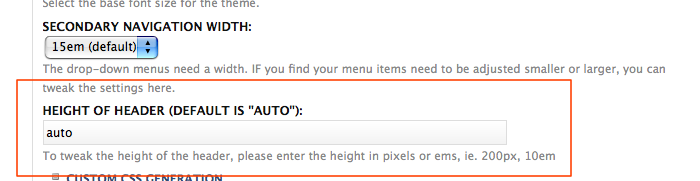
There is a setting on the theme settings page to set the height of the header that will help with this.
Comment #4
doktorrr commentedI would love to know how to put rotation banner on the right side of header.
Comment #5
aimutch commented"I would love to know how to put rotation banner on the right side of header."
Do you have a specific example that you want to replicate?