

 Come together with the global Drupal community in Rotterdam, 28 Sept – 1 Oct 2026. Sessions, contribution, connection, and Early Bird savings until 8 June.
Hello,
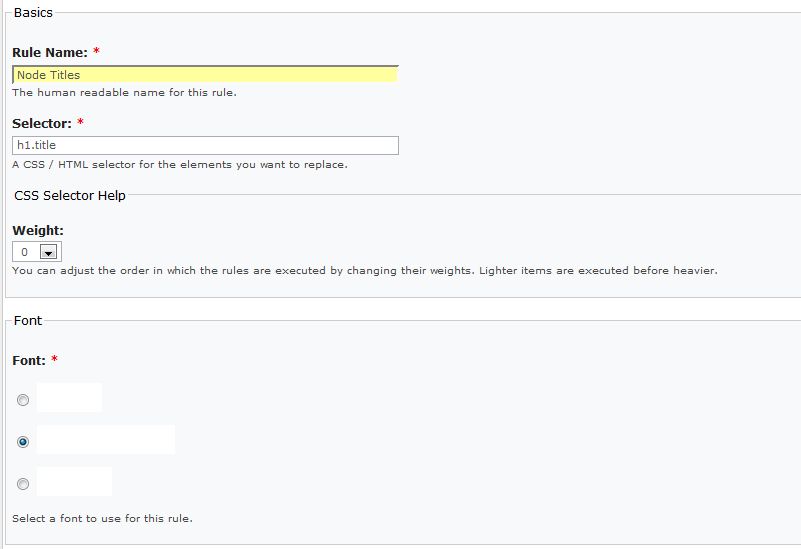
All the swf fonts that I add are appearing white (invisible) when I try to manage fonts. The selectors I try to apply sifr to then also appear white (invisible).
I've attached a screen cap of the admin page (with invisible fonts) and my two main css files (style and layout). I renamed them .txt files so drupal would allow me to upload them.
I assume there must be some conflict between my css and the css the module is generating but I can't figure it out. In addition, I'm using jquery for jcarousel, so perhaps there's a conflict there. I don't think the problem is in the fonts (swf files) since I'm using ones from fontsmack.com, a free sift font site.
Thanks very much for any help.
| Comment | File | Size | Author |
|---|---|---|---|
| style.txt | 21.41 KB | jkestler | |
| layout.txt | 881 bytes | jkestler | |
| Capture.JPG | 37.73 KB | jkestler |

Comments
Comment #1
travisc commentedUpgrade to sIFR 2.0.5 there is a problem with flash player 9.x.something or other 2.0.5 is a compatibility release.
http://novemberborn.net/sifr/2.0.5
edit: actually after poking around some more, this does not fix the disappearing sIFR issue, sorry...
Comment #2
sun@erniem: travisc is right, please update your sIFR JavaScript library and report back if that fixed the bug. Feel free to re-open this issue if it did not.
Comment #3
travisc commentedSadly this didn't work, although rendering seems somewhat more stable, when you scroll the page the text disappears.
Comment #4
sunIn this case, please file an issue against the sIFR project or open a thread in their forums.
Comment #5
travisc commentedI disabled the Drupal Administration Menu and it fixed the sIFR issue, i also tested this on a bone stock install of drupal with just Dynamic Rendering and Admin Menu and confirmed the result. Whoa, I just realized that D.A.M. is also your project! Sorry looks like it's going to bite you in the a** anyways;)