

 The 2026 Drupal Business Survey is open. Your response will help shape the future of the Drupal business ecosystem.
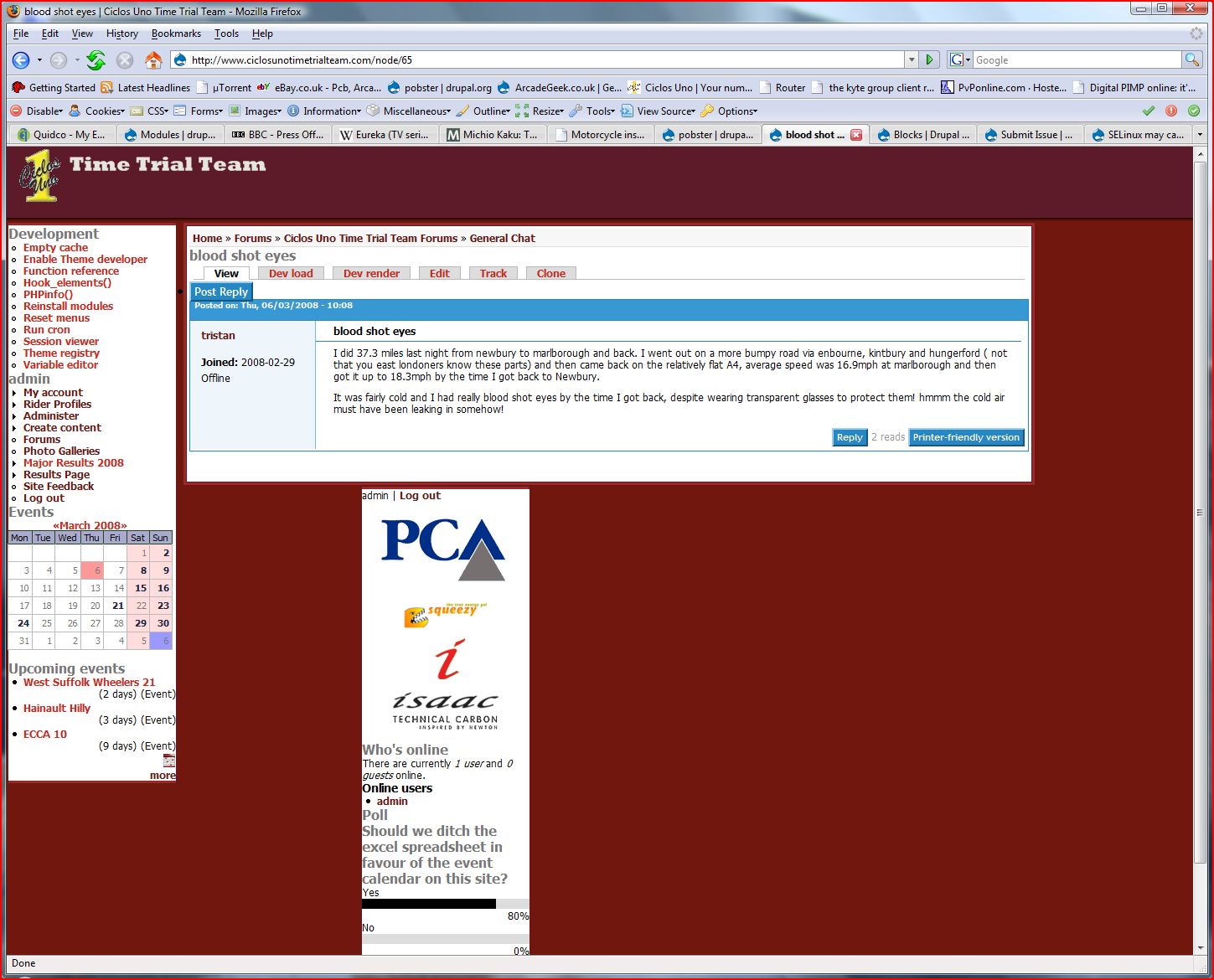
I'm not sure about IE6 this time as it was a user who reported the problem before with 6.x-1-x but now it's my turn to have a problem! Righthand sidebar misbehaves using Firefox 2 - see attached!
I feel a bit lost with themes, usually when a module has a problem I can fix it or prevent it from showing that it's broken (!) but I have absolutely NO idea when it comes to themes!!! Help!!!
Thank you,
Pobster
| Comment | File | Size | Author |
|---|---|---|---|
| #7 | Image1.jpg | 124.24 KB | pobster |
| #6 | Capture.JPG | 79.11 KB | pobster |
| #1 | Capture.JPG | 89.64 KB | pobster |
| Capture.JPG | 242.36 KB | pobster |


Comments
Comment #1
pobster commentedOkay so I didn't notice before and I'm sure it's probably related... In Firefox the righthand sidebar isn't always displayed at the bottom of the screen (well under the content, not right at the bottom of the screen), it's sometimes in the correct place... But... When it is in the correct place, for instance it is on the admin page, the righthand sidebar is *always* about 20 pixels off the side of the window no matter how you resize the browser. The overhang resizes with it. I hope I'm explaining this right... The screen capture doesn't really do it justice as all you can see is the horizontal scrollbar is present (just trust me, it's there whatever size the browser window is!) you can see the capture says "Po.." rather than "Polls".
Okay so this is more important... I've just checked and it seems this happens with IE7 as well, check out http://www.ciclosunotimetrialteam.com and you'll see what I mean. This isn't related to the search box I've enabled btw, as I've a test site using your very nice theme as well (same version) and it's unaltered and has the same problem. In fact... I've removed the old capture (as you can see for yourself anyway!) check out the capture I've attached now though, notice that the sidebar on the right sticks out further than the header/ topbar...
Pobster
Comment #2
pobster commentedOkay so I've noticed something with the Firefox issue... The righthand sidebar ONLY displays under the content column and not on the right when the content column is SHORTER than it is. So in the case of showing a long 'body' such as on the admin page or a search result with lots of hits, the righthand sidebar is on the right in the correct place (albeit with the issue I mentioned above where it sticks out further than the header). On say, the image galleries page where the 'body' is shorter than the sidebar, the sidebar is displayed beneath the body... Hope this helps with debugging!
Pobster
Comment #3
tonyn commentedHey Pobster, thank you for the detailed walk through.
This is a very mysterious bug. I will be looking into this.
Comment #4
jscoble commentedIt has to do with how the browser is handling your declarations for each region. There is an overlap in the boxes that is causing the browser to push the region in question down when rendering. Try adjusting the width, margin and padding declarations so that the region(s) in question isn't being pushed down. You only need to play with the left, right settings; not the top and bottom. Firefox and firebug may help you.
Then recheck with the various browsers that you wish to validate again to make sure you haven't broken the rendering in another browser.
FYI, I haven't used this theme, it's just what happens with CSS sometimes.
Comment #5
tonyn commentedHi, Try going into style.css and adjusting the #right {} width to 195px. This has yielded results for me. Can you confirm?
Comment #6
pobster commentedAce! Yes, this makes the r/h sidebar stay put regardless of the content in the middle column (body/ content column whatever it's called!) but it makes no difference to it sticking out further than both the header and footer. I've played with a few values of various things, but nothing seems to make any difference!!! I'm stumped!
Thanks,
Pobster
Comment #7
pobster commentedOkay so my IE6 user has just got back to me and it seems that he's having the exact opposite problem that Firefox and IE7 are having! It seems his lefthand sidebar overlaps his content rather than the righthand sidebar being too far over! Does this make a solution any clearer?
Thanks,
Pobster
Comment #8
tonyn commentedHaving trouble trying to replicate these bugs in IE6/IE7 with the version I am using. I'll be committing a new release in a few minutes.
Comment #9
pobster commentedHiya! Sorry I haven't replied sooner - I didn't notice you'd updated the theme already as I updated to 2.0-1 before and the updates are for 1.x not 2.x (btw, did you know that Drupal reports the 2.x branch is unsupported?). Anyways, I can report that the problems remain with the 1.0-3 release (well, the FF2 and IE7 problems anyway, I don't know about IE6 yet - my one user who uses it hasn't logged in yet since the change!)
Pobster
Comment #10
tonyn commentedI am having trouble replicating some of these bugs in IE7 -- Though I will say that IE6 is indeed giving weird results.
I will be testing and exploring solutions for these issues. Thank you for your diligence, pobster.
Comment #11
tonyn commentedI made a few changes... and added a new release.
I hope I didn't lose one bug and taken on another -- Hehe.
I am having a problem with IE6 menu showing up correctly. Sometimes it doesn't show up until I mouse over a breadcrumb or refresh. Very odd behavior.
Comment #12
tonyn commentedThis should be fixed in 3.x -- for sure.
Comment #13
tonyn commented