i am having a problem with a fresh install of Drupal 6.1 using PHP5.
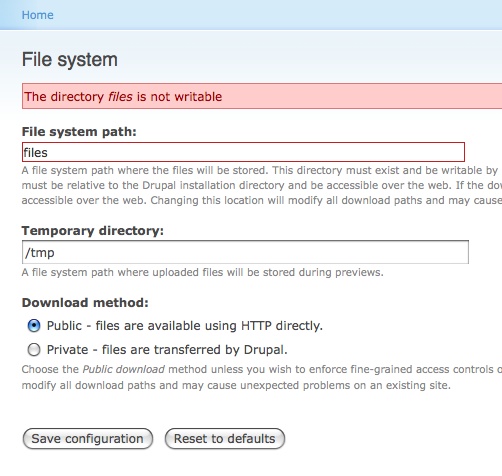
after enabling uploads in the core optional modules i get an error that the sites/default/files is not writeable.
the owner and user are set to 99/99, the permissions are 775.
i cannot change the owner/group or permissions, and i can't delete or rename it using either my ftp application or my cpanel file manager.
i can manually create the files folder elsewhere and point drupal to it and no problems, but if it is created by drupal it is not writeable.
any pointers would be great.


Comments
Comment #1
messenger commentedTYPO above:
should be
- - - - -
i just came across other mentions of this (http://drupal.org/node/172250). here's what worked for me.
using my ftp client
1. change the permissions on the sites/default folder to be 777;
2. this let me delete the files folder;
3. have drupal recreate the files folder by going to http://www.example.com/admin/settings/file-system, setting the path to sites/default/files and saving the configuration;
4. change the permissions on the sites/default folder back to 755;
the files folder was recreated and drupal was able to write to it. what i don't understand is why. the permissions on the recreated folder are the same as before, 775, and the owner/group is still 99/99.
Comment #2
flydef commentedI have this same problem. Even though the folders files and tmp are 755, it says they are not writable.
When I delete the folders and try to save the configuration in file-system, I get a "the directory ... does not exist" error.. So it's not creating the directories. I wonder why Drupal considers a 755 directory not writeable?
Drupal 6.1, PHP5
Comment #3
drewish commentedthe page you're referering to is actually part of the system.module, not upload.module so i'm going to move this to the generic filesystem component.
Comment #4
ari-meetai commentedSame problems here.. It also affects my drush install (http://drupal.org/node/298048#comment-1042211)
Comment #5
earthangelconsulting commentedi had a similar problem (probably same cause), in Drupal 6.4, i was getting the "The directory sites/default/files is not writable" error, until I changed permissions of the files folder to 777. but that's not exactly safe, is it? :-)
i then followed exactly the instructions in #1... problem solved. thanks, messenger!
Comment #6
dave reidYou can keep the 755 permission on sites/mysite, but you should also keep 777 applied to sites/mysite/files
arielon, if you created an install through drush, the PHP 'user' might be different from the PHP user used by the webserver, so there are now two different PHP users trying to access the files, so the files directory needs to have 777 permission.
Comment #7
nbilyk commentedDave, you were right. You can either do what #1 suggested, or you can do: chown www-data files
where www-data is the apache user.
Make sure your files folder and all sub-folders are 775, not 777
Comment #8
davidjm777 commentedI'm having the same problem, but I tried #1's advice, which still did not work. I couldn't get Drupal to recreate the folder. How do you do that?
I did get it to work by changing the permissions to 777, but I understand you don't want to keep it that way in the files dir. I'm running ver. 6.6.
Thanks.
Comment #9
gpk commentedDepending on the owner (uid) of the process that created the files directory, the only way of allowing the PHP "user" used by the webserver to write to that folder is often to use the third digit in the permissions, i.e. the third 7 of 777 (corresponds to "others" -> anyone). This is normal - nothing to worry about.
Comment #10
ericjam commentedI just went to http://www.example.com/admin/settings/file-system and just changed the path to /files2/
Drupal kept on recreating the files folder after i deleted it so to hell with it!
Comment #11
ainigma32 commentedLooks like all issues were resolved so I'm setting this to fixed.
Feel free to reopen if you think that is wrong.
- Arie
Comment #13
sytru commentedSetting permissions to 777 is potentially (very) high security risk especially when on a shared hosting server. Anyone can access and delete your files!
Is there a working workaround for this?
Comment #14
donpositivo commentedThank you very much "messenger #1"!
it worked!
Comment #15
the wabbster commented1. You know, it's been more than a year since this was posted.
2. I was looking for a solution for a different issue but somewhat related to the 'files' folder.
3. The ftp method worked.
Seriously. Wow!
Thanks a ton.
-A Newbie.
Comment #16
NoCoolNamesRemain commentedWorked for me:
1. Delete /sites/default/files (that is delete the 'files' folder only)
2. Set permissions of /sites/default to 777
3. Recreate the files folder by going to http://www.example.com/admin/settings/file-system, setting the path to sites/default/files and saving the configuration
4. Set permissions of /sites/default back to 755
5. ?
6. Profit
When Drupal recreated the 'files' folder it was created with permissions of 775. When setting the folder permissions to 775 directly it failed. I believe this is due to who the 'group' really was initially or even after I manually created the folder as opposed to when Drupal created it.
Comment #17
halloffame commentedGuys I'm experiencing the same problem now with D6.12 but none of the above solution works for me.
Comment #18
lesley825 commentedWe just ran into this problem and I wanted to offer a solution to those who haven't figure it out or who haven't had the other methods work (this also eliminates vulnerability in the '777' chmod command)
Check to see where the ownership lies for your files directory. Ours was set to root, and all we had to do was change ownership to apache and it worked. Permissions were kept at 775 so it's secure, and the 'file not writable' error disappeared.
We spent a lot of time staring and head scratching but finally figured out that that was the problem, so I wanted to offer this up to anyone else who might be in the same situation!
Hope this helps.
Comment #19
JariJ commented1-4 worked for me too.
In openSUSE 11.1 recreated (step 3) files directory User is wwwrun and Group is www.
And now towards 6...!
This was meant to be a reply for #16 NoCoolNamesRemain - May 23, 2009 - 15:15
Comment #21
XCeeze commentedNone of the solutions above worked for me!!! I attempted to re-install ImageAPI and ImageCache on my hosted server and received the error that GD php was not installed. Installed GD-php on my hosted server and it works fine now.
Comment #22
wik commentedEach time I am running the Administer dashboard(i.e. ?q=admin) the `sites/default/files` become not writable :)
The reason:
http://github.com/mikl/drupal/blob/8ffea27c38647cbdefc40d79119658bd5b9f4...
Actually `sites/default` become not writable, but however `sites/default/files` it's default setting, then it's a bug...
Probably "files" should be located outside of "default" folder or "default" folder should be writable.
As a quick workaround, set "File system path" to "files" or anywhere outside of "default" directory ;)
?q=admin/settings/file-system
Thanks.
Comment #23
nicholas.alipaz commentedDisclaimer: try at your own risk, I will not be held responsible if you run a command that you don't know what it does.
For me the solution was to do a good old
chown -R www-data:www-data drupalrootfolder/*where www-data is our apache user in many cases.If you don't have root access this could be harder, but you might be able to run that through cron if you are on a shared host without shell. Be sure to use the absolute path to drupal root if you try that.
Comment #24
wik commentedI am afraid that it could not solve all problems, see my previous comment #22.
The easiest way it's to use another "File system path"(admin/settings/file-system), for example: "sites/all/files"
And then just
chmod 777 sites/all/filesfromdrupal_root_folder, if you running as php_mod, not needed if you running as cgi or fcgi with the same user.Comment #25
tjdennis commentedChances are, these issues are being caused by SELINUX mode being enabled on your Linux distribution. I disabled SELINUX on my CentOS/RHEL install and the problems went away.
If using CentOS or Redhat Enterprise Linux, edit the /etc/selinux/config file and set the SELINUX value to disabled, the reboot I'm sure you can google some instructions for other distributions. You can also turn it off right away with "setenforce 0".
If you need SELINUX enabled for security though, you'll have to learn to live with it's restrictions.
Comment #26
the.zerose commentedThank you very much "messenger #1"!
it worked!
Comment #27
kage.fu commentedmy thoughts were - if i need the php process to have write permissions to a directory, why don't i get php to create the directory, thereby owning it?
1) chmod 777 sites/default to open permissions all the way up
2) delete sites/default/files if necessary
3) create a php script that looks like this in sites/default:
mkdir("./files", 0775);4) execute the script by requesting http://yourdomain.com/sites/default/files/script-name.php
5) sites/default/files should exist now, with group read/write access, owned by whatever your php process runs as
6) delete your script and chmod sites/default back to 755
Comment #28
Tux Love commentedMy 2 cents worth ...
As an Ubuntu user doing local development, nicholas's solution (#23) worked for me:
sudo chown -R www-data:www-data /var/www/drupal/*Comment #29
afdave14 commentedI'm lost. I don't know what any of this means. I'm getting an error like the original user posted ("The directory sites/default/files/images is not writable") and it's causing me problems. If anybody could tell me what this all means in laymen's terms that would be great. I need this fixed! Thanks
Comment #30
Marc Cepeda commentedIn laymen, this is all regarding the access permissions to the files directory. The methods described here propose methods to correct the permissions on the directory to allow Drupal to use it.
The parts that I think are confusing you are all the parts regarding the use of CHMOD. To perform these actions, you will need shell access or at the very least, FTP access to your files.
Use Google, and search for how to use CHMOD or how to change permissions on (L)UNIX servers. You may even be able to do this through your host's web panel, if available.
Otherwise, you're SOL.
Comment #31
sandpc commentedI found the answer here!
http://community.contractwebdevelopment.com/drupal-cant-delete-or-modify...
Comment #32
tsssystems commentedI thought I'd add what I found when faced with this same problem. My Drupal sites are on a virtual private server (aka VPS) where I do have root access. The OS is CentOS 5 something, and it's running fairly current versions of PHP and MySQL. The "container" - my virtual server - is administered through Parallels Infrastructure Manager (aka Power Panel), I have WHM running to divide the server up further, as I'm a reseller, and the actual users (myself included) set up their pieces of the server through cPanel.
None of this helped this situation, as I haven't been able to find out how to change file ownership through cPanel. What I can do in WHM is set up SSH access, so I can connect directly into my server shell as the root user via PuTTY. Yes it's all command line, but it also does give you the power to fix these things.
I moved my site from another VPS by downloading the entire site, including the 17 MB database export file, and uploading it to the web root directory for this particular site, which is in a subdirectory of that particular user directory on the server. cPanel takes care of all that for me. However, I did have to import the *.sql (database backup) file via the command line. phpMyAdmin didn't work for me; perhaps there was a permissions problem there also. I changed the amount of memory allotted to PHP through cPanel, so the site could run without memory errors.
Once I did all of that, the only persistent problem was the "sites/default/files is not writable" issue; well, there was also the same problem with "tmp/images". Here's what I discovered and what worked for me.
Changing the chmod, even to 777, had no effect. I did that through my FTP client (Filezilla). I still got the same error. I couldn't figure out why that was, and still don't know. I thought about deleting the "files" folder and having Drupal re-create it (as suggested above), but it was full of files, most of which I wanted to keep. BTW, you can see the ownership of files and folder in Linux by using the "ls -l" command (don't type the quotes).
The solution was in the "chown" command, which you use to change ownership of files and folders. I first re-assigned ownership from myself to the "apache" user, as suggested, but that didn't work. Then I tried the apache user in the apache group, as in "apache:apache", but that didn't work either. It turns out that, at least in CentOS (and probably other Red Hat systems), "nobody" is the user you want to have own these folders and files. Here's the command that solved my problems. I was logged in as root.
From the web root folder (whether it be www or public_html or whatever your system uses) type
chown -hR nobody:nobody tmp
to give Drupal (Apache) the ability to write files to the temp folder for the image module.
From the sites/default folder level, type
chown -hR nobody:nobody files
to give Drupal (Apache) the ability to write files to the files folder for everything else.
These 2 commands made all my warnings go away, and the site is finally up and running as it's supposed to with no errors. I was able to scale back the permissions from 777 - which didn't work for me anyway - to 644
My status report finally looks like this:
File system Writable (public download method)
Image import Import directory tmp/image exists.
Image module directories Exists (sites/default/files/images).
The only question I have is whether the sites/default/files folder needs to be 755 instead for some reason. I can't see why, as .js, .css, .jpg, ,gif, png, and .ttf files, which are all that I have in the "files" folder, aren't executable. If anyone knows why this folder would need executable permissions assigned, please let me know by commenting here.
I hope this helps someone else, as it took me a long time and a lot of searching to figure it out!
-> Originally posted on 8 Jan 2011. Edited on the 10th to correct typo.
Comment #33
nicholas.alipaz commentedtssystems. I would try doing the following. Be careful what you are doing, I won't be responsible if this has adverse affects, I am just giving suggestions:
If you do those commands they should get most of the permissions back to their originals. The css, js and imagecache folders will get regenerated along with the files within them.
Comment #34
tsssystems commentedThanks nicholas.alipaz!
I deleted the js and css directories per Rosamunda's comment (http://drupal.org/node/325635#comment-2427292) regarding the first set of errors I received after moving the site and updating Drupal core. Others had similar issues, which I found at that thread - "unlink(sites/default/files/js/gmap_markers.js) [function.unlink]: Permission denied". There was no imagecache directory as that function hadn't been used yet - although I think I have the image module set to write to the tmp/image directory anyway.
The main issue is that "sites/default/files" should have permissions of 775, which I didn't remember. Your commands worked great to change that, although I needed to do the "chmod 775 ." command after each "find" command individually.
In researching this issue I came across a page that said using the "nobody:nobody" user and group for Apache - which seems to be the default in this CentOS installation - could potentially be a security hole. So now I'm looking to find out how to change the configuration files to have Apache run as the user and group "apache:apache", but if no other service uses "nobody" it shouldn't be a problem. Oddly, the group "apache" does exist on the system, but doesn't seem to have a user assigned to that group. Perhaps that's what gave me those "could not write" errors.
Comment #35
bryanb229 commentedThanks Nick.
Comment #36
dig1 commentedI got this error and so I ran:
ls -l mysite/sites/default
It showed me that this directory was 755 and it was owned by me and the group www-data. These permissions meant I could read, write and execute but php (as a member of group www-data) could only read and execute.
I then ran:
chmod 775 mysite/sites/default
This changed permissions in the directory so that both I (as owner) and and php (as a member of group www-data) could now read, write and execute files.
Sorted and Drupal was now happy!
Dig
Comment #37
aharown07 commentedFor security reasons, sites/default is not supposed to be 755. Supposed to be 555. I'm not sure how much it matters though.
When I encountered the problem (after tar, move to new server, untar), the solution in #23 worked for me. chwon everything to www-data
Comment #38
zirafi commentedHi,
I had similar error after updating to 6.20 version and the error message is something like this.
"The directory files is not writable. You may need to set the correct directory....."
The file system on the shared web server had 775 on www/files directory. If I change the permissions like chmod 777 and saved the setting on my drupal site, then the error was gone. Is it really safe to keep 777 on www/files dir.? Please advice?
thanks
Comment #39
dig1 commentedActually I think Drupal policy is to have 770 on some of these directories, have a look at http://drupal.org/node/244924. I am going through it to get clarity.
Cheers
Comment #40
zirafi commentedHi,
Actually I have two"files" directories on my site and not sure whether it is same for the rest of the durpal users.
/~/public_html/files
/~/public_html/sites/default/files
I see an error on status page for the file system which shows "The directory files is not writable. You may need to set the correct directory.....". Please see the attached snapshot. Then I tried to change both of them to
$chmod 770 /~/public_html/files
$chmod 770 /~/public_html/sites/default/files
or
$chmod 775 /~/public_html/files
$chmod 775 /~/public_html/sites/default/files
but the error still can not be avoided. I see only "777" permissions fixing the issue for me. Please let me know whether it is a known bug. I did not have this issue before updating my site to 6.20.
thanks
Comment #41
nicholas.alipaz commentedshould be something like chmod 770 /var/www/files is my guess. You could also try running as sudo. sudo chmod 770 /var/www/files
Comment #42
willow315 commentedIn reference to #28...I'm not getting any error....still in the install/setup mode...I am using Ubuntu installed locally through VirtualBox on my MAC...I have just completed a Lamp install and was attempting to install Drupal 6.15 using apt-get...it created the db, sort of...but none of the files, in /var/www/, so I'm doing it manually...downloaded and extracted files, created the main drupal directory (/var/www/drupal), and have just created the defaults/files directory....and have been reading about permissions...ownership. and I see www-data....is that always the case with Ubuntu....that ww-w-data is the apache user? 'Cause I did a chown -R apache:apache files...and it told me it was an invalid user. Please forgive my ignorance. WCW
Comment #43
jcarlson34 commentedIt seems several people here have provided the answer but here's the step by step commands for the newer linux/apache users...
To avoid the 777 problem, do the following:
Log onto the server. Sudo to root (if you have access)
sudo suNavigate to the /sites/default directory.
cd /var/www/html/sites/default/ (or whatever your path to /sites/default/ is)Change the files directory permissions to 755. The -R means recursively which will apply the settings to all subdirectories and files.
chmod files 755 -RChange the owner and group (most likely from root) to "apache" (the actual "apache" owner name will depend on your linux, you can determine this name usually by running
ps aux¦grep httporps aux¦grep apacheand look at the results).chown apache:apache files -RComment #44
jhchnc commented#1 above is still valid advice on D7
Comment #45
Everett Zufelt commentedAppears to be fixed, multiple solutions.
Comment #47
odisey commentedBEFORE you delete your files folder ......
1) Back it up .....
2) Delete it ....
3) Recreate it ....
4) Upload all you files back into it --- EXCEPT THE .htaccss file, Drupal will make a new one ...
5) Follow the instructions "messenger" posted ....
using my ftp client
1. change the permissions on the sites/default folder to be 777;
2. this let me delete the files folder;
3. have drupal recreate the files folder by going to http://www.example.com/admin/settings/file-system, setting the path to sites/default/files and saving the configuration;
4. change the permissions on the sites/default folder back to 755;
the files folder was recreated and drupal was able to write to it. what i don't understand is why. the permissions on the recreated folder are the same as before, 775, and the owner/group is still 99/99.
Comment #48
mineshaftgap commentedSince this thread is still high on Google results, wanted to leave this bit of SELinux fun (https://www.drupal.org/node/1044454) for others who might land here.
sudo chcon -t httpd_sys_content_rw_t sites/default/
sudo chcon -t httpd_sys_content_rw_t sites/default/settings.php
sudo chcon -t httpd_sys_content_rw_t sites/default/files
Comment #49
slydevil commented#48 was exactly what I was looking for! Thanks mineshaftgap.
Comment #50
uzmaabdulrasheed1@gmail.com commented#48 worked for me as well, Thanks mineshaftgap!!!
Comment #51
ajaybhaskari give the 777 permission on 'file' folder and then flush all cache from admin and its working properly but showing temp folder is not writable.
then
i going to root directory and give the 777 permission on temp folder and again flush all cache and my website not showing any types of error and working perfectly.
Comment #52
OOPdude commentedTechnically speaking, most of these permission errors are not from folder permissions but from SeLinux if your hosting services, or your own servers have Secure Linux which monitors and handles all directories.
Check lists:
1. Check ownership of the folder - sites/default/files.
As long as it has httpd access ownerships and groups (for instance, apache:apache) and 644, that's not permission error on the directory.
2. Then, check selinux status by running
> sestatus
in your command line or select selinux system tool if you are able to access system admin tools under desk-top session.
3. you will find selinux = enable status. Turn off selinux status. Then it will work as expected.
Once again, changing ownership of 755/777 does not matter on sites/default/files.
In the case where you make a fresh installation, and you find defaultsettings.php file not writeable or not found, the same system security by selinux blocks it.
Comment #53
aquibrashad commentedComment #54
quietone commentedUpdating tags per Issue tags field and Issue tags -- special tags and for issue #3565085: Drupal core issue tag cleanup.