Dynamic Bookmarklets to post content to external site
We used this code to allow site administrators of www.heavenletters.org to select a series of quotations from one site and post it to

Prepopulate module was created for bookmarklets.

Bookmarklets are links in your browser which "add one-click functionality to a browser or web page" says Wikipedia. For example, you could have a bookmarklet which makes it easier to post content to your website.
With the Prepopulate module, you can make bookmarklets that will fill out specific fields in your custom content types made through CCK.
Normal bookmarks on your browser's toolbar would have a title and a URL, which is just a plain web address starting with http://. A bookmarklet has a little script in the URL instead, starting with javascript:
Add a bookmark in your browser's favorites or bookmarks, or edit an existing one. In the case of Internet Explorer, you right click on the bookmark to access the properties, and then add in the javascript code (below) where it asks for the URL. It's the same for Firefox. In Safari you 'edit address'. Each browser is different.
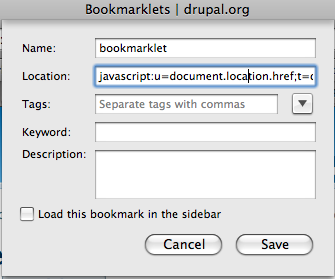
Here is an example bookmarklet to post web links to a site
javascript:u=document.location.href;t=document.title;s=window.getSelection();
void(window.open(%22http://example.com/node/add/content-web-link?edit[title]=%22+escape(t)+
'&edit[body][und][0][value]='+escape(s)+'&edit[field_url][0][value]='+escape(u),'_blank',
'width=1024,height=500,status=yes,resizable=yes,scrollbars=yes'));
This turns into a URL like this:
http://example.com/node/add/content-web-link
?edit[title]=drupal.org%20%7C%20Community%20plumbing&edit[body_filter][body]
=&edit[field_url][0][value]=http%3A//drupal.org/
The 's' variable puts in the selection, in the body of your node form; 'u' pulls in the current URL you are on; and 't' fills in the title. You can figure out the names of your fields by viewing the source, and modifying your field names accordingly.
Here's another example with different field names, and a link field with a title as well.
javascript:u=document.location.href;t=document.title;s=window.getSelection();void(window.open(%22http://example.com/node/add/blog?edit[title]=%22+escape(t)+'&edit[body][und][0][value]='+escape(s)+'&edit[field_link][und][0][url]='+escape(u)+'&edit[field_link][0][title]='+escape(t),'_blank','width=1024,height=500,status=yes,resizable=yes,scrollbars=yes'));
Feel free to add additional bookmarklet examples as child pages here.
We used this code to allow site administrators of www.heavenletters.org to select a series of quotations from one site and post it to

Drupal is a registered trademark of Dries Buytaert.
