

Needs work
Project:
Wysiwyg
Version:
6.x-2.1
Component:
Code
Priority:
Normal
Category:
Feature request
Assigned:
Unassigned
Issue tags:
Reporter:
Created:
18 Mar 2008 at 13:27 UTC
Updated:
17 Nov 2013 at 06:19 UTC
Jump to comment: Most recent, Most recent file



Comments
Comment #1
merlinofchaos commentedThis won't be fixable until Drupal 6; getting javascript to work in the popups requires a mechanism that doesn't exist in Drupal 5. Sorry.
Comment #2
lourenzo commentedI've made it work, but it required a little hack that requires FCKEditor to be available.
Now, I'm trying to figure out how can it be reusable and support FCKEditor's absence, or even to deal with other WYSIWYG modules...
Comment #3
merlinofchaos commentedDepending upon where your hack is, you might try the module_exists function to test for the presence of FCK editor; if you need to test this in javascript, have it put something in the settings?
Comment #4
populist commentedI was able get WYSIWYG working with TinyMCE in a panel pane environment by doing a few modifications to the panel forms in form_alter. There are some limitations to the approach and it can be cleaned up a bit, but it can make it all happen in Drupal 5.x.
Comment #5
jkpro3 commentedlourenzo: or anybody else
can you please share your hack for the panels pop-up window.. i need fckeditor to show up on the custom content pop-up but i can figure out how to do it.
Thanks in advance
Comment #6
melezhik commentedlourenzo, should you please figure out how did you hack it?
It would be very fine for me to repeat your experience and make FCKeditor available for editing custom content for group panel pages...
Comment #7
mrfelton commentedis there a solution to this for D6/panels2 then?
Comment #8
yasir farooqui commentedThanks Man, your solution worked for me, However I needed it to be done in D6, so I modified a bit. Here is the modified version for D6.
Comment #9
lord_of_freaks commentedAny solution for WYSWYG module in D6/Panels 2?????
Comment #10
yasir farooqui commentedHey the solution I posted is for drupal 6 + Panels2 + tinymce. Do you want to know some thing else?
Comment #11
yasir farooqui commentedHey the solution I posted is for drupal 6 + Panels2 + tinymce. Do you want to know some thing else?
Comment #12
yasir farooqui commentedSorry guys , I noticed that my I posted the same post twice.
Comment #13
lord_of_freaks commentedComment #14
Dubber Dan commentedHey Lorenzo, any chance of you posting your hack for FCKeditor?
If not then I guess I'll have to try the TinyMCE one instead.
Comment #15
dkruglyak commentedI suggest to consolidate separate TinyMCE / FCKeditor solutions into a single one based on WYSIWYG API module, intended as their replacement.
Comment #16
sunOn an attempt to save merlinofchaos from such issues...
Marking as duplicate of #356480: Lazy-load editors and #350035: Implement Drupal.detachBehaviors(). You can follow up on that issue to track its status instead. If any information from this issue is missing in the other issue, please make sure you provide it over there.
However, thanks for taking the time to report this issue.
Comment #17
Dubber Dan commentedThe code by populist sounds promising, but I'm a little unsure where this code needs to be placed. Can anyone give some pointers?
Comment #18
Dubber Dan commentedThere's a good explanation of the code to get TinyMCE working on D5 to be found at http://www.chapterthree.com/blog/matt_cheney/howto_use_tinymce_panel_pan...
Comment #19
ruloweb commentedI've made work the WYSIWYG module for panels 2 using the code below:
Im using it in the hook_init of a custom module, sure there is a better way such as runing the code just in the panel_content page.
I havent tested it on Panels 3 yet.
Hope it helps!
--
Jose Sanchez
http://www.deviancefactory.com/
Comment #20
recrit commenteddrupal 6 + panels 6.x-3.0-beta2 + tinymce
This is a combination of the previous solutions with some tweaks.
Comment #21
recrit commentedamendment to previous post to handle panel pages also.
Comment #22
bensnyder commentedUgh....
This is difficult.
@recrit: Do I make a custom module or put this code in template.php? Do I need to have my profiles configured a certain way in WYSIWYG module or simply have the libraries for TinyMCE installed?
Thanks ^_^. Please leave as little as possible up to the imagination.
Comment #23
recrit commentedWYSIWYG API + tinymce library
profiles do not have to be a certain way. This gets triggered on the panels edit form - if the user is privileged to select an input format that uses the WYSIWYG profile.
The above code needs to be put into a custom module.
Comment #24
david.a.king commentedrecrit -
couldn't get this to work (no effect whatsoever) when putting it in a custom module with d6, panels 3.1, wysiwyg with tinymce - am i doing something wrong?
Comment #25
hefox commented20, 21 in a module attached.
Works for me
Comment #26
pvanthony commentedThis was the module that I really needed. It has solved many issues for me. You have really helped me.
Thank you, hefox, for sharing the module, panels_tinymce.
It works great with panels version 3.2.
Once again thank you very much for sharing this module.
P.V.Anthony
Comment #27
hefox commented(Thank recrit, all I did was put it into appropriate files, zip+upload).
My suggestion is someone make it a module for now like imce wysiwyg bridge is a module or move over the issue to WYSIWYG issue queue.
Comment #28
bensnyder commentedIt would be better to integrate it into the WYSIWYG module imo.
Moving it over :)
Comment #29
harking commentedI've made a new patch for WYSIWYG module. Applies to 2.0.
Comment #30
twodA patch like this is not likely to make it into wysiwyg.module itself. It's just a case-specific workaround for a more general problem, like sun mentioned in #16, this is a duplicate of #356480: Lazy-load editors.
Reverting/bumping version tag as patches should be made against the -dev versions, and new features are added to the highest version first. Released code is not touched again.
Changing to normal priority since other modules could also implement this workaround using their own hook_form_alter until the issue is fixed.
Comment #31
danny_joris commentedThanks for the patch/module, Recit.
Is there a way to make this work with the ckeditor-module ?
If not, is there a way to make the WYSIWYG-module work in Panels with ckeditor? (or even fckeditor?)
Tnx.
Cheers,
Danny
Comment #32
recrit commentedI am not familiar with the ckeditor, so I am of little help there.
The code above accomplishes 3 things:
Since ckeditor does not use the WYSIWYG API, you would need to find equivalent ways to do all 3 in ckeditor.
Comment #33
sunQuite some confusion here: Wysiwyg module supports CKeditor in the latest development snapshot (also 2.x)
Comment #34
recrit commented@sun, thanks for the update. Didn't see it on the module page and haven't used editors for some time now.
To update my post:
you would just need the specifics for 1 and 3 above since 2 would be handled the same way with the Wysiwyg module.
Comment #35
ruloweb commentedHi all!
I created a module which make WYSIWYG module works with Panels :D. Im using it in a few sites and works awesome!
Please test it and let me know.
Do you think I have to create an official Drupal module? or this code has to be commited to WYSIWYG or Panels?
Thanks!
--
José Sánchez.
www.deviancefactory.com
Comment #36
ruloweb commentedYou just have to enable it'll work.
Comment #37
danny_joris commentedHello Jose,
Thank you very much for sharing. However, when I enabled your module, I was unable to view/edit my existing panels-content, until i turned it off again. (examples in attachment)
Again thanks for sharing and I would love to test any versions of your module.
Cheers,
Danny
Comment #38
ruloweb commentedI've fix it. Now it's using the hook_init, I'll try to find a better place for it.
Thanks for testing!
--
José Sánchez.
www.deviancefactory.com
Comment #39
ruloweb commentedAttachment.
Comment #40
danny_joris commentedIt works great for me, Jose!
Thank you very much.
Cheers,
Danny
Comment #41
spamwelle commentedthanks, Jose!
Comment #42
burtsbees commentedHi. I downloaded your module and it works for panels when I create content. But if I go through site building, panel page, layout, and add new custom content, then I get nothing. The editor doesn't show up. I am trying to use wysiwyg and panels to create a custom homepage and this is the only way I know how.
Comment #43
sunComment #44
ruloweb commentedHi all,
just added support for CKEditor and FCKEditor modules (sponsored by Danny_Joris).
Thanks!
--
José Sánchez.
www.deviancefactory.com
Comment #45
Zachary Oan commentedI get the same results that burtsbees gets in post #42, even with the new files so kindly provided in post #44.
Zack
Comment #46
lelizondo commentedsubscribing
Comment #47
maxmatty73 commentedsubscribing
Comment #48
cyberwolf commentedSubscribing.
Comment #49
willhowlett commentedsubscribing
Comment #50
mrfelton commentedmodule at #44 works for custom content in panel nodes. Doesn't seem to work for the same in mini panels.
Comment #51
mrfelton commentedAttached patch adds support for mini panels to the module at #44. Works for me at least.
Comment #52
ianchan commentedsubscribe
Comment #53
scotthoff commentedIf the module works, you will be my hero.
Comment #54
harking commented@josegabriel.st
If you feel up to it, please make an actual Drupal.org module until this functionality is rolled into the core of the wysiwyg module.
Thanks!
Comment #55
mrfelton commentedThis is still not 100%. My patch at #51 made it work for mini panels. But it still doesn't work for Panel Pages (only panel nodes and mini panels)
Comment #56
scotthoff commentedIt worked perfectly for me for what I was trying to do.
Comment #57
robbertnl commentedWorks only for minipanels content here. I want to use the editor on a panel page as well.
Comment #58
robbertnl commentedCombined #44, #51 and added support for Panel Pages
Comment #59
mrfelton commentedOk, so we're almost there with this one now. What's the plan - get it incorporated into WYSIWYG? Or create a separate module? I'm happy do the later if that is the route people want to take. Either way, I'd love to see this get moved out of this issue queue and somewhere more accessible.
Comment #60
Bezerik commentedHello all,
I updated the code from #58 and added support to "og_panels".
Especial thanks to hefox, harking, josegabriel.st, mrfelton, robbertnl and everyone who help's to build this module.
Greetings from barcelona!
Comment #61
lelizondo commented+100 for a module. Even if it doesn't work for panel pages, remember there's 'alpha', 'beta', and 'dev'...
Comment #62
ruloweb commentedHi all,
I'm commiting this into a Drupal module. I'll let you know when it's done.
Making some changes...
Sorry for the delay! Im gald this code helps you!!!
Thanks!
--
José Sánchez
Comment #63
robbertnl commentedI have got an issue on panel pages. Sometimes the popups in the ckeditor ('insert url' and 'insert image') doesn't accept keyboard input. Can somebody confirm this issue? Or, even better, fix this issue? :)
Comment #64
elviento commentedSame here with Drupal 6.17, Panels-6.x-3.5, and Wysiwyg-6.x-2.1.
Temporary work around is to use Ckeditor (confirmed with 6.x-1.1) and enable the module. Panels will default to Ckeditor in this instance.
(Sorry, it looks like somebody already found that 8()
Comment #65
mrfelton commented@josegabriel.st - did you get it committed yet?
Comment #66
locomo commentedsubscribe
Comment #67
jbylsma commentedHopefully I'm not stealing anyone's thunder, but josegabriel.st's module request was turned down. You can see the discussion at http://drupal.org/node/803762. sun has a good synopsis in #4.
I've been using Bezerik's code from #60 for a while with TinyMCE/WYSIWYG and I've been pretty happy with it. The only issue I've encountered is when a user disables the wysiwyg ("Disabled rich-text") and tries to submit the form. I traced the problem back to the Drupal.wysiwygDetach call on line 8. The ajax submission attempts to detaches everything in Drupal.wysiwyg.instances, including wysiwygs that have already been detached. I've added a quick conditional check to see if the wysiwyg has been detached and to not do anything if it has been. I'm not sure if this issue only affects TinyMCE, but I figured it would be post back with the update for everyone.
Also, because of the somewhat nebulous status of the module, I've bumped up the version to 2.2, added version information in the info, and added a link to this node in the info. Hopefully that will help to minimize any future confusion! Thanks for all the hard work everyone else has contributed!
Comment #68
adugna17 commentedThanks!!!
Comment #69
tallsimon commentedthis is awsome I can see why they won't commit it to wysiwyg module as it is a specific work-around, but would love to see it as a contrib module - concerned if I install it, in the future I won't be able to work out where to get an update/file a bug report etc...
Comment #70
lelizondo commentedI don't see why this patch is not a module, the module is working. Yes, it might have some bugs, as every module has, and without an issue queue of its own is very difficult to report new bugs/issues.
The module is working for me with the exception of the bug mentioned in #67 by @jbylsma but that's something I can live without.
I don't want to be the bad guy here, I have a CVS account and I could create the module, but I also respect the members of the community, even if I don't share @sun's thoughts, I know he's an important and valuable member of the community and if he said no, I won't go against that, I've seen too many times stupid fights for stupid reasons and I won't be part of it.
There might be a solution after all: github
Comment #71
robbertnl commentedGood work #67. Didn't test it yet but i can verify this problem also occurs with CKEditor, so I will try this.
Comment #72
codewatson commented#67 Seems to have been broken somewhat in the 3.7 release of panels. The editor loads fine, but on submit any changes are not saved, the only way to save the changes is to make them in the editor, then disable the editor, then submit the form. this is with wysiwyg 2.1/panels 3.7 and the module from #67.
Comment #73
thomasmuirhead commentedI'm also getting the same problem as in #72.
If I disable the rich text editor and type in some content, then save it it works. If I use the wysiwyg it won't save any changes.
Comment #74
lelizondo commentedHaven't tested #67 but it will harder and harder to follow and solve several bugs in just one single issue. Has anyone considered moving this small module to Github?
Comment #75
codewatson commentedSo i'm trying to debug why this is now broken and i've traced it to possibly this part of the wysiwyg_panels.js line 29:
For some reason it looks like the IF statement does not come out true, which i haven't figured out why yet. This seems to prevent Drupal.wysiwyg_panels.submitAjaxForm from running which if i understand things correctly is what actually handles the wysiwyg detach stuff?
Anyone have any insight?
Comment #76
codewatson commentedHmm well i dont know why this works but it seems if you comment out the if statement and just have the two lines contained within it everything works fine again...
Before:
After:
I really dont understand all the inner workings of what is going on between panels and wysiwyg and this module, but again, if the IF statement is left out the editor loads and saves just fine.
Comment #77
vkareh commentedThanks for pointing me in the right direction! I've been trying to debug this since yesterday and based on your findings, I changed that snipped to the following:
It now works for me. I'm going to test some more use cases to make sure it's not screwing up anything else, but so far I haven't had any problems. This is using Panels 6.x-3.7, WYSIWYG 6.x-2.1 (with CKEditor 3.3.1.5586) and wysiwyg_panels_2.2.
Comment #78
codewatson commentedYea i guess that's basically the same, i've also been updating the module to work with the in place editor and fixing mini panels support, still have to get the IPE to work for panel pages (it works fine for panel nodes atm).
Comment #79
codewatson commentedArg.. Is there a simple way to test if the currently viewed page is a panel page?
Comment #80
codewatson commentedWell for now i've got it to work for everything but the IPE on Panel Pages.
Change this:
To this:
Comment #81
chriso commentedsubscribe
Comment #82
that0n3guy commentedThe above works pretty good for me with ckeditor, wysiwyg 2.1 and panels 3.7 for panel nodes.
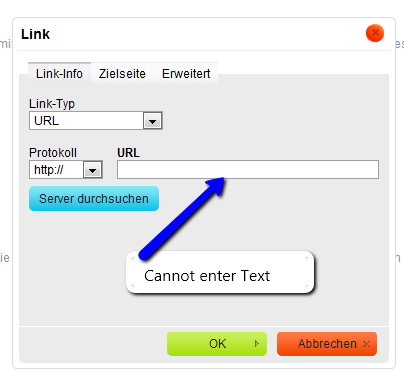
With ckeditor, the mage button uses a modalframe popup thing which works pretty good except you cant type in any of the fields. You can right click and paste, but not type. Same with the link popup dialog thing. The "paste from word" popup lets you type in it though.
Anyone know how to get http://drupal.org/project/wysiwyg_imageupload modalframe thing to popup? Then this would be perfect for landingpages for my clients.
Here are some errors too look at.
Comment #83
jon nunan commentedI'm on the CTools & Panels Dev branches and something over the past couple of days seems to have broken the mini module provided here.
I'll start digging round.
Comment #84
jbylsma commentedI took lelizondob's advice and created a GitHub repository for this module. It is available at http://github.com/jbylsma/wysiwyg_panels.
I've also done some further work to the module. cTools 1.7 changed the selector that was passed for attachedBehaviors, which is why everything stopped working. vkareh's workaround, which just checked if the context object had a non-empty ID, did work, but I did some more work to make sure it was running on the actual modal container. I also tweaked how the close code was being applied and incorporated drwatson's conditional update (#80). If you'd like to see the rest, I've tried to be descriptive in my commits :)
I also can confirm that0n3guy's issue in #82 and added it as an issue on GitHub.
meatsack: I did some initial testing with my updated copy of wysiwyg_panels and the dev branches of ctools and panels, and everything seemed OK. Hopefully your issues will get resolved.
If I've done something dumb with GitHub, please cut me a little slack; I took some time last week to try and get accustomed with Git and GitHub, but I'm fairly fresh at all of this.
Comment #85
codewatson commentedDon't hold your breath but there could be native support for this soon in panels: #890824: Mini panels content doesn't save upon update (#7).
Comment #86
jon nunan commented#84 @jbylsma, downloaded from your github rep and it does seem to be working again. Not sure if I had your version or someone else's originally.
Thanks!
Comment #87
adrianjacob commentedHi all,
This is exactly what I have been wanting, and although it is working fine for panels, the wysiwyg editor doesnt show up for mini-panels. Am i missing something?
I am using:
Panels 3.7
Wysiwyg 2.1
Wysiwyg_Panels from github.
Ad.
Comment #88
codewatson commentedAs far as i can tell it is working just fine with mini panels using the wysiwyg_panels from github. Perhaps you need to clear your cache and browser cache?
Comment #89
adrianjacob commentedHi dwatson,
All caches are cleared.
It works/shows here:
/admin/build/mini-panels/list/[mini-panel-name]/edit/content
But just not here seemingly (creating new mini-panels):
/admin/build/mini-panels/add/content
Any ideas why?
A.
Comment #90
codewatson commentedAh, i see, thats another url to check for then, change the condition part of the module to something like this (untested):
this is the new condition:
Comment #91
elliotcapelo commentedHi,
We can't get this to work with our panels. We have Panels 6.x-3.7, Wysiwyg 6.x-2.3, Chaos tools 6.x-1.7, tinymce 3.3.7 or fckeditor 2.6.6 (tried both but they neither of them work)
When I go to add a new panel and enter text in the teaser, the editor appears in the teaser and I can type the text in but when I click save it doesn't show up anything in the panel. if I click edit I can see the text again but not once I've clicked saved.
I can see this text however in the feed on the home page, just not on the page when i click on it. Same goes for adding new custom content in the panel, I can add the content but it doesn't appear.
Any idea what I've missed?
Cheers,
Fiona
Comment #93
elliotcapelo commentedWe're having the same problem as #72 and #73 can write in the box in panels with the rich text editor disabled but it doesn't save it if we use the rich text editor.
Any ideas?
We have Panels 6.x-3.7, Wysiwyg 6.x-2.3, Chaos tools 6.x-1.7, tinymce 3.3.7 or fckeditor 2.6.6
Comment #94
codewatson commented#92 and #93
Do you mean Wysiwyg Panels 6.x-2.3? There is no wysiwyg 6.x-2.3, that module is only on 2.1.
Did you download the wysiwyg_panels module from the github that is listed in #84?
Comment #95
elliotcapelo commentedYes sorry I meant wysiwyg_panels 6.x-2.3 and wysiwyg 6.x-2.1 I have tried the wysiwyg with the editors in full HTML (where you set the editor in the wysiwyg module) with CKEditor 3.4.0.5825 and TinyMCE 3.3.7. This is only in full HTML and not using an editor with filtered HTML
I also tried the wysiwyg_panels from github which when I installed was at version wysiwyg_panels 6.x-2.2. But came up with the same result (shows when editing in panel, click save and content isn't saved, unless disable rich text editor)
Is there any other tools I need installed that are related to it? I have chaos tools installed version 6.x-1.7.
Thank you so much for your help!
Comment #96
elliotcapelo commentedOk its working now thanks :-)
I had make sure ckeditor module wasn't enabled, for some reason it took a while for the changes to work after I disabled the module.
But working now and is a fantastic module! thanks
Comment #97
eigentor commentedI got it to work with Panels 3.7, Ctools 3.7, Wysiwyg 2.1 and CKeditor 3.4.
Though: When I open up say a link Popup, I cannot enter Text into the Textfields of CKeditor.
Dropdowns and everything else works.
Comment #98
codewatson commented#96, you probably had to clear a cache somewhere after you uninstalled the ckeditor module, not sure, i dont use that one myself, good to hear it's working though.
#97, i think that is a known issue on the github issue queue: http://github.com/jbylsma/wysiwyg_panels/issues#issue/1
I can say that so far the tinymce editor is working like a champ with it so if you really need something that just works, you could switch to that
Comment #99
eigentor commentedNow I have another problem with panels_wysiwyg: I cannot get rid of it anymore.
Since It does not work reliably with CKeditor, I disabled the module and deleted it from my modules directory.
But I cannot stop something from rendering all custom Content Text areas in Panels with CKeditor.
It is still there. When I empty Drupal's cache it goes away for one time. But the next timee I edit
that pane again, the text area is rendered with CKeditor again.
I wonder where this gets stored? I deleted the entry in systems table, but this also does not help.
Comment #100
codewatson commentedYou didnt happen to update panels to the dev version did you? I think they were adding support for the ckeditor in the next version without the need for an external module?
Comment #101
eigentor commentedWell meanwhile the Problem is kinda solved. I updated to the dev version, which allows for basic editing like Merlin states here: http://drupal.org/node/890824#comment-3366722. Though there are quite some issues for CKeditor, so happily waiting for the official version so I can post them ;)
Comment #102
mrfelton commentedAttached patch gets it working on mini panels clone too.
Comment #103
harking commentedxtfer has created a repo on github for this fix: http://github.com/jbylsma/wysiwyg_panels
Please fork with any future patches so we can keep it up to date :)
Comment #104
stefanp commentedLatest from github works fine for me on panels 1.7 and Wysiwyg 6.x-2.1 ! thanks!
Comment #105
bensnyder commentedAs sun stated in http://drupal.org/node/803762#comment-2990660:
Shall we give 7.x a stab? +1
Comment #106
sunThanks for taking the time to report this issue.
However, marking as duplicate of #356480: Lazy-load editors. You can follow up on that issue to track its status instead. If any information from this issue is missing in the other issue, please make sure you provide it over there.
Comment #107
slybud commentedHi everyone,
I had the same issue on a fresh install : couldn't make TinyMCE appear in the mini-panel> pane editing modal.
Working with :
I gave a try at the module on github listed in #103 and it works like a charm on my install.
Thanks to @harking and @xtfer then, though it's considered as a dirty hack !
Comment #108
alunyov commentedThanks, lord_of_freaks!
That helped me to resolve same issue but for D7 + WYSIWYG 7.x-2.0 + Panels 7.x-3.0-alpha3.
removed this line, cause wysiwyg_load_profile doesn't exist for D7:
To
Note: my editor (TinyMCE) was assigned to 'full_html'
UPDATED: still issues with saving edited content in wysiwyg
Comment #109
jepster_subscribe
Comment #110
sunComment #111
flyzi commentedI search a patch module for : drupal 7 + wysiwyg "7.x-2.1" + panels "7.x-3.0-alpha3"
I want to use wysiwyg when I add "new custom content" (panels).
Solutions ?
Thanks
Comment #112
webcultist commentedI also look for a way to use wysiwyg editors in "new custom content" form.
Comment #113
twodPlease note that this issue is closed.
The main causes of the problems, and patches, can be found in #356480: Lazy-load editors and #350035: Implement Drupal.detachBehaviors(), as mentioned first back in #16.
We're targeting D7 first because a solution for D6 will require relying on other modules and/or significant hacks before it would be possible to load editor libraries via AJAX.
With the latest patch in #356480: Lazy-load editors, and the Core patch in #1287368: Drupal.settings.ajaxPageState.css gets overwritten it is now possible to get editors to show up correctly. We need reviewers and testers in those issues to confirm all situations are covered, so please join if you can.
Comment #114
rlmumfordHas there been any progress with this for Drupal 7. I'm happy to help out wherever needed.
Comment #115
anybodyInformation: A possibly real solution can be found here: http://drupal.org/node/356480#comment-5494486 (#91)
Perhaps this issue should be closed to avoid duplicates?
For the German users (and others of course who would like to use it), I've provided a temporary patched wysiwyg module download at:
http://julian.pustkuchen.com/drupal-7-wysiwyg-tinymce-panels-benutzerdef...
which I am using myself.
(As a short help for users who don't know how to patch, of course handle with care, it's just a reviewed patch!! See warning at the end of the blog post.)
Comment #116
MKorostoff commented^^ @Anybody, this worked for me!
Comment #117
mw4ll4c3 commented*sorry double-post*
Comment #118
mw4ll4c3 commentedWith a little tweak, I was able to get WYSIWYG working for Custom Content panes in a Panelizer / Panels IPE environment. Strong text editing is obviously very critical in such cases! Thanks for the original code... best non-module ever :)
Be advised this tweak does not address node/%/panelizer/content, as
The check could be tighter, but it works. See #3, above, and how ultimately harmless the worst-case outcome of a false positive is.
This simply adds the following function, and check its truth in the OR stack in wysiwyg_panels_init().