

Closed (won't fix)
Project:
Drupal core
Version:
11.x-dev
Component:
node system
Priority:
Normal
Category:
Feature request
Assigned:
Unassigned
Reporter:
Created:
18 Mar 2008 at 23:41 UTC
Updated:
19 Mar 2025 at 05:00 UTC
Jump to comment: Most recent, Most recent file



Comments
Comment #1
Susurrus commentedWhile I think this would be useful for some people, though I'm not sure specifically what for, I doubt that enough people would use this for it to become a part of core. I would think that this could also be easily handled by a contrib module, since it's just a form alter and some queries into the path table if I'm not mistaken. I think this feature should be in the realm of contrib modules.
Comment #2
dkirkpatrick commentedI think this would be extremely useful as customer sites are worked on by people with little or no programming knowledge, the ability to simply add the menu items to multiple menus across the site from one easy to find location would be a real help. This should definitely be developed for use in the core if for no other reason than most other popular CMS systems have a simple method of achieving this.
I have now worked on multiple projects where this functionality would save a huge amount of time.
Comment #3
stevenpatznew features go into HEAD
Comment #4
x3cion commentedIf I got it right, it should be able to generate a menu like this with it?
If that's the case, it's absolutely needed!
Is there any way so I could do that in Drupal 6 already?
For me, if I create a menu like that and "Testmenulink" in "Testmenu1" was the first one created, drupal expands this one, even if I click the "Testmenulink" in "Testmenu2". This is also the case if the links have different names, though...
Comment #5
realityloop commentedx3cion, yes you got it right, thats what I meant
Comment #6
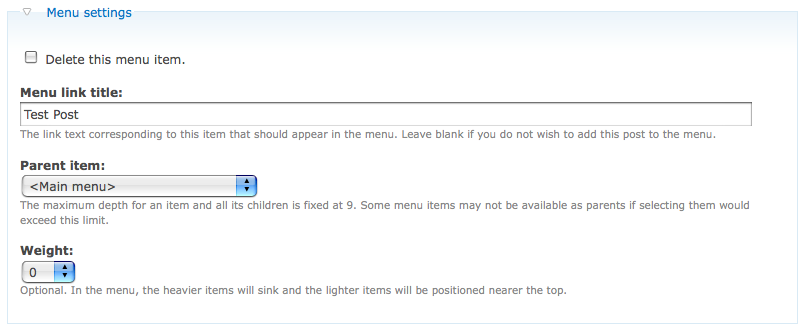
realityloop commentedUpdated for Drupal 7 UI
Comment #7
jstollerI'm very interested in this feature and would love to see it in core. In fact, I requested it myself over a year ago (#219851: multiple menu locations, multiple weights). Many of the sites I've worked on have had pages that needed to be listed in multiple places within the menu structure.
How do you propose handling the path displayed when a node has more than one parent? Should their be a way to designate one parent as the "real" location of the node? You could simply add a column of radio buttons to your form and let the user choose which location they want to use.
Comment #8
realityloop commentedPersonally I think that most node types should only have a single URL, so your suggestion makes sense to me.
Comment #9
jstollerAnother use case you should consider is a node being its own parent. I've come across many cases where a section in my menu hierarchy does not really need a landing page, but instead just redirects the user to a sub-page.
For instance, take a current case I have where the site has a "Plan Your Visit" section under Primary Links. Under this section are several pages, including "Hours & Admission," "Maps & Directions," "Planning Tips," etc... There's no need for an actual "Plan Your Visit" landing page. Instead I want anyone clicking on that link to automatically go to the "Hours & Directions" page. To accomplish this I would first select Primary Links as the parent of this page and give it the menu title of "Plan Your Visit." Then I could select "Plan Your Visit" as a second Parent for the same node, give it the menu title "Hours & Admission," and set this as the true location of the page.
This would add a great deal of needed flexibility to the menu system. The possibilities are endless!
Comment #10
realityloop commentedThat seems to be entirely possible based on the last mockup I did, and my original intent for this feature request.
Although you would need to take care when deleting menu items, to not delete a parent, and hence orphan your remaining menu entries.
Comment #11
yoroy commented@#2:
Would be nice to see some screenshots or explanation of how those other popular CMS system solve this in their UI.
Comment #12
keesje commentedSubscribing
Comment #13
Mac Clemmens commentedWhat about how http://drupal.org/project/nodesymlinks is handling this issue? It appears to have some advantages from an SEO perspective, which is often cited as a pitfall of multi-parented menu items.
Comment #14
jstollerCan you explain how nodesymlinks approach is advantageous from an SEO perspective? I know from a website analytics perspective, I would much rather have two menu links pointing to the same place than one page with two unique URLs.
All that aside, looking at this from the user's point of view, there should be a way to manage all of a node's locations in the menu structure directly from the edit page for that node. Whatever solution is settled on, I should not be required to go to another config page, or create an "alias" node in order to achieve this result.
Comment #15
cwd commentedHmm, nodesymlinks will generate content in two places, but one of them will have meta no-index so at least the search engines won't see the content twice.
this might work to solve some of these problems, but adding an option to add a page to the menu in multiple places would be more fantastic.
also, nodesymlinks is still in DEV status so I am hesitant to install it on a production site.
Comment #16
wojtha commentedjstoller #15:
Reason to have multiple URL is for example to have multiple breadcrumb or multiple menu with same content. Drupal menu can't handle that and users are confused when they jumping from one menu navigation branch to another.
Imagine you have this menu structure:
Menu Services No.1
- Service A
- Service B
Menu Services No.2
- Service C
- Service A
Service A appears in two places, what happend if you click on the Service A under menu 2? Both menu will be opened and Service A will be highligthed. Maybe there is some use cases when this is desired behaviour, but there is a lots of use cases when it is not. Additionaly only one of them can appear in the in the breadcrumb. Ok there is a way how to do it in with the Drupal Menu module - make two nodes and fill them with same content - but in this case you need to maintain two separate copies of the same content and site will get SEO penalty...
NodeSymlinks solves that.
Comment #17
jstoller@wojtha
I don't think anyone is talking about a node being in two places at once. We're just talking about a node being listed in multiple places. One of the locations would be it's "real" location. All menus and breadcrumbs would reflect that location. While the ability to place a page in multiple locations should be used with care, in many cases any confusion you might cause by jumping from one section in the site hierarchy to another is more than made up for by making it easier for users to find the information they need.
Another use that involves no user confusion at all is the ability to place a node in multiple menus. For instance, my site has a footer menu where I put a selection of links to pages that otherwise are more buried in my site hierarchy. Why shouldn't I be able to add a node both to my primary navigation menu and to my footer menu?
The idea of a symlink is interesting and I can see many uses for it, but it is not always the desired behavior. For instance, my example in post #9 above, where I have a node that is it's own parent in the hierarchy. In that case I want clicking on the second location to redirect the user to the real menu location. A symlink would make things even more confusing. Same thing with my footer menu links.
I'd love to see this symlink function included in the menu system, but it should be an optional behavior that can be turned on or off for each menu instance. Also, I would rather see multiple menu support included in core without any symlink support than have to wait even longer to get the basic multiple location functionality. As I've said before, the key thing is this must be configurable within the standard menu controls on the node edit pages. There shouldn't be any need to go to a different admin screen just to add a second menu location for a node.
Comment #18
Mac Clemmens commented@jstoller
I have to say that I disagree with all menus and breadcrumbs reflecting the setting, although I strongly support this being a configurable option. The most confusing thing for a user is when they are surfing levels 2+ of the navigation (clicking top to bottom on the links) and are then jumped unexpectedly to a new section.
We face this situation with a church website we are working on. Levels 2+ of the primary links appear in left block. They have a music program for kids. It falls underneath "Opportunities for Children" and "Music Programs". If someone is clicking through the five music programs and then suddenly jumps to "Opportunities for Children" they get puzzled. How are they to know that it "really lives" there? We could also use taxonomy terms to organize the pages, but sometimes there are cases where there is a need to double-post content in two different sections without diving into the taxonomy fray (which is overkill for small non-profits who only have a 20-30 page site.)
And simply adding a no robots tag on one of the pages would keep search engines from indexing it and penalizing for duplicate content, if that were a concern.
Comment #19
jstoller@Digital Deployment
I'm not suggesting that jumping someone to a completely different place in your site hierarchy is always ideal. However...
Comment #20
PeteS commentedFYI, a module to enable editing multiple menu links is awaiting a CVS account, so hopefully we can move forward a little with this feature without needing to touch the core.
Comment #21
realityloop commented#20 Awesome.. what will it's name be?
Comment #22
PeteS commentedIt's "Multiple Node Menu", available by CVS or the download should be there after the nightly script runs.
Comment #23
brisath commentedI also discovered an alternate way to do this describe at http://drupal.org/node/524252#comment-1918806
Comment #24
sunComment #25
jstollerHere are some slides I submitted on this topic to the Drupal Core Developer Summit at DrupalCon 2010.
Comment #26
cfviper commentedI think this would be a great feature. I have a situation similar to the footer menu idea. Also this may not be the best place to ask, but since user confusion was brought up, how much user testing(HCI) is done when it comes to core features and the UI in general? Just curious, I'm really impressed with the progress Drupal has made.
Comment #27
jstollerI marked #219851: multiple menu locations, multiple weights as a duplicate of this issue. Technically it was posted first, but this issue has more discussion around it.
Comment #28
casey commentedThe Menu link module uses fields for menu links. It's not too stable right now. But I think this approach should be followed for Drupal 8.
Comment #29
xjm(Merging "node system" and "node.module" components for 8.x; disregard.)
Comment #32
Alluuu commentedAny progress on this or a plan to implement?
I'm in dire need of this functionality and there doesn't seem to be anything for D8 that could help..
I have 2 similar menus, for different parts of the site, and I'd like them to point to the same nodes and places, but can only have one automatically do that from node editing, and if I edit anything I'll currently have to update the other menu manually, which is a pain and prone to errors..
Comment #34
omguhh commentedAny update on this at all? Wouldn't mind helping out..but it's really strange how many years have passed and drupal (currently on 8) is still not capable of having menu items in multiple locations (without having to duplicate what you already entered)
Comment #36
mester9 commentedI cannot believe we haven't been able to solve it yet for Drupal 8. At least with some contrib module or something.
We're almost in 2018, and there is no easy way to link to 1 node, from 2 different menu parents.
If I am coming from A -> B -> X . or from D -> E -> X . I want to show X, but with different menu hierarchy (and breadcrumb).
How is that possible?
I would love to code a solution/module myself, but can anyone lead me into the right direction?
How would X know if it's coming from B or E? manipulate query url ?
Comment #37
simon georges commentedI cannot take the necessary time currently, but if anybody is willing to port NodeSymlinks to Drupal 8, I'd be happy to commit it, to adress the issue in contrib first. We can eventually see about integrating it back into core afterwards.
Comment #40
mgiffordIt's been over 2 years since the last comment on this. There's been no real advance on NodeSymlinks from what I can tell. What have people been doing on this in the interim?
D8 version that might work is https://www.drupal.org/project/multiple_node_menu
Comment #42
donduck commentedIt's not ideal however, I plan to use node embed in order to embed one node in two locations. This allows the content to exist in multiple locations in the menu with separate IA paths. This will not necessarily solve any SEO issues however, I am working on an intranet so I won't need to worry about that. You could potentially include additional content on the page with the embed making the content slightly different so it could potentially still work for SEO purposes as well. I haven't found any better solution.
Comment #49
acbramley commentedGiven the lack of activity here or support from contrib this doesn't seem like a feature that belongs in core (since not many people seem to need it)
https://www.drupal.org/project/multiple_node_menu seems abandoned (8.x only) but there may be other solutions out there.