

 The 2026 Drupal Business Survey is open. Your response will help shape the future of the Drupal business ecosystem.
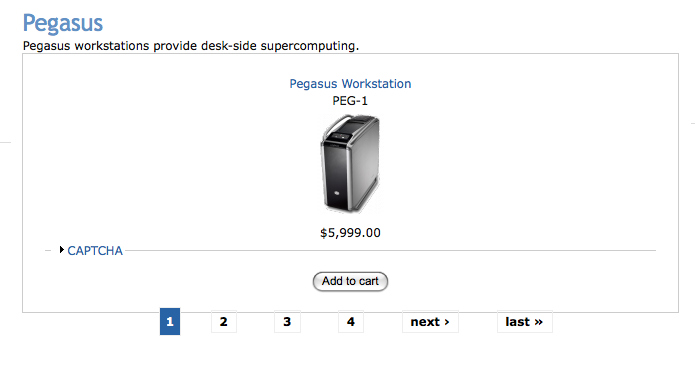
Pagers unnecessarily appear on the /catalog page when only a few products are present. When selecting to page forward, you only see the image for the catalog category.
| Comment | File | Size | Author |
|---|---|---|---|
| #13 | catalog_settings.png | 103.99 KB | guodskrap |
| #12 | catalog_items.png | 47.33 KB | cha0s |
| #11 | catalog_settings.png | 95.01 KB | guodskrap |
| #11 | product_category.png | 37.75 KB | guodskrap |
| #11 | product_category_2.png | 59.96 KB | guodskrap |


Comments
Comment #1
WISEOZ commentedUpdating to version rc2 as it is still happening.
Comment #2
WISEOZ commentedIs this fixed in rc3? I would just like to know so I can make the determination as to whether to upgrade now or wait longer. My site is live now and upgrades are a bit more complicated at this point.
Comment #3
Island Usurper commentedThis was determined to be a problem with the query for Postgres in the Catalog module. I'm not sure why the counting query in theme_uc_catalog_browse() was split into MySQL and PostgreSQL versions, but the Postgres version doesn't work right. I don't have a pgsql database to test on, but if you want to try the MySQL query, I'd like to know what happens.
Comment #4
Island Usurper commentedComment #5
cash123 commentedHas the pager problem been fixed?
Comment #6
rszrama commentedComment #7
cha0s commentedThis needs more information, cause I can't reproduce it.
Comment #8
rszrama commentedLet's just assume it's been inadvertently fixed, then. >:) It's quite old...
Comment #9
guodskrap commentedI am encountering this issue on our sandbox installation of Drupal with Ubercart using Postgres. Ryan on the Ubercart forums pointed me to this bug report. Here's the message I put there:
I'm working on setting up Ubercart for our site. I've created a couple of categories that appear in the catalog.
When I click on a category, I get the grid of products as I should. Underneath this, however, is a list of linked pages that looks something like this:
Unfortunately, I have only created a couple of products, so all of these links go to pages without the footer above, showing nothing but the page title and category description (and regular site blocks, etc.)
How do I prevent these empty links from showing up?
The URLs look like this:
I've attached an image of what I'm seeing. This is on the Zen Classic theme.
Comment #10
cha0s commentedKay, I still can't reproduce this... so answer a few questions for me, wouldja? =)
Thanks...
Comment #11
guodskrap commentedThanks for revisiting this. Here are some answers:
1. I had Ubercart version: 6.x-2.0-beta3, but I upgraded to beta4 and encountered the same problem.
2. The one I posted a clip of had one product. I have two products in another category, with the same result. I don't have a category with more than two products at this time.
3. Here's a text dump of the config:
Catalog settings: edit
* The taxonomy vocabulary Catalog is set as the product catalog.
* Catalog breadcrumb is being displayed.
* Node count is not being displayed in the catalog breadcrumb.
* The catalog view is not displaying subcategories.
* Subcategories are being displayed in 3 columns.
* There are 12 product nodes displayed per page.
* Block settings:
o Block title is pointing to the top-level catalog page.
o Not expanding categories in the catalog block.
o The number of nodes in a category are not being shown in the catalog block.
Product grid settings: edit
* Products are displayed in a grid.
* The grid will be displayed in 3 columns.
* Displayed fields:
o Product title
o Product SKU
o Default product image
o Sell price
o Add to cart form
o Attribute selection elements
I've attached some images, including shots of products as a table rather than grid:
Comment #12
cha0s commentedI configured my catalog exactly as you specified, I even turned on the Zen classic theme.... but my products displayed fine on the catalog page. I attached a screenshot here...
Comment #13
guodskrap commentedOkay. I've investigated my setup and here's what I've found:
When I go to the Store Administration --> Configuration --> Catalog Settings, I can change this number:
Catalog products list
Product nodes per page:
It's normally set to "12". When it is, I see 4 extra pages on the pager below the item(s).
When it's set to "1", I see 9 extra pages below the item(s).
When it's set to "99", the pager disappears.
This is true whether or not the display is set to be in a grid or not.
Does this help narrow it down?
Here's an image of the settings:
Comment #14
cha0s commentedDude... for some reason this one is still evading me. I've set it all up the way you said, but nothing... I've created multiple terms with different numbers of products under them. I double and triple checked that I was running on pgsql and not mysql... changed the grid number, you name it.
I'm out of ideas. All I can think is, would it be possible for you to attach your uc_catalog.pages.inc here, so I can confirm we're running the same code in theme_uc_catalog_browse() ? I'd appreciate it.
Thanks...
Comment #15
yahozna commentedI encountered the same problem (using drupal 6.9 & ubercart 2 beta 4)
I solved it by editing the file "uc_catalog.pages.inc"
In line 110 the 'count query' is defined in a variable called $sql_count. This query should return the number of products in a category.
It is defined as:
$sql_count = "SELECT DISTINCT n.nid, COUNT(*)
FROM {node} n
INNER JOIN {term_node} tn ON n.vid = tn.vid
INNER JOIN {uc_products} AS p ON n.vid = p.vid
WHERE tn.tid = %d
AND n.status = 1
AND n.type IN (". db_placeholders($types, 'varchar') .")
GROUP BY n.nid";
So what happens is that the number of products is determined by the first value the query returns (n.nid) which of course is not right ;-)
The query should be:
$sql_count = "SELECT count(DISTINCT(n.nid))
FROM {node} n
INNER JOIN {term_node} tn ON n.vid = tn.vid
INNER JOIN {uc_products} AS p ON n.vid = p.vid
WHERE tn.tid = %d
AND n.status = 1
AND n.type IN (". db_placeholders($types, 'varchar') .")";
(the same as the MySQL and MySQL-cli variant)
Bye,
Robert
Comment #16
cha0s commentedRobert, thanks for the code! I creaed patches for 1.x and 2.x... if guodskrap confirms the fix, then we're good to go! (Simply cause my configuration doesn't reproduce the bug, just wanna be sure...)
http://therealcha0s.net/tmp/uc_catalog.pager.1.x.patch
http://therealcha0s.net/tmp/uc_catalog.pager.2.x.patch
Comment #17
cha0s commentedComment #18
guodskrap commentedSorry for the delay.
I ran that patch and it DID fix the error.
Thanks so much for your work on this!
Comment #19
Island Usurper commentedThanks for reviewing. The patches have been committed.