

Closed (fixed)
Project:
Webform
Version:
5.x-2.0-beta2
Component:
Code
Priority:
Minor
Category:
Support request
Assigned:
Unassigned
Reporter:
Created:
25 Mar 2008 at 10:08 UTC
Updated:
28 Oct 2008 at 20:52 UTC
Jump to comment: Most recent file

Comments
Comment #1
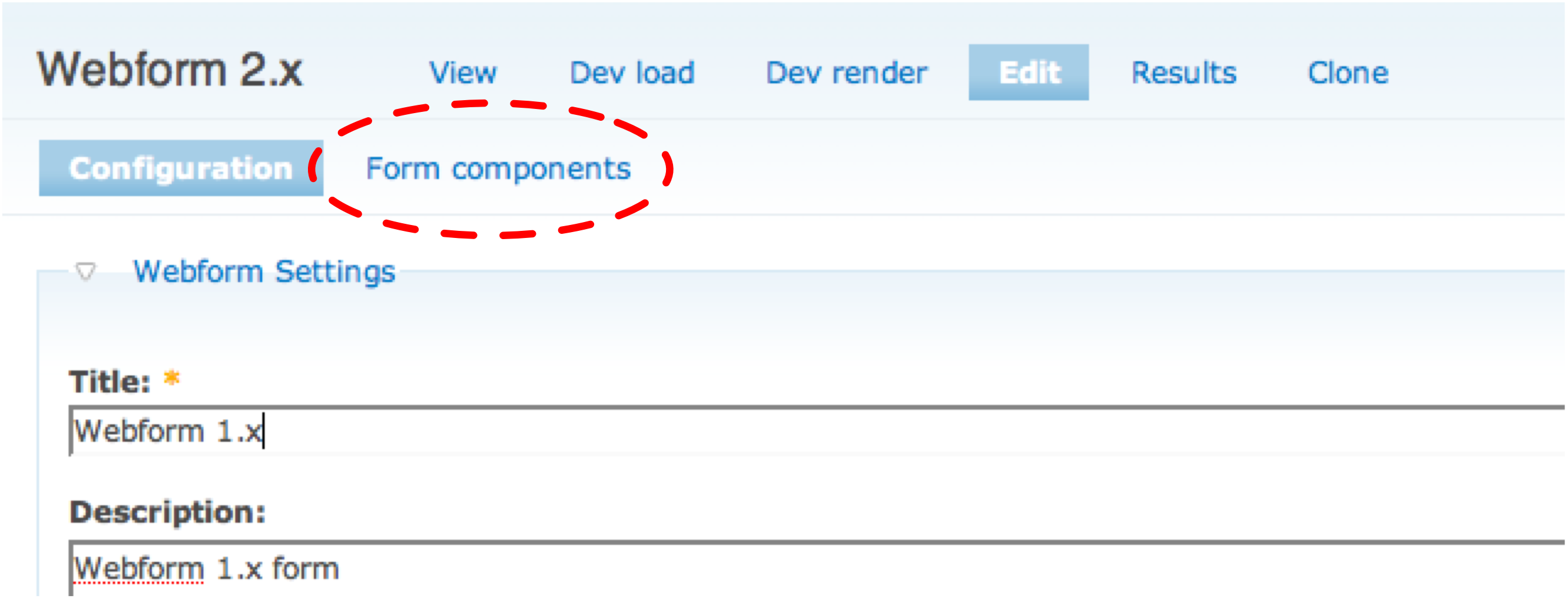
quicksketchThere's a new tab at the top of the node edit form for all components (they're now on a separate page).
Node -> Edit -> Form Components (node/x/edit/components)
Comment #2
goosemoose commentedThe tabs at the top seem to be missing on some of my themes. Is there something required to make sure they appear?
Comment #3
quicksketchThe tabs should be shown automatically as long as you're printing out the $tabs variable in page.tpl.php:
If the tabs show up in Garland (or other core themes) but not in your own, it's definitely a theme-specific problem.
Comment #4
Marat commentedThank you for your replay,
I am sorry i couldn't find this tab ... I am using bluemarine theme and I changed to garland and the same ... nothing appears.
However, I have some problem with my website ... it could be the reason for missing this tab.
Comment #5
quicksketchJust to make sure you see what I'm talking about (the tab really is easy to miss), here's a screenshot of what you should see.
Edit: er, sorry the screenshot is *huge* :)
Comment #6
hectorplus commentedI thought i was the only one with this issue.
When i go to create content > web form, the Component option is disabled. I have Default, Custom, Component, the last one, appears grayed out, the drop down list. I cannot add anything.
I believe this module does not depend on any other module. I have the beta2 installed, DR 6.1
Comment #7
goosemoose commentedI added this exact code to the theme and nothing still showed up. I'm using Drupal 5.7. It works in Garland. Anything else that it might require?
Comment #8
Marat commentedThank you quicksketch for this nice screenshot.
I updated the module but I could not find this tap, may be the wrong with my theme or with my website itself.
Comment #9
goosemoose commentedI figured out the problem. You must have $tabs2; in your theme!! I didn't even realize there was a tabs 2. I've resolved it in all 25 of my themes now.
Comment #10
quicksketchWhat?? $tabs2... who knew. I wonder how Garland gets away with just $tabs. How interesting. Thanks for your following Goosemoose.
Comment #11
goosemoose commentedI wondered that myself. It must be something extra the Garland theme does somehow. I read $tabs2 are secondary tabs when I was trying to figure out why they were missing, and it works :D
Comment #12
Anonymous (not verified) commentedAutomatically closed -- issue fixed for two weeks with no activity.
Comment #13
mikeybusiness commentedAlso if you are accustomed to using the 1.0 version you might get confused. With 2.x you have to create the webform node and submit before you get the options to add components.
Comment #14
PixelClever commentedI am seeing this problem show up with all the standard themes after upgrade to beta2. I have made sure that tabs2 is in the page.tpl. I think it may depend on whether you started with a new install or did an update like I did.
Comment #15
actdigital commentedI started with the webform 2 beta, and am now at the most recent version (5.x-2.1.3).
I have $tabs2 in my theme, and can create components fine when creating a new webform.
However, if you want to edit a webform later, there is no way to return to the components page, to add or edit components. Even with $tabs2 in place, it doesn't appear. Also, after the form is created, from the edit page if you hit submit again after making changes (or not) you aren't taken to the components page. This is what happens on form creation but not on a second edit - so from a user perspective you can never get back to edit fields on the form.
Based on this thread, I can type in node/[nid]/edit/components and this will take me correctly to the components page. This is generally too much for a normal user to think about, so I would like to suggest that this page be placed back in the main tabs.
Thanks!
-Michael
Comment #16
stellamaris commentedI just ran into this problem and would like to enthusiastically second actdigital's request. Without the option of typing the URL directly, I would be dead in the water right now.
Comment #17
stellamaris commentedI just ran into this problem and would like to enthusiastically second actdigital's request. Without the option of typing the URL directly, I would be dead in the water right now.
Comment #18
quicksketchI won't move the tab back into the top level tab-structure. There are many, many other locations in Drupal that use the second level tabs for other purposes. The bug exists in your theme, and it needs to be remedied directly there, rather than in Webform.
Comment #19
actdigital commentedHi quicksketch.
Just to be clear, in our case the theme does show tabs2 for other modules that use it. If there is a component tab in tabs2, we don't see it. All other modules we have that use tabs2 work correctly. Anything is possible, but I have looked into this a great deal and don't believe it's a problem with our theme. Webform is the only module affected.
Thanks for your help.
-Michael
Comment #20
PixelClever commentedTo all that have struggled with this. I finally realized that quicksketch is right. It is a theme issue. However, it is a theme issue that came from using outdated functions in the template.php file. To fix it I went to the template.php and deleted all functions that made references to tabs and put in this function instead:
function wellservicemag_menu_local_tasks() {
$output = '';
if ($primary = menu_primary_local_tasks()) {
$output .= "
\n". $primary ."
\n";
}
if ($secondary = menu_secondary_local_tasks()) {
$output .= "
\n". $secondary ."
\n";
}
return $output;
}
The wellservicemag would be replaced by your theme name. Then after clearing the cache I went to the form clicked edit and voila the submenus are there. This function isn't really even necessary, but it gives you a way to customize the output if you want. This is a bug that is probably happening to many people who update a Drupal 5 theme without making sure every single function in the template.php is still valid.