I downloaded asset-5.x-2.0-beta1.tar.gz and was able to install and seemingly integrate with tinymce, but when I click "Finish" at the end of the wizard, it doesn't respond. If I turn off rich text and don't use tinymce, it goes ahead and gives me my link. The upload process works fine with tinymce in the picture, and I can turn it off and then go and get the link for the uploaded file.
When I click "Finish" in the wizard I get the following error:
uncaught exception: [Exception... "Component returned failure code: 0x80004005 (NS_ERROR_FAILURE) [nsIDOMNSHTMLTextAreaElement.selectionStart]" nsresult: "0x80004005 (NS_ERROR_FAILURE)" location: "JS frame :: http://mysite.com/sites/all/modules/asset/js/asset_wizard.js :: anonymous :: line 225" data: no]
I chose this version because I know we will want the upgrade path, and for now we don't need the fancier features that are not yet working. We are only uploading and sharing some pdf files.
I've gone over all the installation steps carefully, paying especially close attention to the tinymce instructions. I copied the folder from the asset directory to the correct one in the tinymce directory. I added the lines to plugin_reg.php, enabled the button in tinymce settings, and added the input type. Tinymce works fine otherwise.
I had some confusion at the start. I first installed the earlier version of Asset, but didn't try to run it. I only enabled the module without any configuration or testing. I realized I was going to want the new one, so I disabled and deleted the old one but didn't think to "uninstall". I then uploaded the new module, enabled and configured it and nothing much worked. I was getting things like this: Unknown column 'pid' in 'field list' query: SELECT aid, pid, title FROM asset WHERE type="directory"...
So I disabled the new module, and then noticed it was waiting in the uninstall list, so I ran that. I got a warning about a table not being available for deletion, but I went forward.
I turned the module back on and received one user warning: Table 'asset_role' already exists query: CREATE TABLE asset_role ( aid int(10) unsigned NOT NULL, rid int(10) unsigned NOT NULL, status tinyint unsigned NOT NULL default '0', PRIMARY KEY (aid,rid) ) TYPE=MyISAM /*!40100 DEFAULT CHARACTER SET utf8 */; in /home/content/.../html/includes/database.mysql.inc on line 172.
Again, I went forward and, in spite of all that, it works except for this one last bit, although I should mention my installation looks a bit different from the documentation images. My wizard shows icons for the files and folders, but no other icons. The menu at the top does not look like a menu bar, instead it's just a text list. I seem to be missing some css or something like that. I don't care how it looks if it works, but am mentioning it because it's different.
Any ideas? If I have to remove the module and try again, should I remove some things by hand from my MySQL tables after I do? If so, exactly what should I remove? Should I try a different version? (I realize I'm probably dealing with exactly the stuff I was trying to avoid by opting for the newer module but at least I don't have any uploads to worry about yet.)


Comments
Comment #1
juroon commentedAlso... This all took place in Firefox on Ubuntu. I also tried it in Opera, but the Wizard pops up the gray translucent screen and that's all, whether rich text is enabled or not.
Comment #2
zroger commentedWhen using the wizard with TinyMCE, are you using the TinyMCE button from the toolbar, or the Asset Wizard link below the textarea?
Comment #3
juroon commentedHi Roger.... When I turn off rich text, and thus TinyMCE, I can use the the Asset Wizard link below the textarea, and it works just fine. When TinyMCE is on with its toolbar visible, I use the button from the toolbar, it acts like it's working - it even uploads the image - but the last step, when I click finish and it's supposed to give me the link, it just doesn't do anything.
Comment #4
zroger commentedThanks for the clarification. Just a few more questions.
- what browser/version are you using?
- can you attach some screenshots of the wizard style issues you are seeing. This could possibly be an insight into what's going on.
Comment #5
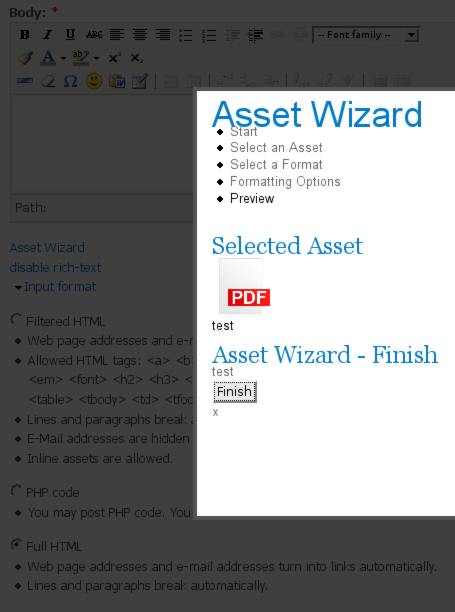
juroon commentedI've tested in both Firefox and Opera on Ubuntu, and in Safari on a Mac - always the same problem. In the attached screenshot, I have already gone through the Wizard, selected my file, and chosen "Link - A simple link to the file," clicked "Finish" and now it's dead in the water. You can see I don't have any icons except the pdf icon for my uploaded file.
It uploads the file when I chose to upload one. It just doesn't produce the link. It also won't produce the link when I browse to an already uploaded file. I've tried various pdf files from various place, so it's not a problem with a particular file. I just tried it with a .txt file - same result.
You might also notice in the screenshot that I have my input format set for "Full html" Inline file assets are enabled for both full and filtered at the moment and I get the same result with either setting.
I really appreciate your help!
Comment #6
zroger commentedis this site on a live url where I can see what is going on for myself? What concerns me is that there are no styles being applied to the wizard, which is most likely a symptom of a larger problem.
Comment #7
juroon commentedRoger, sadly this is in a private area on a client's live site, so I can't give access. Too bad.
Comment #8
HallSL commentedI'm getting this same error when using 5.x-2.x-dev downloaded tonight.
uncaught exception: [Exception... "Component returned failure code: 0x80004005 (NS_ERROR_FAILURE) [nsIDOMNSHTMLTextAreaElement.selectionStart]" nsresult: "0x80004005 (NS_ERROR_FAILURE)" location: "JS frame :: http://www.mydomain.com/sites/all/modules/asset/js/asset_wizard.js :: anonymous :: line 225" data: no]
I probably could give you a login, though I don't want to post it here. I get the above error when using the module in Firefox / Windows, same general behavior in that everything seems to be working pretty well, but when it gets to finish, it just doesn't do anything and I find the above error in Firebug. As I was posting this, I thought I'd try it in IE. I have IE6 on this machine and it won't even open the Assets wizard.
Just for good measure, I'm attached a screen capture that shows the editor screen, looking quite nice, and the error message at the bottom. After that, no asset is added to the story.
Comment #9
HallSL commentedFollow-up... in reading around in other issues, having to do with why I didn't have a button for drupalasset on the TinyMce toolbar, I found that I had indeed put it in the tinymce/plugins directory rather than the tinymce/tinymce/jscripts/tiny_mce/plugins/ directory. That did get me a button on the toolbar and a successful completion of the asset insert via tinymce.
Comment #10
test_drupal-1 commentedHi
HallSL,
I am also encounter with same problem....
Did u find any solution for asset module...
Please Help me....
Comment #11
wmostrey commentedAsset 5.x-2 has been discontinued, please use 5.x-1.