

 Come together with the global Drupal community in Rotterdam, 28 Sept – 1 Oct 2026. Sessions, contribution, connection, and Early Bird savings until 8 June.
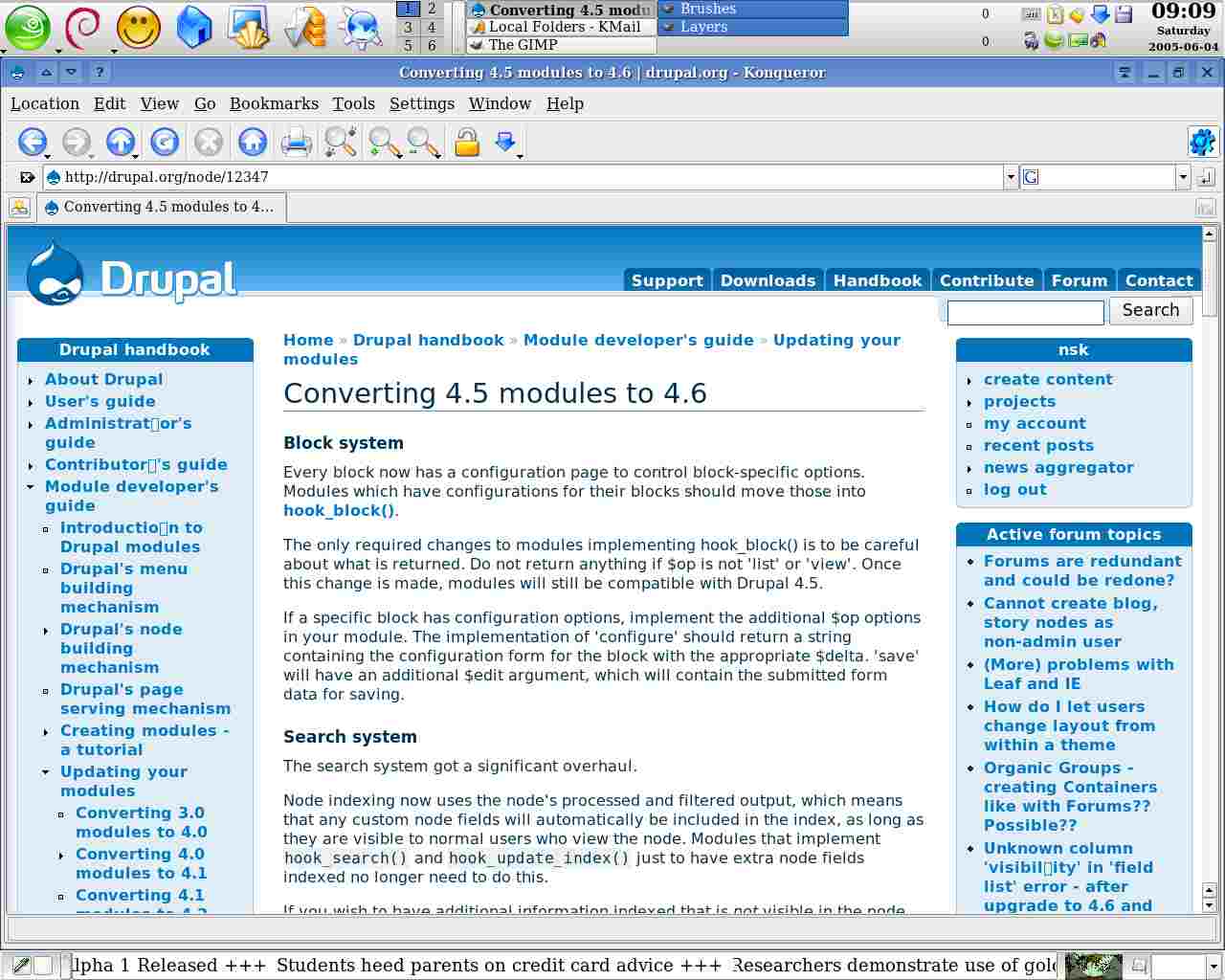
Many unrecognised characters everywhere. See screenshots. Happens with any encoding (I tested utf8, iso8859-1, iso8859-7).
| Comment | File | Size | Author |
|---|---|---|---|
| fontproblem.jpg | 86.03 KB | nsk |

Comments
Comment #1
TDobes commentedThis appears to be a problem with Konqueror attempting to render the <wbr /> tag as some sort of non-existant character. The boxes on the screenshot appear everywhere a wbr tag is used.
I do not experience this problem in Firefox, Opera, or IE6.
Comment #2
nsk commentedperhaps this tag shouldn't be used since it creates problems for a number of users.
Comment #3
junyor commentedAgreed, especially as it's invalid XHTML.
Comment #4
nsk commentedPlease remove wbr tags. They create problems on Konqueror and I am unable to read the words where wbr are present. wbr tags are not part of any W3C standard.
Comment #5
nsk commentedComment #6
moshe weitzman commentedit is part of the HTML4 standard. nsk - you linked to a different tag.
Comment #7
junyor commentedWould you please link to WBR's location in the spec.? I can't find it.
Comment #8
moshe weitzman commentedhmm. now i can't find it either. i guess it isn't part of an official standard. so yeah, lets strike it. see http://www.blooberry.com/indexdot/html/tagpages/w/wbr.htm
Comment #9
Steven commentedMost likely this is caused by the following CSS rule in the stylesheet:
wbr:after { content: "\00200B" }
I guess Konqueror doesn't know how to deal with it. Pity. Until I find a method of word breaking which works on as many common browsers as wbr + this, I'm inclined to leave it in. WBR is not in HTML because the Unicode (non-)joiner characters are supposed to be used instead, except support for them is appaling.
What happens if you install a Unicode font which includes the character properly? Or doesn't KDE/Konqueror support font substitution?
Comment #10
tagman23 commentedThere may be a better way to hack this tag. Consider the following code:
wbr {
display: inline-block;
width: 0;
overflow: hidden;
}
You might also try this tag in the beginning of your document, before the html tag:
<!ELEMENT wbr EMPTY>
That should make the tag validate.
Comment #11
cosmicdreams commentedLooks like this issue got into the user experience queue and died. I'm confused as to where it belongs. What do others think?
Comment #12
Anonymous (not verified) commentedThe user experience project is closing so this issue is being moved to the usability component under the Drupal project
Comment #13
sun.core commentedCompletely wrong queue.
Comment #14
vm commentedComment #15
gerhard killesreiter commentednobody cares for a browser with less than 0.5% of page requests. Also, bluebeach will be retired soonish.