Closed (fixed)
Project:
Quick Tabs
Version:
5.x-1.1
Component:
Code
Priority:
Critical
Category:
Bug report
Assigned:
Unassigned
Reporter:
Created:
5 Apr 2008 at 00:24 UTC
Updated:
18 Jul 2008 at 21:01 UTC


Hi all
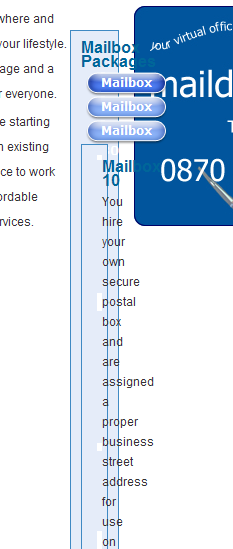
This is a brilliant tabs module - great job. Except the layout is all messed up in IE7. It works great in Firefox but IE7 renders the tabs vertically and the block is squashed into a tiny vertical layout. I know this is a CSS bug but have no idea how to fix it. It affects every style sheet and I think will affect everyone using the module :(
It also fails validation on the * html attribute. Apparently this works great for IE6 but IE7 does not like it and needs it written in a different way. Here is what the validator says it fails on:
sites/all/modules/quicktabs/tabstyles/phylactere/phylactere.css
45 		Parse error - Unrecognized *html ul.quicktabs_tabs{ background: transparent url(images/shade.gif) repeat-x 0 25px; }
49 		Parse error - Unrecognized *html ul.quicktabs_tabs li a{ padding:0px 21px 3px 0; background-image: url(images/phy.gif); }
52 		Parse error - Unrecognized *html ul.quicktabs_tabs li{ background-image: url(images/phy.gif); }
I hop you can help me to sort this out because it took me forever to find a simple tabs module which works and it looks great in Firefox.
Also, I am using the rounded corners module on the same page but I don't think makes any difference
| Comment | File | Size | Author |
|---|---|---|---|
| quicktabs_bug.png | 31.93 KB | drupalferret |

Comments
Comment #1
drupalferret commentedI fixed this by moving the * .html attributes to an IE6 stylesheet and calling using a conditional statement to load it if the browser is IE6. I also added width: 98%; to the block class for my content blocks to solve the narrow block rendering issue for IE7.
All seems to look as it should and the tabs module works fine. :)
Comment #2
katbailey commentedHi,
I will ask couzinhub (my ie7 debugging ninja colleague ;-) to look into this and get him to post his findings here.
thanks,
Katherine
Comment #3
robgxx commentedI've installed quicktabs at our site at http://thecubreporter.com
Everything works great in Firefox, Safari and Opera.
I tested it in IE7 and the tabs in the left sidebar work fine. The tabs on the right sidebar load on top of each other and clicking on them jumps me to the top of the page. I haven't even checked on IE6.
Any thoughts or is this the same issue? And if this is the same issue, how do I implement that code you provided? Where does it go, what should I check for?
I'm a Drupal newbie and particularly uncomfortable and inexperienced with playing around with code.
Thanks in advance.
Comment #4
robgxx commentedI narrowed the problem. I'm using swfobject to load a flash ad animation that loads on the right sidebar. When I disabled that block, quicktabs worked fine. Unfortunately swfobject is the only way I know to load a flash animation that will work in all browsers (especially IE7). And of course it's a paying customer.
Any ideas on why the swfobject and quicktabs would conflict?
Thanks in advance...
Rob G.
Comment #5
katbailey commentedHi Rob,
yes, I did a little testing myself in IE7 yesterday and any of my sites that use quicktabs have no problems. I think there must be a problematic bit of mark-up - maybe a missing closing div or something. These kinds of things cause havoc in IE while FF and Safari can deal with them no problem. The jQuery behaviours aren't being attached to the QT blocks in your right sidebar which suggests the selectors aren't targeting what they're supposed to (seeing as the jQuery obviously works fine for the left hand blocks). I would examine the mark-up that's being output to your right sidebar very closely and see if you can find something amiss.
Hope that helps.
regards,
Katherine
Comment #6
robgxx commentedthanks for your response...
as I mentioned, it was a conflict between swfobject and jquery on my site. To solve it, I found the jquery media plugin and used that to load the flash ad animation that appears before it instead. Seems to be working on all browsers I checked now. If anyone needs help, email me and I'll walk you through the process of adding the plugin.
But if you google swfobject jquery conflict you'll get a few hits. Just an FYI for everyone else who stumbles across this.
But thanks for this module, works wonderfully.
Comment #7
katbailey commented