

 The 2026 Drupal Business Survey is open. Your response will help shape the future of the Drupal business ecosystem.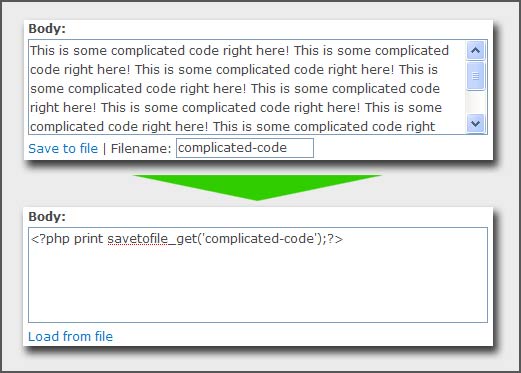
This project is not covered by Drupal’s security advisory policy.
Ever wish that Drupal had a front-end code editor? Frustrated with using the space bar to indent code in textareas? Wish you could back up your node code to a hard file? Then Save-to-File might be the solution for you!
Save-to-File adds a link under a textarea to "Save to file". When clicked, some handy javascript moves the entire content of the textarea to a file, and replaces the textarea content with a short function that will grab the content from a file the next time the content is loaded.
Common Workflows:
Switching between Drupal and Your Favorite Editor
- You start creating your code in a node content's textarea and realize that you'd really appreciate some syntax highlighting and automatic tag completion.
- You click "Save to file" to save the content you've already created to a file via ajax.
- You save the node and view the page.
- You open the new file up in your code editor. Now you can work with the content as a static file. Changes will be reflected in the browser because it's drawing from the file contents.
- Later on, when you're updating your site, you want to edit the content using Drupal instead of your editor. No problem! You just click a 'Load from file' link and it loads the content of the file back into the textarea via ajax (no extra page-loads). When you submit the form, it will automatically remove the old file (however, you can turn this off if you want to keep backups).
Saving File-based backups of complicated content
- You're feeling nervous about not having a hard copy of some code you've created somewhere in Drupal's configuration, or in a node. You could make a backup of the database, but you're looking for something simpler.
- You mosey over to Save-to-File's settings page, check the "Do not delete files" option and save the settings.
- Back to the page where your content is, you click on "Save to file". Now you have a hard copy of that code!
- Finally, you click on the "Load from file" link to load the content back in. Sweet.
Save-to-File Features
- Slick ajax-based saving and loading of content to and from hard files
- Can be used on any textareas on a site. You can specify which pages to use the tool on. It's not just for node forms!
- Save-to-File will keep the file directory clean of unused content files, but if you want to save backups, there's an option to do just that.
Project information
- Project categories: Content editing experience, Content display
- Created by chrisshattuck on , updated
 This project is not covered by the security advisory policy.
Use at your own risk! It may have publicly disclosed vulnerabilities.

