I'm doing something wrong but I'm not sure what and where. I've created a page which has a simple three-column table. I either see nothing or the markup.
My system has:
Drupal 6.1
pearwiki_filter-6.x-1.0
wikitools-6.x-1.0
I checked out Text folder per the readme.txt and put it in the pearwiki_filter directory. I went to my drupal settings page, enabled the pearwiki_filter and wikitools modules, created a new input filter named Wiki using only the PEAR Wiki Filter, and made sure that all users had viewing permissions. In the Configure Wiki tab: the PEAR path was correct, the Mediawiki format was selected, HTML was allowed, and 'Use wiki links' and 'Use wikitools' were checked.
To test it, I created a page with:
Do you 'see' a table?

{|
| topleft || topmiddle || topright
|-
midleft || midmiddle || midright
|-
bottomleft || bottommiddle || bottomright
|}
I saved the page but saw nothing. I found a guide online that implied I may need to have something in the Configure Wiki -> 'Ignore regexp' field. I copy/pasted the string I saw online into the 'Ignore regexp' field, saved, reloaded my page, and saw the markup but without the line breaks.
Do you 'see' a table? {| | topleft || topmiddle || topright |- midleft || midmiddle || midright |- bottomleft || bottommiddle || bottomright |}
Some things I tried were:
1. dl Text_Wiki_Mediawiki package from the PEAR site - the original cvs checkout had newer version of the Text/Wiki/Parse/Mediawiki/* files
2. running a diff on the older and newer versions of the Text/Wiki/Parse/Mediawiki/Table.php file - two regex differences showed up; plugging any of them into the 'Ignore regexp' field still gave me my markup without line breaks.
Help? Thoughts? Suggestions?




Comments
Comment #1
cwgordon7 commentedSet your html filter to allow all necessary table tags. If that doesn't work reopen.
Comment #2
nmashruwala commentedI'm sorry, but I'm having trouble interpreting your answer...
As far as I know, there is no html filter enabled. The input format I created, Wiki, only has the PEAR Wiki filter selected, not any of the html filter options. I'm not sure in which field to put the table tags...
What should I re-open? Do you mean that I should reload the page? If so, that doesn't seem to help - I'm testing on three to four browsers and a few different accounts; all give the same results. Could you be more specific?
Thanks!
Comment #3
cwgordon7 commented"What should I re-open?"
Seeing as you just reopened the issue, I assume that is not a problem...
Please double check that you are not using html filter with the wiki filter. To neglect to use the html filter at all is dangerous, in any case, and a security vulnerability.
Comment #4
nmashruwala commentedah, reopen the issue; that makes sense!
I am sure that none of the html filters are being used with the Wiki filter. As a double check, I'm attaching a slightly edited screen shot of what I see (Home › Administer › Site configuration › Input formats).
Currently, I'm more concerned about how to get mediawiki markup parsed; once it is working, I'll spend a bit of time fixing the security issues.
Can you think of anything I might have done wrong or overlooked?
Comment #5
cwgordon7 commentedAre you sure you're using the correct filter to create the node?
Comment #6
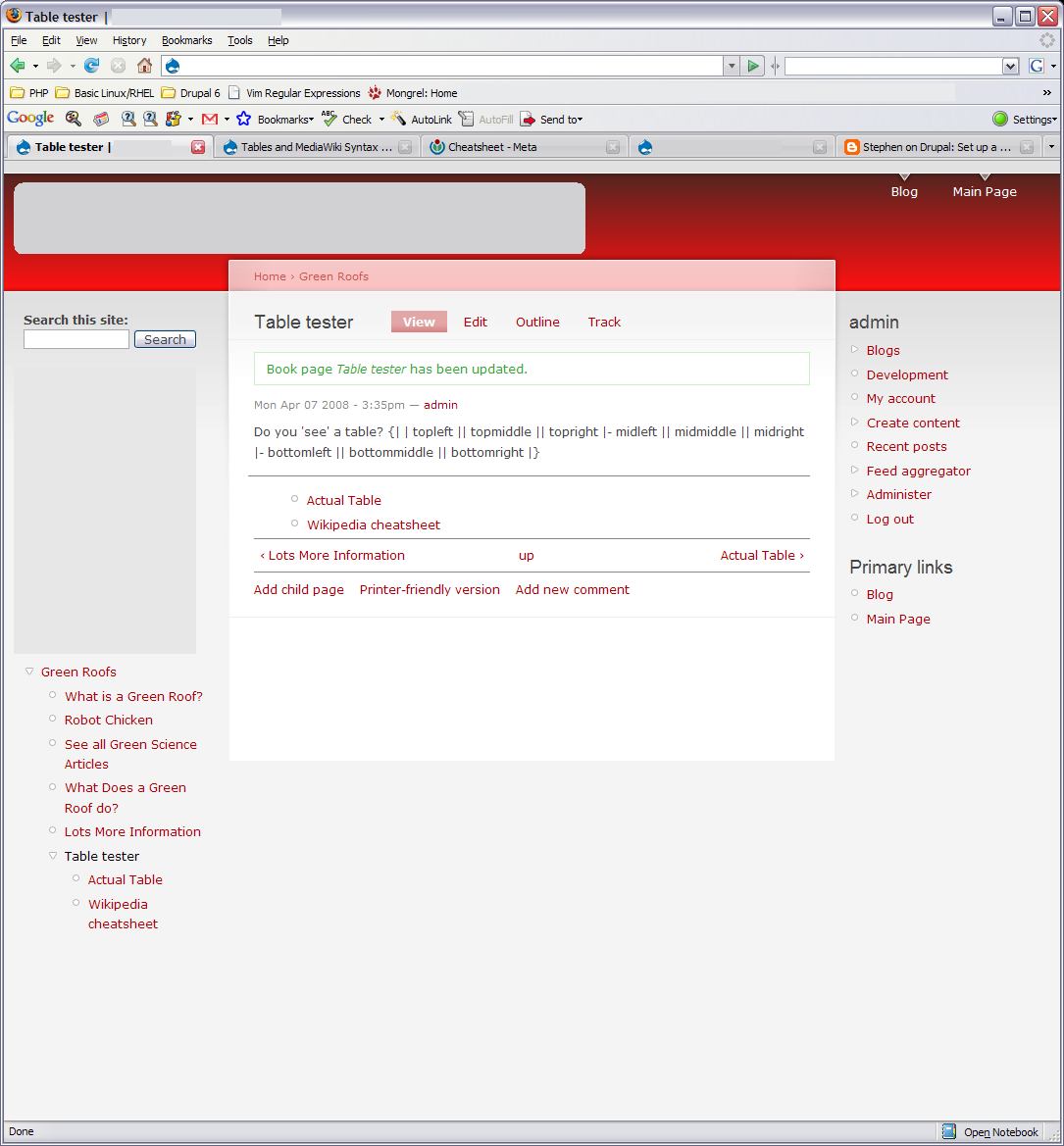
nmashruwala commentedPretty sure - here are screen shots of the Edit screen and the rendered page. Please tell me if I should be doing anything differently
Comment #7
nmashruwala commentedComment #8
Pushkar Gaikwad commentedI am again reopening it since it is not resolved and I am having the same problem with 5.x.
I was under the impression that it has NO suppport for table but may be it has, not sure, Can someone confirm that they were able to create tables using Mediawiki syntax ?
Comment #9
yngvewb commentedI can confirm this.
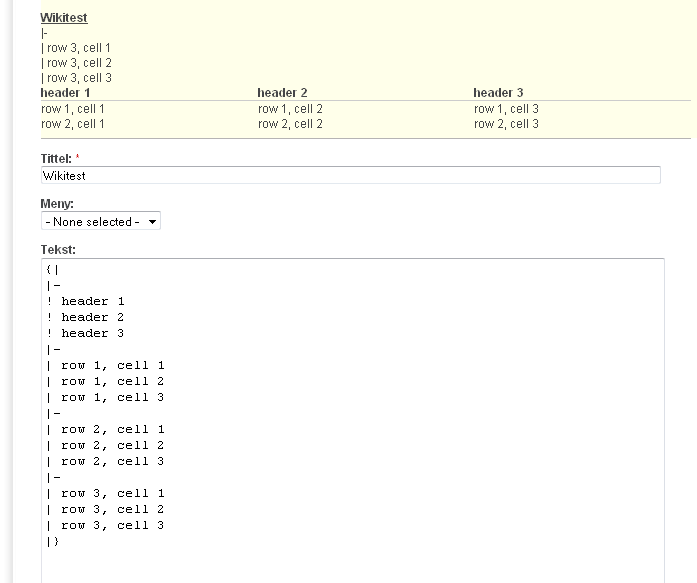
Wiki table code taken from http://en.wikipedia.org/wiki/Help:Table generates a table, but the las row never get formatted (doesn't matter of many rows there are in the table), and the wiki code of the last row get displayed. See screenshot.
Comment #10
yngvewb commentedI fixed my problem, see http://drupal.org/node/298225#comment-1083011
Comment #11
cwgordon7 commentedMarking as a duplicate of #298225: Simple table formatting leaves |- artifact when rendered.
Comment #12
asb commented> I was under the impression that it has NO suppport for table but may be it has, not sure,
> Can someone confirm that they were able to create tables using Mediawiki syntax ?
I'm on 5,x-1.1 as well and can confirm, that some very limited and very, very buggy support for tables exists. However, the table form #9 is far to "complex" to render complete and correctly. Simpler tables with two rows do work somehow better, but still quite unusable.
I'd love to see full MediaWiki syntax support in Drupal, but it's a long road as it seems.
Greetings, -asb
Comment #13
jeffschulerThe table in comment #9 renders just fine when using the CVS version of PEAR Wiki_Text (as was described in #298225: Simple table formatting leaves |- artifact when rendered,) as do the majority of tables listed on http://en.wikipedia.org/wiki/Help:Table .
Please give it another try.