I have two very similar servers one works great showing Gallery2 images, the other shows only the link to the image. This is true of the image block or the embedded gallery page.
I do not have URL rewrite installed on either box.
Box that works:
Gallery 2.2.3
Drupal 5.7
Module Gallery 5.x-2.2
Apache/2.2.8 (Fedora)
Box that does NOT work:
Gallery 2.2.4
Drupal 5.7
php 5.2.4
mysql 5.0.45
Module Gallery 5.x-2.2
Apache/2.2.8 (Fedora)
I even tried a reinstall of Drupal on the second box and added just the gallery module, still no pictures.
Please has anyone used gallery 2.2.4 successfully?


Comments
Comment #1
lvthunder commentedHave you tried to see if the standalone G2 works or is it just embedded G2 that doesn't work.
But to answer your question I have 2.2.4 working just fine.
Look in the source code and see what URL the img tag has.
Comment #2
stompersly commentedGood question! Yes, I have been regularly using G2 stand alone on both servers and it all looks fine.
I should note that I have turned on the photo frames and I see the frames around the photos with G2 embedded in Drupal but no image.
On the Image block sidebar I see just the image link, when clicking the link it takes me to the emededded g2 image page and just shows the link, no image.
I do not have the apache rewrite mod installed and have never set up rewrite on either server for drupal or g2.
The URL link has "mysite"/drupal/?q=gallery&g2_itemId=130
The name of the link is the correct label for the image.
Comment #3
lvthunder commentedIf you take the link in the img tag and paste it in the browser do you get an image?
Comment #4
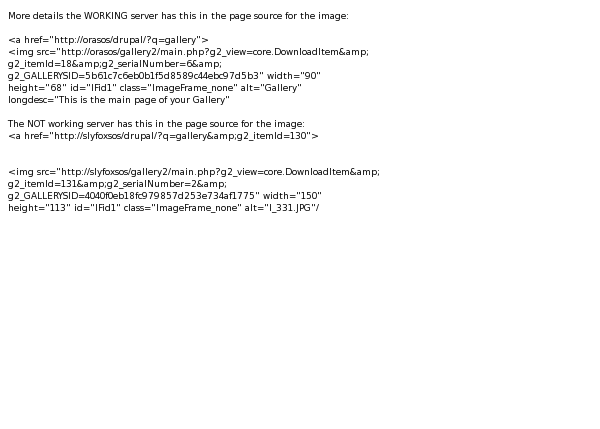
stompersly commentedMore details the WORKING server has this in the page source for the image
and the NOT working server has this in the page source for the image
(I had to put the source as a gif so you could see it)
Comment #5
stompersly commented>>>If you take the link in the img tag and paste it in the browser do you get an image?
No, I get a Not Found URL /gallery2/main.php was not found.
I think I am on to something because my gallery2 is installed in a directory called photo and if I edit the url changing gallery2 to photo the image pulls up OK.
Do you think I am required to install gallery2 in a directory with that name?
Comment #6
stompersly commentedMy http/conf.d lists the gallery2 under the alias of photo, I have no alias for gallery2. I guess I can add one.
Comment #7
lvthunder commentedLook in the install tab of the gallery module and make sure all three of those paths is correct.
Comment #8
stompersly commentedThey are not correct but are set as auto configuration (OK) and I cannot seem to change them.
Comment #9
stompersly commentedOK, reset the install choose manual and fixed them, IT WORKS Thanks for your help on this one.
These are some great debugging tips.
Thank you, Thank you!
Comment #10
lvthunder commentedIf I remember right there is a reset button at the bottom of the page. If you click that then I think you can change it.
Comment #11
lvthunder commentedYour welcome.
Comment #12
stompersly commentedI tried to turn on URL rewrite after getting it to work without it. A week later after much struggling and getting close I finally got it. In the interest of helping others here is a trick I discovered on my own:
First, I had a difficult time getting the .htaccess file to be updated, I tried reinstalling several times, but because my drupal is not installed in web root it would not work. This is what I finally did after following the install steps here http://codex.gallery2.org/Integration:Drupal:Installation very carefully:
* Note to get this to work and update the .htaccess correctly, do the following:
1. After the above go to gallery from in drupal (this must be embedded not stand alone)
2. select site admin (note you must first enable drupal admin role at: user managment->gallery users->user settings)
3. Select plugins
4. Select URL Rewrite configure, This asks again for the URI and path to .htaccess, save entries
5. Now select activate URL rewrite, and it all works.
To see an example go to: http://web3us.com
This is running Gallery 2.2.4, Drupal 5.7
**Update the site is now running Drupal 6**
Click on the photos link to see the gallery.
[edit]