My site is set up as a course system, where each group is a course. There are teachers and students. Teachers can subscribe to other teacher's courses.
I use CTAC to disallow teachers from creating new lessons in other teachers groups that they are subscribed in. This works well. However, if a teacher edits an old lesson, they can see every group they are subscribed to in the audience box, whether or not they have permission according to CTAC to post a lesson in that group.
It seems to me that CTAC is only checking permissions on node/add, but not node/edit? Is that right? Thanks!
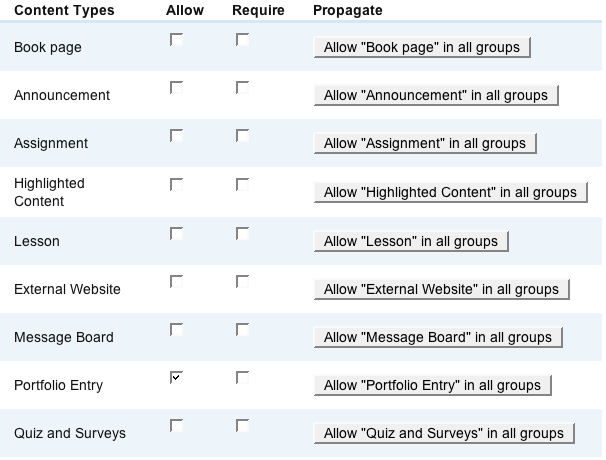
I'm using og 6.1. I've attached two screenshots of my site-wide and default CTAC options.
Nianbei



Comments
Comment #1
Anonymous (not verified) commentedApologies for the confusing post above (and the use of CTAC rather than CTA). It was late. After more experimenting with the module I understand the cause of my problems.
Let me make sure I understand how this module works.
The sitewide menu allows the admin to choose whether a user can publish content outside of a group context.
The default menu allows the admin to choose whether a user can publish content inside of a group context. It also allow group admins to manage which content users can publish in their specific group.
This means you can set a content type as not allowed sitewide, and allowed as default (in group), thus if set this way, when a user adds (node/add/lesson) content sitewide, it gives an error msg, but if they add in group context (node/add/lesson&gids[]=#) it will allow them.
I set my sitewide to require 'lesson' content types, but in default set it so lesson was not allowed or required. I thought this fixed it, because teachers now were not able to post in other teachers groups. However I found later that teachers could not post in any specific group (one group using node/add/lesson&gids[]=#), only sitewide.
So there are actually two issues here.
The first is the one mentioned in the first post: CTA doesn't seem to affect node/edit audience box, it only affects node/add audience box.
The second is that it would be nice that if you allow sitewide, and default, you can set the default to not be activated by default. Right now it is set to automatically be activated. This would be a nice option.
Thus my teachers will not be able to post to other teachers courses by default, but they can change this if they want them to be able to.
My coding ability is minimal. I'm sure I could look through the code and patch it to default to deactivated. However I don't think I can figure out the add vs. edit problem.
Hope someone can help me with this. Let me know if my explanation is not clear enough. Thanks again!
Comment #2
rconstantine commentedI think you've misunderstood just a little. By ALLOWING content types and NOT preventing group owners from making changes to the ACTIVATED types, the content types will not be ACTIVATED for use by group members. Group owners can always create content types that are ALLOWED in their groups, whether ACTIVATED or NOT. Does that clear things up?
Comment #3
Anonymous (not verified) commentedI don't think I've misunderstood. I'm not sure if you read my whole post. I think perhaps I should have been more brief. There were actually two issues, the first is a bug report, the second a support request. In a nutshell:
Bug report:
When a content type is ALLOWED in a group, but NOT ACTIVATED by the group admin, a user is unable to ADD new nodes in that group, however, if a member EDITS a previous node of the same content type, they are ALLOWED to post to the restricted group. It seems to me that when editing a node, there is no permission check happening.
Feature Request (let me know if you'd prefer me to open another issue):
Currently, when you ALLOW a content type, it is by default set to ACTIVATED. It would be nice when ALLOWING a content type for use in a group, for the default state to be NOT ACTIVATED. Or at least give the admin an option box.
Thanks for your time!
Comment #4
rconstantine commentedI did read your whole post as I read all posts. :-)
About your bug report: users should always be able to edit their own posts. Users aren't able to edit other people's posts unless you've given them admin privileges. So, regardless of what the settings are, if a given user has a post of a forbidden type (assuming it was not forbidden in the past), then they will continue to be able to edit their posts. Is that what you are seeing and what you are talking about?
I would prefer issues to be separate, but if my above statement answers your bug question, then just switch this issue title and settings to focus on the request instead.
I'll think about your option box idea, but I think the current behavior should be the default; i.e. odds are that content types will be used by more than just group owners so that is how I have defaulted things.
Comment #5
Anonymous (not verified) commentedOkay, sorry I haven't been very clear. I've reproduced this bug on a clean install. The bug is on step 17.
1) Install drupal 5.7
2) create admin
3) create two users user1 and user2
4) install views
5) install og
6) create group type
7) configure og (page and story are og nodes)
8) install og_content_types
9) did not configure og_content_types (default settings)
10) login to user1
11) create group (group1)
12) UNACTIVATE all content types for group1
13) login to user2
14) create group (group2)
15) add a page to group2
16) join group1
17) edit page1 (able to add to group1, even though UNACTIVATED)
18) add new page (unable to add to group1, as expected)
So the bug is being able to see a group that has UNACTIVATED the content type in the audience checklist when editing a node. Everything works as expected when adding a node. I've attached two screenshots, one of step 17, where I'm able to see group1, even though it should be restricted, and step 18, where everything works perfectly for adding a node.
Thanks again!
Comment #6
scedwar commentedI have exactly the same problem.
My planned solution is to control the form and remove the audience checkboxes at all times (except for admin). Note: the option to hide audience at admin/og/og only removes the audience checkboxes on node/add not edit.
I'll let you know how we get on.
Comment #7
Anonymous (not verified) commentedI thought about doing the same thing you've suggested for the audience checkbox, unfortunately for my site teachers will have several groups (courses) and sections (also groups), and need to post content to multiple groups for convenience. It doesn't make sense to force them to duplicate content.
I'm definitely interested in any solutions you come up with, as well as code snippets. I did post a snippet for restricting adding nodes to only group admins (http://drupal.org/node/203103), however I think the code is too hackish (I'm by no means a good PHP programmer), so I took it out. Plus patching og is a pain.
Comment #8
rconstantine commentedAudiences are a pain in OG, period. I understand there are plans (or wishes) to change how it is done. I'm afraid I don't have a good solution at the moment but will give it thought as time allows. Meanwhile, do what you can and report any findings here.
Comment #9
scedwar commentedIf this is a known issue, then it is a fatal issue as far as using this module and should be stated so on the front page of the module, something like:
"This module restricts where a user can create content, once created they can edit it and place it within any group to which they have membership".
Comment #10
scedwar commentedThis is a critical fault in this module. If this can't be fixed I'd recommend a big warning on the module homepage.
Comment #11
Anonymous (not verified) commentedI also think this a critical design problem. Looking at the module code, it seems like the audience checkbox is only being manipulated on the node_add function. Perhaps by using form_alter this problem could be fixed?
Comment #12
scedwar commentedOur theme guru has hidden the audience checkbox with some themeing and css so it only shows for our site admins, however this is only a temporary fix for us (security by obscurity isn't security):
FWIW we're testing og_user_roles with the Domain module and if everything is fine we'll be moving onto that as the solution as there are too many issues with this module for our liking. Sorry. All we needed was read only groups (except for admins) without hacking og directly.
Comment #13
Anonymous (not verified) commentedWould you clarify where page1 is created ?
17) edit page1 (able to add to group1, even though UNACTIVATED)
Looking at 10 -18
10) login to user1
11) create group (group1)
12) UNACTIVATE all content types for group1
13) login to user2
14) create group (group2)
15) add a page to group2
16) join group1
17) edit page1 (able to add to group1, even though UNACTIVATED)
18) add new page (unable to add to group1, as expected)
i would say there is an
11.5) add a page1 to group1
and that 15 should be
15) add a page2 to group2
when i get to 17) i am not able to edit page1 as i am an ordinary user user2 with regards to group1
Can i clarify the problem ?
Thanks, Paul
Comment #14
Anonymous (not verified) commentedLooking at 10 -18
10) login to user1
11) create group (group1)
12) UNACTIVATE all content types for group1
13) login to user2
14) create group (group2)
15) add a page to group2
16) join group1
17) edit page1 (able to add to group1, even though UNACTIVATED)
18) add new page (unable to add to group1, as expected)
changes:
on step 15:
15) user2 adds page1 to group2 (user2's group)
and step 17:
17) edit page1, check group1 in Audience box, and submit (even though all content types are UNACTIVATED as per CTA) (*bug*)
after user2 joins group1 in step 16, if user2 edits page1 (step 17), user2 will see group1 as an option in the Audience Box, even though this content is supposed to be restricted for group1.
In essence, when adding a node, restricting works, but when editing an old node, restricting does not work.
Let me know if that makes sense...
Comment #15
Anonymous (not verified) commentedLooking into this now ...
Comment #16
Anonymous (not verified) commentedFixed . I'll upload a development release shortly
Comment #17
Anonymous (not verified) commentedAutomatically closed -- issue fixed for two weeks with no activity.