

 Come together with the global Drupal community in Rotterdam, 28 Sept – 1 Oct 2026. Sessions, contribution, connection, and Early Bird savings until 8 June.
Hi,
I have seen a lot of issues like this one but nohing is working with a my clean installation.
I have installed:
Drupal 5.7
Gmap alpha1 (and I've tried with 1.X dev, I have the same problem)
Location 1.x-dev (the last one)
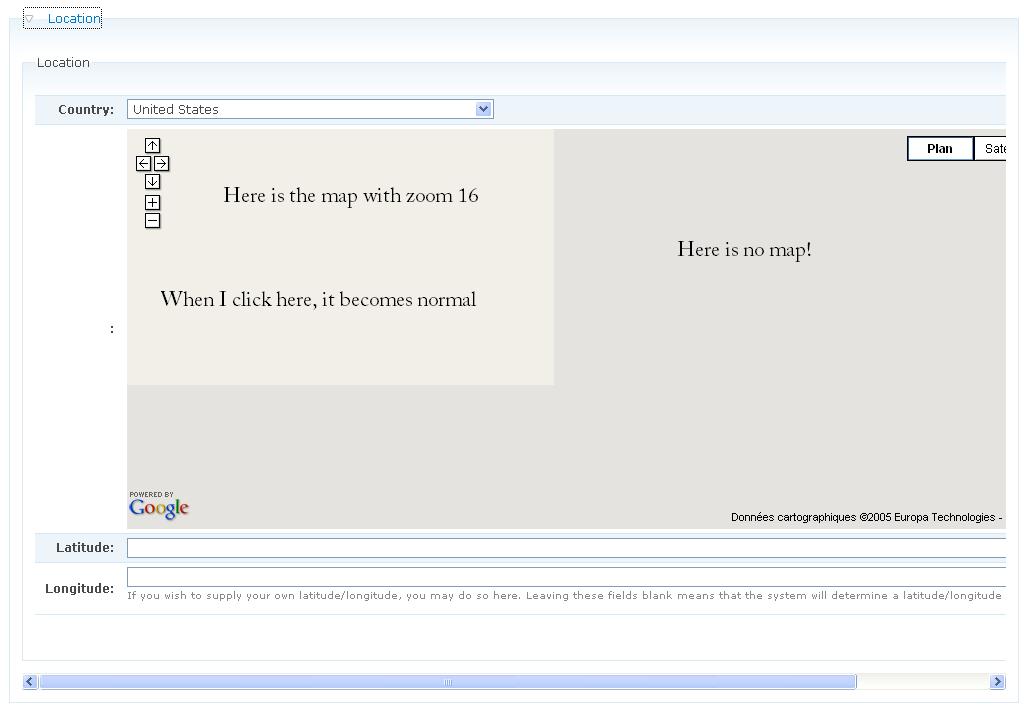
And I have no map (I have just a small map on the corner up left, zoom 16. When I put a marker on the small strange map, it becomes normal!).
Changing the version from 2 to 2.69 in gmap.module, it changes a little bit: I have no more the map on the up left corner.
I can give login and password....
Thanks
Farf, ... sorry for my english

Comments
Comment #1
tom_o_t commentedCould you attach some screenshots so we can see the problem? Have you tried different browsers? Is the map in a 'collapsible' block/fieldset?
Comment #2
farf commentedFor the problem of the map which doesn't show up:
No I didn't have tried with different browsers. Now I have:
- it works with Internet Explorer
- it doesn't work with firefox 2.0.0.13
I don't have the problem with a collapsible not collapsed and with a no collapsible field.
For the problem of the zoom:
With every browsers and collpasible/collapsed options, I have a zoom of 16
here is a part of the source:
Two times location
You will see on the image. There is two times "location". Is it possible to delete one?
Thanks for your help.
P.S. : on the image there is the problem of the width. There is an other issue on it (I have loose it, bu I will find it ;))
Farf
Comment #3
evave commentedThe same problem as described. Map is showing up with IE 7.0, though not working with Firefox. I thought it was a problem with javascript, but yet I haven't found any clues what's causing that...
Comment #4
tom_o_t commentedfarf - I see from your screenshot that the map is inside a collapsible fieldset - for some reason this causes the grey box problem. Try either enabling the 'collapsehack' in the gmap settings page, or not putting the map in a collapsible fieldset.
The other thing that can sometimes cause the grey box problem is enabling the marker manager on the gmap settings page. Try disabling this if it's enabled.
More at http://drupal.org/node/130786#comment-233755 and http://drupal.org/node/131804
With the 'two times location' thing the easiest way to fix this it in CSS, or in a custom module using hook_form_alter() - I think there's some stuff in the issues queue or forum about this. If you can't find it post a separate issue here and I'm sure you'll get some help!
Comment #5
farf commentedThanks. I will see the posts and posts here a direct link....
Farf
Comment #6
bdragon commentedRegarding collapsible fieldsets:
If you grab gmap_addons and turn on gmap_debug.module, you will get a button to force the maps to do a size recalculation. If you expand the fieldset and then click this, and it fixes it, the problem is related to the collapsehack behavior not working properly...
Comment #7
bdragon commented