I installed dbfm 3.1 along with dapi 1.0, dbfmgreybox 2.0 and jstools 0.6 (and organic groups 6.1 I don't actually need), and saved preferences to make it work.
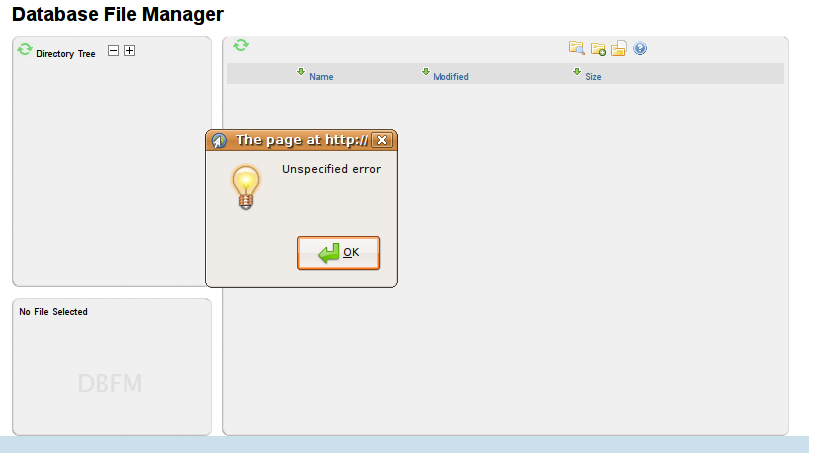
DBFM page opens but a pop up error message appears saying "Unspecified error" (Firefox 2, Firefox 3 beta and Opera 9.20, all on Linux). Error console shows that "cp.content.current is undefined".
Moreover, if I click on file upload icon, I get the greybox with the following message: "ERROR: You cannot upload files - session variable missing - contact your sys admin"
Is it my configuration or a bug?


Comments
Comment #1
rooey commentedUnspecified error is an "Access Denied" - we need to clean that up. You can only write to the "root" directory as the drupal superuser (drupal user id 1).
It sounds like it's working correctly, but that we really need to clean up the error messages.
Go through and double-check your DBFM settings to be sure.
Note that 5.x.3.1 seems to be broken on Internet Explorer - but it does work fine with Firefox etc.
Comment #2
burlap commentedI uninstalled and installed dbfm again (without organic groups this time), no effect. I'm doing everything as a superuser anyway.
Is the root directory an actual directory in the filesystem? I got confused with all this...
Comment #3
rooey commentedNo its not. and the root directory should be one word without spaces.
Try "dbfm" or similar.
Comment #4
burlap commentedI've left "dbfm".
I get the "undefined" error before I start doing anything, right after clicking "database file manager" in the Navigation menu. If it's only permissions, maybe I can change something directly in the database?
Other possible sources of the problem (don't really know where to start looking):
1. Other modules (Localizer? Other modules using javascript?)
2. Leftovers from previous dbfm (2.2) - which was disabled and uninstalled before I added 3.1 but you never know...
3. jQuery 1.2.3 (well, I tried with 1.1.2 provided by jQuery update too, with no luck, tomorrow I'll try with Drupal's default jquery)
Comment #5
rooey commentedOkay - uninstall DBFM completely.
goto your database and run:
drop table dbfm_file;
drop table dbfm_data;
drop table dbfm_cronlist;
Then follow the install process again.
I'm intrigued as to what is causing your problem.
Was there anything in drupal's watchdog?
Comment #6
rooey commentedThe installer/un-installer actually works now.
Comment #7
rooey commentedComment #8
Anonymous (not verified) commentedAutomatically closed -- issue fixed for two weeks with no activity.