
Configuring Komodo Edit
This documentation is deprecated.
Komodo Edit is a free, open source editor and cross-platform (no more supported by Activestate, so it's possible that this doc is outdated).
There a few things you can change in Komodo Edit to keep you Drupal coding clean. First you can enable the syntax checking for both PHP and Drupal. Second is configuring Komodo Edit so that it's inline with the code standards.
Code Intelligence / Completions and Syntax checking
If you want to enable syntax checking and auto-completion for standard PHP and Drupal functions in Komodo Edit, here's what to do:
First you need to download and install PHP on your local machine (if you haven't). Make sure to install the same version that you run on your server.
Then, download the version of Drupal that you're using on your site(s) - or if you keep mirror copies of all your Drupal sites on your local machine already, then you could use those instead and pick up all the available functions.
Launch Komodo Edit and go to the preferences of the PHP language (Edit > Preferences > Languages > PHP) or click on "Check Configuration" (Help > Check Configuration). This will open a screen, click on the config icon on the same line as PHP.
Go into Configure PHP, and you'll want to add the Drupal directory or your site directories under "PHP directories". I only added Drupal 7 because that's the version I'm working with the most.
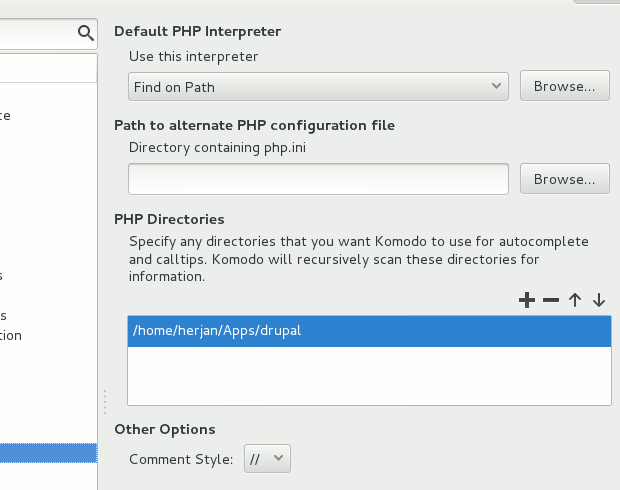
You can also create a Komodo project in your Drupal projects root directory (Project > New Project). Once the project has been created Komodo will scan your Drupal source to populate it's code intelligence database without having to add PHP Directories in your preferences. The Komodo project file allows for other helpful features such as project specific coding standards (see below) where you can configure special indenting and file saving preferences for a specific Drupal project (Drupal 6 settings and Drupal 8 settings perhaps).
After you've set everything right, restart Komodo Edit and click on the "Help > Check Configuration". The PHP line should read "PHP Syntax Checking:Ready".
That's it - Komodo Edit will check your syntax and recommend/auto-complete for all php and Drupal functions as you type.
Coding standards
There are a ton of things you'll have to keep in mind to keep your code to the standards of Drupal. Some of the standards can be met by configuring Komodo Edit.
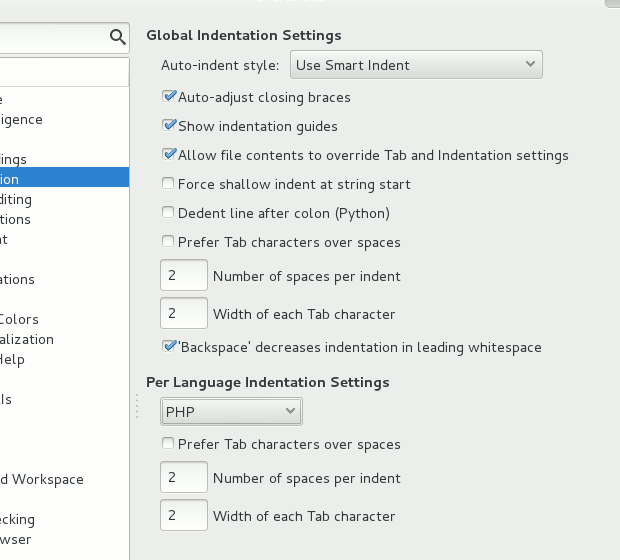
The default way of coding with Drupal is using 2 spaces, not using comments longer than 80 chars and don't leave unnecessary spaces in the file. Those are the settings that will be explained here.
2 spaces
Open the Preferences window (Edit > Preferences). Search for 'Indentation'. Here you can set the default spacing. Set both values to 2. Be sure that both values are also 2 for the PHP language in the drop down.
80 chars comments
Komodo Edit is not able to limit the comment length but it can set a line on the 80th char. Search in the Preferences window for 'Smart Editing'. Here you'll see the option for 'Draw the edge line column'. Be sure that it's checked and that the value is set to 80.

Remove spaces
Komodo Edit can remove unused white spaces. Again open the Preferences window. Search for 'Save Options'. The option 'Clean trailing white spaces ... ' should be checked.

Drupal for Komodo
Be sure to check out the Drupal for Komodo module. This will make it much easier to create new modules. Half of the code is already in Komodo when you start with module development.
MAMP + Komodo IDE + Xdebug
For my version of MAMP I copied xdebug.so to the following dir
(final dir name may vary by PHP version):
/Applications/MAMP/bin/php5/lib/php/extensions/no-debug-non-zts-20050922/
make sure Zend optimizer is OFF in MAMP preferences.
Make sure to restart apache after making these changes to php.ini. After verifying the location of xdebug.so, add the following to your php.ini file (or perhaps /etc/php5/conf.d/xdebug.ini, depending on your operating system):
zend_extension=/Applications/MAMP/bin/php5/lib/php/extensions/no-debug-non-zts-20050922/xdebug.so
xdebug.remote_enable=1
xdebug.remote_host=localhost
xdebug.remote_port=9000
With Xdebug version 3 onward use:
zend_extension=/Applications/MAMP/bin/php5/lib/php/extensions/no-debug-non-zts-20050922/xdebug.so
xdebug.mode = debug
#if you want also: xdebug.start_with_request = yes
OR
you can add this to .htaccess in your Drupal root or a parent dir:
php_value xdebug.remote_enable on
Again, with Xdebug version 3 onward use:
php_value xdebug.mode debug
These (among others) may also be useful to add to .htaccess if you want to profile
memory usage:
php_value xdebug.auto_trace On
php_value xdebug.show_mem_delta On
To debug in Komodo, make sure Debug >> Listen for Debug Connections is enabled. In Drupal, add the query string: ?XDEBUG_SESSION_START=1 .
Alternatively, using the "easy Xdebug" extension for Firefox or the Xdebug helper for Chrome, you can initiate an Xdebug session with one click, instead of having to add the query string.
Help improve this page
You can:
- Log in, click Edit, and edit this page
- Log in, click Discuss, update the Page status value, and suggest an improvement
- Log in and create a Documentation issue with your suggestion
