

 Come together with the global Drupal community in Rotterdam, 28 Sept – 1 Oct 2026. Sessions, contribution, connection, and Early Bird savings until 8 June.
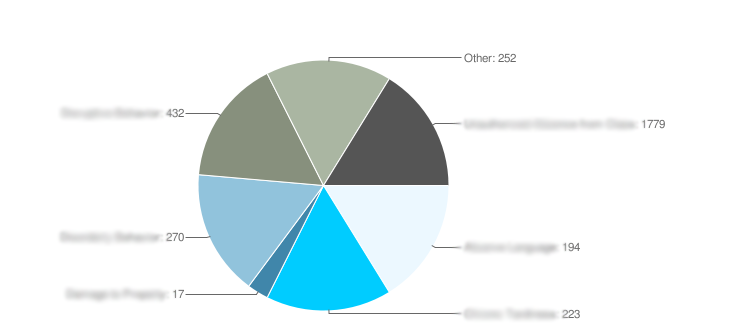
I was setting up some charts that call data from the database and some of the proportions were off. Right now there's a pie chart with 5 different metrics and one exceeded 1200 for the count and another has 200, they each show up as the same proportional slice on the chart. Is there some limit in the module I should change?
| Comment | File | Size | Author |
|---|---|---|---|
| #2 | chart1.png | 33.92 KB | fakeplastic |

Comments
Comment #1
tjholowaychuk commentedhmmm, that should not be happening, can you paste a print_r of the chart array, I will take a look and reference my code
Comment #2
fakeplastic commentedSo I basically just went into the system_charts.module file and changed all the variables in the watchdog_counts chart to a generic report_counts as follows:
The result is the attached image file (i blurred out the field names that are called), but essentially what happens is the one field that has 1779 appears proportional to the field that has 270 or 194. However I created a chart using the same code method and it comes up proportional but the values are much smaller.
Comment #3
tjholowaychuk commentedInteresting that is certainly odd, even the others seem to be very similar as well.
At the bottom of chart_build(); just above
Line 278: $charts[$chart['#chart_id']] = drupal_query_string_encode($data);if you have devel installed just print out the data, remove anything confidential, just so I can see the numbers and try to figure out what is going on
Comment #4
fakeplastic commentedHere's the array the dpm($data); gave for this specific chart:
Array
(
[chd] => t:194,223,17,270,432,252,1779
[cht] => p
[chs] => 840x300
[chtt] => Report Breakdown
[chts] => 000000,14
[chl] => instance 1: 194|instance 2: 223|instance 3: 17|instance 4: 270|instance 5: 432|instance 6: 252|instance 7: 1779
[chco] => ecf8ff,00ccff,4086AA,91C3DC,87907D,AAB6A2,555555
[chf] => bg,s,FFFFFF
)
Hope that helps.
Comment #5
tjholowaychuk commentedhmmm, I would almost try $chart['#adjust_resolution'] = TRUE; I cannot remember if I limited the resolution scaling to specific chart types or not, but it may work for pie charts as well.
Comment #6
fakeplastic commentedIt worked! Thanks so much TJ.
Comment #7
tjholowaychuk commentedFewf! haha, good to hear :)
Comment #8
Anonymous (not verified) commentedAutomatically closed -- issue fixed for two weeks with no activity.