Closed (fixed)
Project:
Glossary
Version:
5.x-2.3
Component:
Performance
Priority:
Normal
Category:
Support request
Assigned:
Reporter:
Created:
28 Apr 2008 at 16:03 UTC
Updated:
14 May 2008 at 18:12 UTC
Jump to comment: Most recent file


I've been using the Glossary successfully through various previous upgrades. However, since my last upgrade FROM (Drupal 5.2 + Glossary 5.x-1.x-dev) TO (Drupal 5.7 + Glossary 5.x-2.3) the terms and definitions show in the Taxonomy, but they don’t show on the Glossary page*.
*When I click on the Glossary menu button on the Navigation menu, this is all that shows on the Glossary Page:
Glossaries
Glossary name Operations
(see the page here: http://www.soliveanew.com/glossary)
My Upgrade path:
1. Drupal 5.2 & glossary 5.x-1.x-dev - Glossary was working
2. Upgrade Drupal to 5.3 - glossary wasn't upgraded - Glossary was working afterwards
3. Upgrade Drupal to 5.4, upgrade glossary to 5.x-2.3 - Glossary was working afterwards
4. Upgrade Drupal to 5.7, glossary wasn't upgraded, cleared cache - Glossary only partially working, as explained above.
Glossary ID: Id: glossary.module,v 1.121.2.24 2008/04/26 17:13:20 nancyw Exp $
Thanks for your great module!
Best Wishes,
Stephen
| Comment | File | Size | Author |
|---|---|---|---|
| #1 | glossary_index.JPG | 18.49 KB | Stephen Winters |
| #1 | glossary_helpf.JPG | 120.18 KB | Stephen Winters |


Comments
Comment #1
Stephen Winters commentedHere are Some Pictures
Hi,
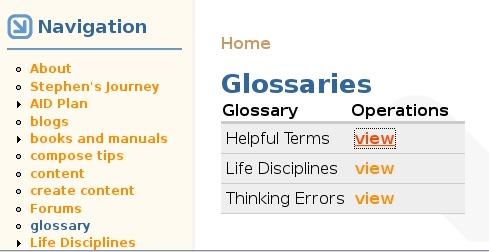
Just so that you have some idea of what type of glossaries are supposed to show on the glossary page(s),
I've attached a couple pictures below of how the glossary looked before I upgraded. The first pictures shows the glossary index (which was the actual glossary page that the use would come to after pressing the Glossary menu button. As the glossary_index picture shows, my website has 3 glossaries.
The second attached picture, glossary_helpf.jpg, shows the "Helpful Terms" glossary, one of the three glossaries.
(Fortunately, a couple months ago I had mirrored the website with this glossary to my computer, so I still have a working version of what the website, and glossary, was like before I upgraded.)
Best Wishes,
Stephen
Comment #2
nancydruSo it's not necessarily 5.x-2.3 - it could be something in 5.5, 5.6, or 5.7? Hmm, I've been through each one of then and am currently on 5.7 on my test site and 5.5 on my live site.
Have you tried adding the vid to the glossary URL?
Out of curiosity, what version of PHP are you using on the two sites?
Comment #3
Stephen Winters commentedHi Nancy,
Thank you for your efforts on my behalf. I really appreciate your helpfulness. Trying to upgrade a website can be intimidating at times, and I'm thankful for your guidance.
Now about my website upgrade: before upgrading Drupal each time, I made a backup copy of the website and the MySQL databases. To back them up I created a new folder each time and copied all the files and folders from the website into the folder I also backed up the MySQL databases to my computer for each Drupal version. Now, as I'm trying to track down the problem, I'm trying to recreate earlier version(s) of my website in those backup folder(s) and connect it to an earlier version of my MySQL database. Have been getting some database errors when I created a new database and then tried to import the earlier version of the MySQL backup file into it. I'm out of time right now, but will work on it again later.
IN the meantime, Here's the status report from the current version of the website:
Best Wishes,
Stephen
Comment #4
nancydruIt's that version of PHP that worries me. I'm seeing more and more issues popping up on many modules that point back at PHP before 5.
There was something that happened to taxonomy in 5.4, but I didn't see it in Glossary. I did see it in TAC-Lite. It was fixed by 5.5.
Comment #5
nancydruDo you disable modules when you do updates? If so, please make sure the vocabulary is set right (particularly content types) and that the filter settings are still correct. There were several problems reported against FAQ and they all ended up being because they disabled modules before upgrading and the vocabulary settings got dropped.
Comment #6
Stephen Winters commentedYes, I did disable modules before I updated.
I don't understand your comment, "If so, please make sure the vocabulary is set right (particularly content types) and that the filter settings are still correct." What do you mean by "vocabulary is set right" How do I check that and what should the settings be? Same thing with filter settings. What do mean "filter settings are still correct?"
I opened by the mirrored version of the old Drupal 5.2 on my computer and compared the settings with the newly upgraded Drupal 5.7 on my website.
Under Admin/Site Configuration/Glossary I compared all the settings under the General tab. They were all the same on both websites.
Then, I checked under Admin/Site Configuration/Input Formats.
Lastly I checked under Administer/Content management/Categories. I checked each Vocabulary. The each have the correct entries under name, description, type, hierarchy.
Am I missing something. Should I check somewhere else.
Thanks,
Best Wishes,
Stephen
Comment #7
Stephen Winters commentedTo compound the issue, I have been trying to restore the older Drupal (5.2, 5.3, etc.) MySQL databases to my website control panel (CPanel). It will only upload about 3/4 of the MySQL databases each time, and then the upload stops. I was trying to just take a test copy of my website back to a stage prior to the upgrade. However, not (yet) being able to restore a copy of the database is slowing that down.
Another possible solution might be to, as at test, make a copy of the MySQL database from my current Drupal 5,7 website, then drop the glossary tables, and then to import the glossary tables from the (above mentioned) partial MySQL restore file that is in the control panel website. However, I went into phpMyAdmin and looked in the database tables for the glossary tables, but couldn't find them. What are they called? Is this idea (replacing the tables) even workable? Is this the best solution, or do I have any other options?
I'm at a loss of what to do now. Any Suggestions?
Best Wishes,
Stephen
Comment #8
nancydruGlossary doesn't have any tables. It gets all its information from the taxonomy tables.
#6, if those settings are all the same, then you have done what I suggested.
#7, you can zip or tar the database before uploading it - that will save time. You can also TRUNCATE all of the cache tables and watchdog table, thereby saving time and bandwidth. There should also be a setting that allows start/stop on the import.
One quick thing you might try is to just save all the Glossary settings again, even though they look right.
Comment #9
nancydruI just added a bit more error checking for the list page. Please try the -dev version when it rolls out at midnight GMT.
Comment #10
Stephen Winters commentedHi Nancy,
Thank you! Thank you! Thank You!
Your message "One quick thing you might try is to just save all the Glossary settings again, even though they look right." directed me to the answer. Under Home » Administer » Site configuration » Glossary/Glossary Settings/full html. Under "Input format settings>Select Vocabulary", None of the glossaries were checked. Once I put a check mark in each Vocabulary, I check the glossary page. Now the glossaries worked. It was such a simple solution that I had overlooked.
Looking back at my problem, my problem was that I didn't understand the new glossary module enough to realize that those vocabulary buttons had to be checked. I had originally set up the vocabularies under Drupal 4.x. The Glossary module has changed a LOT since then and I really like the new Glossary module. Looks GREAT!, and it's much better laid out. I just didn't understand what needed to be set.
Thanks so much for you help!
Best Wishes,
Stephen
Comment #11
nancydruFantastic, Stephen. I'm glad it's all fixed.
Comment #12
Anonymous (not verified) commentedAutomatically closed -- issue fixed for two weeks with no activity.