

 Come together with the global Drupal community in Rotterdam, 28 Sept – 1 Oct 2026. Sessions, contribution, connection, and Early Bird savings until 8 June.
How to create more than 1 level in taxonomy menu?
Example
Term 1
Term 1.1
Term 1.1.1
Term 1.1.2
Thank you.
| Comment | File | Size | Author |
|---|---|---|---|
| #3 | tm-1.JPG | 120.19 KB | tf5_bassist |
| #3 | tm-2.JPG | 118.78 KB | tf5_bassist |

Comments
Comment #1
tf5_bassist commentedCreate the Taxonomy vocab the way you want the menus to be organized. So, go into Taxonomy into the vocab you want to create the menu from, create the Term 1. Create Term 1.1 as a child of Term1, etc etc.
Once you have the Taxonomy terms structured appropriately, go into Taxonomy Menu and activate that vocabulary and tweak with the options there. Taxonomy Menu will look at that Vocab and it's children terms and create the menus to match that (as long as it works lol).
You may have to tweak with the Hide Empty Terms or Always Expand options in the TM config page, but it'll work.
Comment #2
jessicakoh commentedI am trying to create this http://drupal.org/node/23408.
I am OK with Taxonomy Menu config and options.
I can create Term 1.1 child of Term 1 (Term and Vocab, respectively).
I am stuck with creating Term 1.1.1 and 1.1.2, children of Term 1.1
Any idea?
Thank you.
Comment #3
tf5_bassist commentedOkay, I think I see what you're getting at.
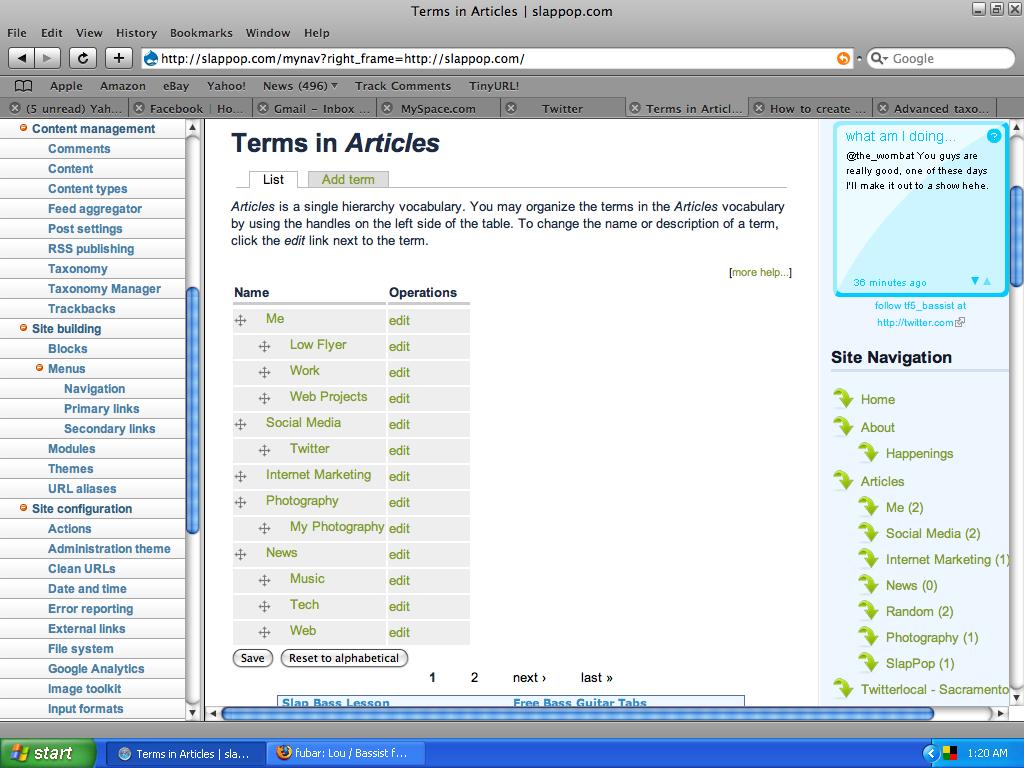
When you go into Taxonomy, and you list the terms of the vocab, you'll see the structure, as I've shown in the tm-1.jpg file i attached. The term I'll work with is Low Flyer, which is under Me, which is under Articles (I may have a weird structure, but it works for me).
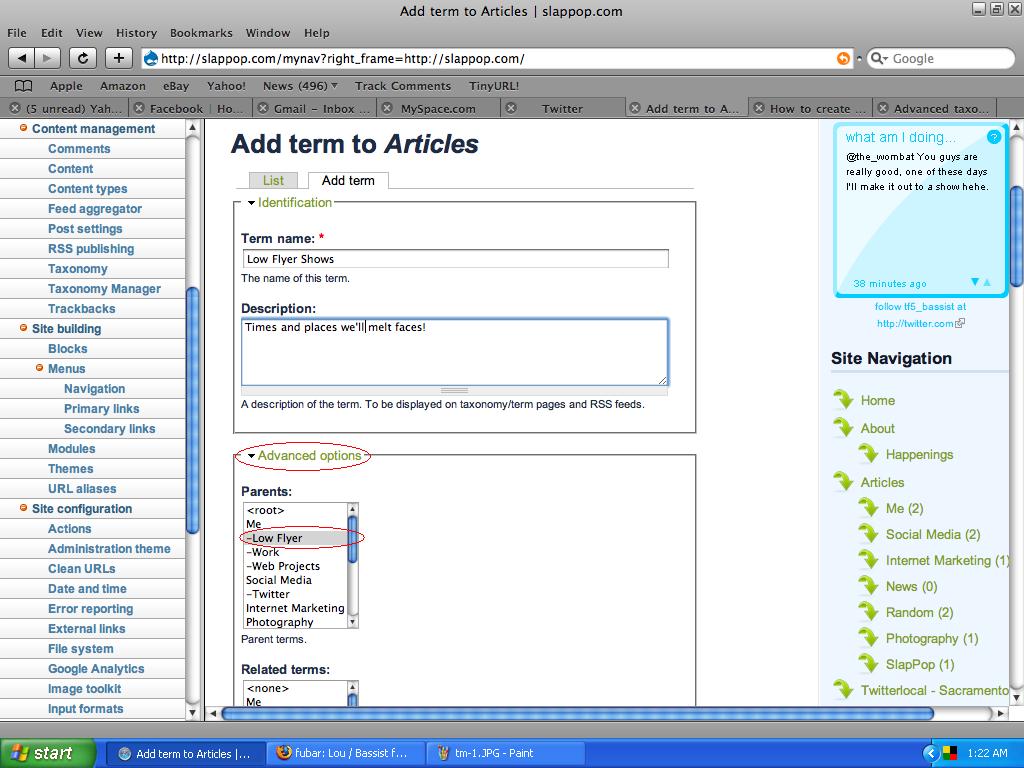
When you click Add Term, you have an Advanced Options link below the main info fields, and a Parents box in that drop-down (as shown in tm-2.jpg). You assign the new term to have the Parent you want it to be under. In this case, I'm creating a term called Low Flyer Shows, a term that will be about shows my band plays, just to make documentation and promoting of the band easier, keeping the show-related info separate.
Hope this makes sense and helps you out!
and if I'm way off-base or something, I apologize in advance. :D
Comment #4
jessicakoh commentedThank you, tf5_bassist for the detailed reply.
What if I want "Low Flyer Shows" to also appear under Social Media and Photography?
Can I reused the term which I already created under "Low Flyer"?
In other words, I want to create one term that may have more than one parent.
Thank you.
Comment #5
tf5_bassist commentedYou can set a child term to have multiple parents, however if you do so, it will disable the drag-n-drop interface, and I don't feel like messing with that on my live-ish site, but it's possible.
Ctrl-click in the Parent box to select the parents you wish that term to have, and then it will take you to a screen telling you about multiple parents, and then an option to enable multiple parents, or to cancel the action.
Go ahead and try and see how it goes.
Comment #6
arlinsandbulte commentedOld support issue with no follow-ups