

Closed (fixed)
Project:
Ubercart Option Images
Version:
5.x-1.0-beta2
Component:
Code
Priority:
Normal
Category:
Support request
Assigned:
Unassigned
Reporter:
Created:
1 May 2008 at 12:16 UTC
Updated:
20 May 2008 at 17:43 UTC
Jump to comment: Most recent file



Comments
Comment #1
tjholowaychuk commentedMy intention of the module was to use uc_option_image as the 'only' image for the product nodes. To be honest I did not really even think about having products that use other image modules as on the site we developed this module for each product primarily has a 'style' or 'color' attribute attached to each product which is then the default image.
I could implement a simple scan to see if any attributes are even in use, then if not simply do not display the placeholder image as you mentioned. This may be a while though I am extremely busy lately :(
Comment #2
Alaska commentedTrying your module on localhost with Drupal 5.7 and Uber 1065.
Uploaded 3 different images. One for each option. When submitted and displayed, all the images are the same. Select box will not fade between the three images.
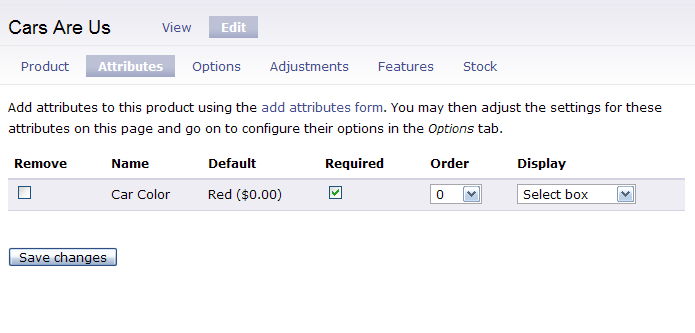
Here are three screen shots to make sure that the correct buttons are selected.
Will upgrade the site this evening to the latest Bazaar - 1075 or so.
Thanks,
Jim
Comment #3
Alaska commentedUpgraded to Uber 1075. Still the same image issue.
Did notice that fade was not working.
The issue is that there are two places to make a "select box" selection. One at node/3/edit/attributes and the other at admin/store/products/attributes/add or /5/edit.
Edit/attributes does not override products/attributes/add. Seems that there should only be one place to make this selection of radio buttons or select box. Or the last made change will override both. Made sure that both were at "select box" and the fade now works.
However, there is still the issue of all the images being the same. If there are 5 options, then by selection one image, all five change.
It will also be nice when radio button can be used as a future enhancement.
Jim
Comment #4
tjholowaychuk commentedLike I mentioned it was intended to switch a single product image, not display multiples which switch independently, although this may be a feature in the future.
Another user has submitted a patch for radio support which I have not had time to review/patch yet.
Comment #5
Alaska commentedThe need on this end is to have the module show a green car, a red car and a blue car all under the attribute of Car Colors as options. That, of course would be ideal. But now I know that the module will not operate for my needs and it is not an installation or use issue.
Thanks for the answer.
Jim
Comment #6
tjholowaychuk commentedComment #7
Anonymous (not verified) commentedAutomatically closed -- issue fixed for two weeks with no activity.