

Closed (fixed)
Project:
Printer, email and PDF versions
Version:
5.x-3.4
Component:
Code
Priority:
Normal
Category:
Support request
Assigned:
Unassigned
Reporter:
Created:
5 May 2008 at 12:43 UTC
Updated:
31 May 2010 at 23:50 UTC
Jump to comment: Most recent file



Comments
Comment #1
stenjo commentedSorry, wrong urls, should be:
http://halogen.cust.ipeer.no/print/348 and http://halogen.cust.ipeer.no/node/348
Comment #2
jcnventuraI am looking into this, but it will take me some time to replicate your setup.
It would help me considerably if you could insert the following line:
After accessing the print page, some debugging information should be printed on top of the page.. Can you tell me what that info is?
A possible solution to your problem may actually be:
Can you try that and tell me if it fixed your problem??
Thanks,
João Ventura
Comment #3
stenjo commentedAssuming you wanted me to insert this into the print.module file, I inserted the line var_dump($node->body) into the only place that matched the lines above and below. It appears to me that this is pretty early in the print_generate_path() function. In my example, this function is never called. print_generate_node(), on the other hand, is.
Inserting the same line in that function located in:
produced the following output on the above example links:
I do not know if this was helpful at all.
Trying out your suggestion, replacing the var_dump() line with the $node->body = html_entity_decode($node->body); It actually appears to fix the problem!!
... but unfortunately only until I print a different content type with a more complex structure. In this content type, It seems that the print page prints some of the content twice.
Try out the following link:
http://halogen.cust.ipeer.no/node/328
and view the print friendly page at http://halogen.cust.ipeer.no/print/328
Note that the content is printed twice, but the html is only displayed the second time it is printed on the page.
I have left the var_dump() line active on this version.
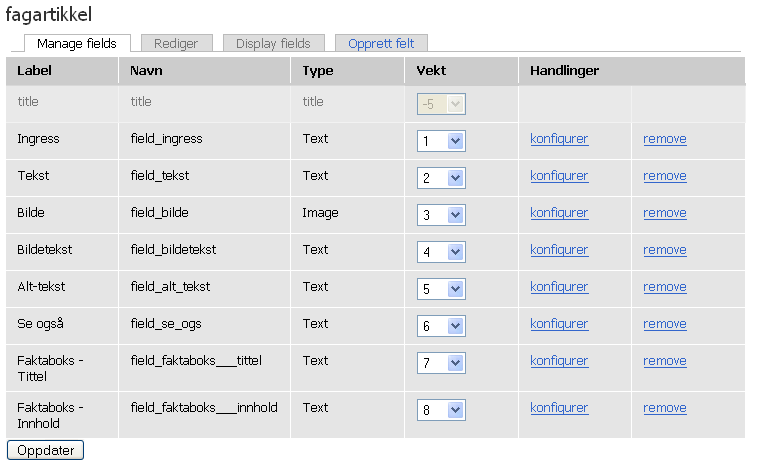
Attached you will find a view of how this particular content type is constructed.
I think this may be a CCK<->Print issue.
Give me a shout if you are sure you wanted a var_dump() in the print of any of the admin pages.
Comment #4
jcnventuraHi,
Thanks for the quick work... I thought the CCK type would be handled by the admin handler. Thinking better about it, it is obvious that this is not the case.
The solution will obviously be a post-processing in the point where you have inserted the var_dump, but I must find out what triggers this problem so that I don't call html_entity_decode() always. It's a bit weird that the $node->body content gets duplicated...
I don't think that it is so much a case of a problem between CCK and Print. As you can see, only a simple drupal_render() call is made. Whatever is being done, CCK should not return escaped HTML on that call.
Unfortunately, I am not an expert on CCK, but I will try to replicate your case.. Can you tell me which versions of CCK and Drupal you're using?
João
Comment #5
stenjo commentedSorry I did not think of this in the first place.
Attached is the screenshot of the cck modules enabled. I'm using Drupal version 5.7
Thank you for doing this work for me, and thank you a million times for the print module as this is very usable-
/Sten
Comment #6
stenjo commentedI need to apologize...
I owe you an explanation to the history of my project: I am actually upgrading a site from version 4.6 where there was extensive use of flexinode content. I've spent many hours converting from flexinode to cck and believed I was successful at it too.
When debugging the problem of having the content displayed twice as described above, it turnes out that there are remenants of the old flexinode content of many articles in the node_revisions table. My two examples above differed in the way that one was a new node created after conversion and the other was a convert from flexinode. The latter is displayed - not only by the print module - with the flexinode content in the $node->body before drupal_render() was called.
My fix for this was easy and simple. I run the following query on the database:
as it happened that all the old flexinode content was wrapped in a div-tag with a flexinode-body class.
How did I manage to come about this? I selected a differen - standard- theme that I had not redesigned from the old site, end suddenly the extra content appeared when displaying the articles.
Sorry again for this mess. This means that your inital suggested fix for my problem (the one with inserting the
$node->body = html_entity_decode($node->body);) actually is more than good enough for me, and my client is happy :-)I have been able to recreate the problem of the unformatted html code using cck and the print module on a separate site dedicated to this. Give me a few hours, and I'd be happy to share the recipe on ho to do that if this is still something you feel is needed!
/Sten
Comment #7
jcnventuraI am happy that you have found half of the problem..
I am focused now on other things, so I actually appreciate that recipe :)
João
Comment #8
jcnventuraHi,
I am still waiting for that recipe on how to reproduce the problem...
João
Comment #9
jcnventuraNo further info in more than two weeks. Closing the issue.