I found this code after days of searching and it works for me to get the labels and textfields on the same line:
/** WEBFORMS */
/** first set labels and items to appear next to each other */
.webform-component-textfield label,
.webform-component-select label,
.webform-component-select .form-item .form-checkboxes,
.webform-component-select .form-item .form-radios{
   display:inline;
}
.webform-component-select .form-item .form-checkboxes .form-item,
.webform-component-select .form-item .form-radios .form-item,
fieldset .webform-component-select .form-item .form-checkboxes .form-item,
fieldset .webform-component-select .form-item .form-radios .form-item
{
   display:inline;
   white-space: nowrap;
   padding-right:20px;
}
/** ELEMENTS TO APPEAR NEXT TO EACH OTHER */
.webform-component-fieldset div.form-item{
   display:inline;
   padding-right:20px;
   float:left;
}
.webform-component-fieldset div.form-item .form-item{
   position: absolute;
   left: 25px;
}
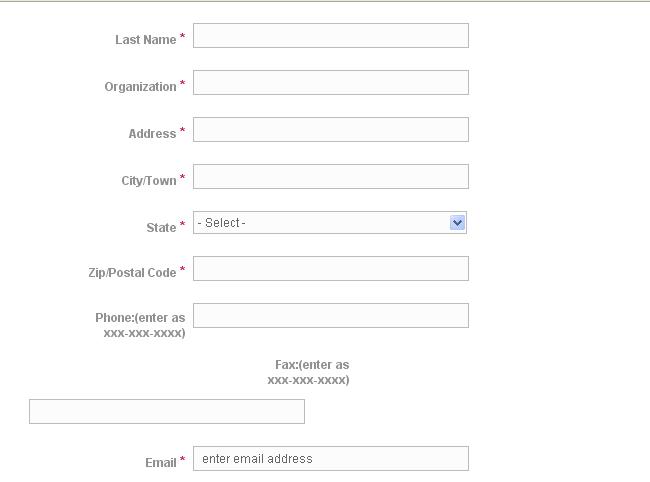
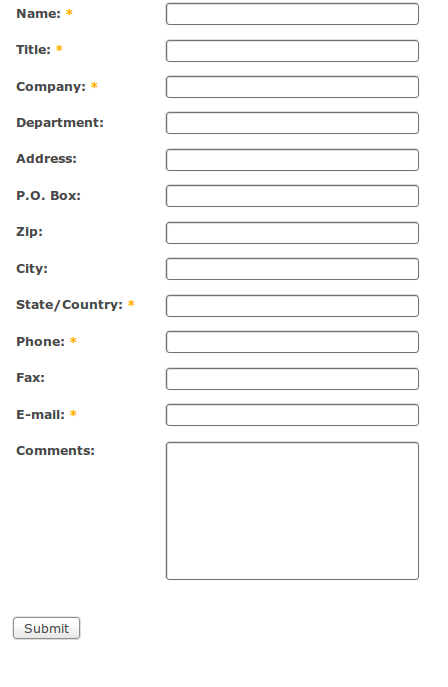
However I would like the text fields to look like this:
Label1: ________
Label2: ________
Label 10: ________
Right now it looks like this:
Label1: _________
Label10: _________
Labelexample: _________
Label2: _________
Can anyone help me out with this?
Thanks!



Comments
Comment #1
quicksketchThese look the same to me. Wrap your tags in
<code>if you need to maintain spacing.Comment #2
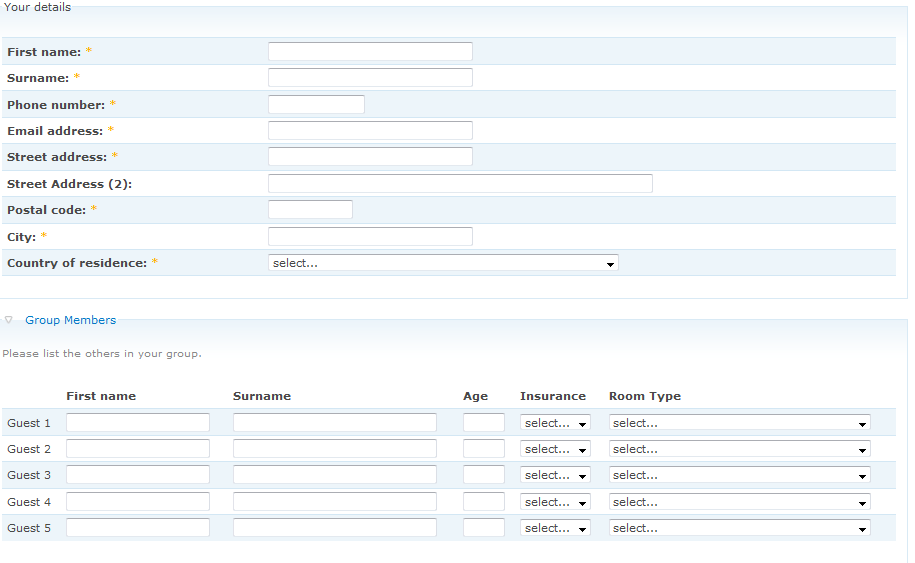
woc_art commentedSorry about that, I meant that the textfields are all aligned and aren't jaggedy.
kinda like this:
regardless of the length of the labels
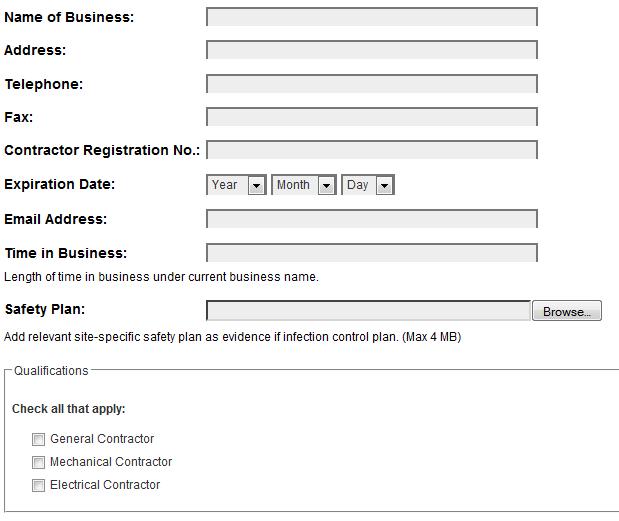
right now form looks like this:
Thanks for your quick reply!
Comment #3
electronicmonkey commentedsubscribing
Comment #4
quicksketchJust try out some CSS like this:
Comment #5
electronicmonkey commentedThanks , they are still quite staggered. Some are inline,, some not
Comment #6
sapnac commentedwhere do i paste the code above for webform. even i have the same allignment problem. which i am not getting it
Comment #7
ar4 commentedthanks
Comment #8
quicksketchI'm moving this to a feature request, to have this as an option in the Webform UI.
Comment #9
danbuntu commentedHi all
I've tweaked the given code to look like;
the check boxes now line up nicely with their labels and the text fields sit below their labels, which stops them becoming jagged.
However I've now got extra check boxes beside each component title. Any ideas on how to solve this?
Comment #10
Dubber Dan commentedsubscribing... great thread
Comment #11
quicksketchMoving to 3.x version.
Comment #12
dkruglyak commentedHere is the simplest code for getting textfields in one row:
The question is if/how all the snippets in this thread could be rolled into the module
Comment #13
zokazola commentedComment #14
reij commentedCould someone please tell me where exactly to put that code?
I tried putting it in the webform-form.tpl.php file in my theme directory but all I get is an error:
Parse error: syntax error, unexpected '/' in /home/a3252565/public_html/sites/all/themes/framework/webform-form.tpl.php on line 32
Comment #15
quicksketchreij, it's CSS code, put it in your theme's style.css file (though you can put it in webform-form.tpl.php if you wrap it in
<style></style>tags). I'd suggest you buy a book on basic CSS and HTML if you're not familiar with CSS. http://www.w3schools.com/css/default.asp is a good reference too.Comment #16
reij commentedThanks quicksketch, that worked!
Your right, I'm pretty new to web programming :)
Comment #17
dvkd commentedHi quicksketch ,
I pasted the code which u told in style.css , but its not working still. (I use Inove theme), are there any way?
thanks
Comment #18
dvkd commentedhi ,
please i copied the code in style.css , but now working, what should i do? i am using drupal 6
Comment #19
dkruglyak commentedTry this module: http://drupal.org/project/css_injector
Comment #20
dvkd commentedHi reij,
Can u please tell me how to display fields in inline.
i used this code but not working:
div.form-item label {
display:inline;
}
Comment #21
djalloway commentedTaking a look into this myself.
Inline Fields would be excellent, I'll post a patch when I come up with one.
Comment #22
quicksketchI tried to take a stab at this when doing the (failed) #469782: Provide a Webform-specific Form Element Theming issue. It might be worth seeing how Wufoo implemented this same feature, but it looks like they simply add a class on the entire form to say whether elements are inline or not.
According to usability studies (as written by Luke Wroblewski) forms should never mix and match different displays for form elements within the same form. They should either all be label on left or label above, never mixed. I have to agree it does look strange having mixed form elements. So for both the sake of consistency and ease of implementation, this should be a form-level configuration option.
Comment #23
djalloway commentedagreed, maybe referring to it as "Inline Fields" is a bit misleading, the only suitable approach for this is form-wide.
I have a few ideas on a clean integration for this and will try to get you all something to look at soon.
Comment #24
elijah lynnsubscribing
Comment #25
elijah lynnWow! I never knew there could be a whole book dedicated to webform design!
Thanks for posting this, it is some good wisdom.
Comment #26
reaneyk commentedsubscribing
Comment #27
jvogt commentedThanks for a good start. Here's what I ended up using:
Comment #28
ressaBasically the same as the previous, but with textarea and width of the input fields added.
Comment #29
MPforce commentedGreat tip! The CSS makes sense. It should work, but it doesn't for me. Anyone know of any common problem with making this code work?
Thanks
Comment #30
abhisheknagar commentedI ended up using the below as my form contained email fields aswell
Comment #31
Brainwrap commentedthanks so much for this thread!
I used some of the suggestions above to get *most* of my form fields laid out the way I want them. However, I'm running into one very frustrating problem.
I want *some* types of "select" fields to appear next to the label (drop-down menus), but I want *other* "select" fields to appear below the label as normal (checkboxes & radio buttons).
Unfortunately, since all of these appear to fall under ".webform-component-select", it seems to be an all-or-nothing situation.
Part of the reason I want to do this is because I have one batch of 12 checkboxes which I'm using the Multicolumn Checkboxes Radios Weform module for to list them in 2 columns, but even without that I'd like to be able to have the checkbox fields laid out as they normally are.
One workaround is to change checkbox fields into a "multiple select list" box, but I've never liked those and they confuse a lot of people (since you have to hold down an extra key to select more than one, etc).
Any suggestions would be greatly appreciated.
Comment #32
clang1234 commentedThis is just about perfect for me but for some reason select components don't display correctly. What I would like is for two select radio buttons to be inline with one another.
Here's my form. The select field is at the bottom of the page right before the submit
http://www.indinsinfo.com/node/13
Comment #33
theohawse commentedDammit guys, changing the CSS doesn't help me at all, and it's not a solution either,
the problem is that on big forms, the labels and data are all on separate lines.
much better solution to this would be to optionally wrap all the inputted data in
<SPAN>tags, so whena user copies and pastes the output data, it still appears inline.
This is how it's done in views, here's a sample of the html output that does this nicely, and stays inline no matter how you look at it. :
So does anyone have a solution for this other than overriding the whole form template?
something like:
if form inline textfields = yes then foreach textfield do this: <span class="?textfieldname"><!-- Original Textfield Output --></span>Comment #34
scott m. sanders commentedSubscribing
Comment #35
cbearhoney commentedSubscribing
Comment #36
coloryan commentedIs this what you're looking for? (see attached)
Comment #37
scott m. sanders commentedYes, that's what I was looking for, anyway.
Comment #38
summit commentedHi Coloryan, can you post your css to get #36?
thanks!
greetings, Martijn
Comment #39
coloryan commentedSorry for the delay, was focused on something else. I'll have this up in the next 24 hours for you.
Comment #40
coloryan commentedOkay, I've got a working sample up here: http://mortgageriot.com/financial-advice/sample-form (It's not live, so feel free to play).
There are three forms in the attached zip file.
//
1. import-me.txt
2. form-formatting-helpers.tpl
3. webform-form-NID.tpl
//
Try this:
1. Find 'import-me' and paste that into node import.
2. Create a folder in your theme (I called it templates/insurance/travel on different sites) and put the other two files in there. On the file named webform-form-NID.tpl, replace NID with your node ID (the one created in step 1).
3. Test it and adjust as needed.
I recieved a huge amount of help from a friend and his site describes this process thoroughly and in greater detail. I'll ask him for permission to provide a link (he helped me out with the JS cough http://drupal.org/node/800870 cough).
Comment #41
wavesailor commentedAnyone know how I can get a list of all the id's to be used for CSS formating? i.e. webform-component-xxx
Comment #42
coloryan commentedFirebug? [http://getfirebug.com/]
Comment #43
jimmb commentedHello, I'm glad to have found this thread, as I was having the same question. After some trial and error, this is the code which worked on my site:
This looks good in every Mac browser I checked with, and also on every PC browser. Except IE 8 :(
For some reason, IE 8 is placing multiple fields on the same line, resulting in fields going off the right of the page.
I tried a bunch things to fix this in the CSS, but couldn't find a way. If anyone has any suggestions, I'd greatly appreciate it.
Jim
Comment #44
sapox commentedSubscribing
Comment #46
quicksketchThis may not ever happen in Drupal 6 due to the limitations of the Drupal forms system in D6, but #1009240: Individual field inline-label support looks very promising for Drupal 7 (which natively supports inline labels).
Comment #47
winston commented#40 worked extremely well for me for anyone stumbling on this issue.
It is also described in more detail here - http://1013.fi/cms/theming-drupal-web-forms
Comment #48
mobonobomo commentedThe following ended up working very well for me:
Tested, and works in Chrome 9, Firefox 3, IE8, and Safari 5 (Windows 7), and Firefox 3 and Safari 5 (Mac OS X 10.5.8).
Comment #49
mobonobomo commentedI should have also noted that my implementation above was with Drupal 6.20, Webform 6.x-3.6.
Comment #50
axon commentedsub
Comment #51
quicksketchThis feature for inline labels has been added as part of #1009240: Individual field inline-label support. We did end up taking the per-field support after all. Note that it still doesn't fix the "jagged" issue, which will still require specific CSS. Considering the difficulty of making a width that works perfectly in all situations, I don't think it's likely that we'll add any option for the "label width" or similar.
Let's please close this discussion out and start a new one to discuss evenly lining up options (or better start a handbook page), as this post now contains a lot of out-of-date information in the post-inline option version of Webform.
Comment #53
akshita commentedHi Abhishek
Could please let me know where did you place this code.
I created a customized css file /var/www/profiles/openpublic/themes/openpublic_theme/css/mycss.css but this did not work.
I copied ur code into /var/www/sites/all/modules/webform/css/webform-admin.css but this also did not work.
Please help.
Thanks in advance
Revathi
Comment #54
akshita commentedThis is not a fixed issue.Do not close.
Comment #55
akshita commentedCan you please help me in fixing this?
Comment #56
salvadorp commentedThis worked for me.
Hope it helps.