

 Come together with the global Drupal community in Rotterdam, 28 Sept – 1 Oct 2026. Sessions, contribution, connection, and Early Bird savings until 8 June.
Thank you for the module. I'm experimenting with it on a blog aggregation site www.blogotariat.com to see if it does a better job than the standard Drupal filters. Some feed items regularly have unclosed tags which cause flow on effects through the layout.
As far as I can determine, deleting htmLawed's default settings for a particular node type (Feed Item, in this case) will invoke htmLawed's standard filter set. This seems to work really well at this stage. No other Drupal filter options are applied.
If a node has an image at the beginning, it only appears in full node view, not in the teaser, as it does when using Drupal's Filtered HTML with images allowed. It is as though the teaser is being filtered differently from the body. When previewing in node edit, the teaser preview shows the image, but when saved the image is absent from the teaser.
I'm wondering if this may have something to with the node_teaser function in the node.module.
Any ideas or suggestions will greatly appreciated.
If you check the site at the moment, teasers which have images are using Drupal Filtered Html and have a larger font size. All other teaser are formed by my test filter using HtmLawed.
Cheers
| Comment | File | Size | Author |
|---|---|---|---|
| #19 | settingsSave.jpg | 60.63 KB | alpha2zee |
| #16 | teaserFilter.jpg | 54.56 KB | alpha2zee |
| #16 | htmLawed.module.txt | 24.69 KB | alpha2zee |
| #13 | variables.txt | 28.78 KB | Slim Pickens |

Comments
Comment #1
alpha2zee commentedThe htmLawed module uses hierarchial input-format-, content-type- and case-specific settings. Here 'case' refers to the body, teaser, or comments of a node. Further, htmLawed needs to enabled case-specifically. The default filtering setting is the same for all scenarios. This comment has more information on all this.
If img tag is allowed in 'Body' but not 'RSS', then the teasers will be stripped of images. Is that the reason for what you see?
Comment #2
Slim Pickens commentedFor my content type, Feed Item, 'Use' htmLawed is selected for both body and RSS. In each case, the config array is blank - I'm assuming the default filter is then used - thinking I'd explore the results from the default first before tweaking the config.
When editing a Feed Item, applying the filter in preview mode shows image in both trimmed and full versions, but not on the front page display of Feed Item teasers. The front page is created using Views and Panels.
Comment #3
alpha2zee commentedI can replicate the scenario. It is a bug in the module, in the hook_filter hook. I am fixing it right now and the new release should be out soon.
Comment #4
alpha2zee commentedFixed in version 1.7. Developers may note that because of the Drupal's core workflow/code, the hook_nodeapi "alter" way is the best available option even though it means that the filtering for teasers occurs twice (first through hook_filter and then through hook_nodeapi) and that the 'RSS' 'Config.' must be a "sub-set" of 'Body' 'Config.' if filtering for 'Body' is enabled.
Comment #5
Slim Pickens commentedThanks alpha2zee.
Still no images in the teaser, although visible in the trimmed preview.
I've also tried the default settings plus img allowed and still no luck.
Comment #6
alpha2zee commentedVersion 1.7 did fix the issue I was seeing when trying to replicate your scenario. I had 'img' included in 'Config.' for both 'Body' and 'RSS', both enabled, for the input format used with the node-type. The teaser preview, the teaser on the front page and the RSS item, all come out fine. The front page view is the default Drupal one. Could the fault be with the Views/Panels module (though I don't see how)?
Comment #7
Slim Pickens commentedI've also been experimenting using the filter on blog content. The blog page isn't using Views or Panels, and besides, the use of other Drupal filters is effective on the Views pages.
The best result I am getting is using your module without the config settings. Am I correct in assuming that htmLawed applies its default as per the bioinformatics help file? Or does it default to the config array you have as default in your module?
Interestingly, using the filter without the config array in ver 1.7 strips away line and paragraph breaks altogether, which it wasn't doing in ver 1.6.
Perplexing.
Comment #8
alpha2zee commentedThe htmLawed module default 'settings' serve two purposes: 1) to pre-fill the 'Config.', etc., in the configuration forms, and 2) use during filtering when a stored 'Config.'/'Spec' value cannot be found. The latter happens, e.g., a new node-type was created but the htmLawed settings to use with it have yet to be specified.
The default settings are NOT used if the 'Config.' field is made empty. An empty 'Config.' value is interpreted as an empty PHP array and that is what is given to the htmLawed filter. The htmLawed filter uses its own default values when the array supplied to it does not have explicitly-mentioned keys. Those default values are documented in the htmLawed documentation (not the module documentation). With the htmLawed module, an empty 'Config.' form-field is thus equivalent to an htmLawed filtering that allows all legal HTML elements (85 or so) and attributes.
I've tried to clarify these aspects in the module's handbook.
-------
About the stripping of the 'br' and 'p':
For 'Body', this will happen if htmLawed filter runs after Drupal's line-break converter and 'Config.' doesn't have 'br' and 'p'. So, a filter-rearrangement for the input format or editing of 'Body' 'Config.' for the node-type will correct this.
For teasers, because of the way Drupal core/workflow is structured, the htmLawed module works in an 'odd' way. First, the teaser is filtered as per 'Body' 'Config' if htmLawed is enabled for 'Body' (even if not, other Drupal filters like line-break converter will filter the teaser). Then, as the last filtering step, the teaser is filtered again as per 'RSS' 'Config.' if htmLawed is enabled for 'RSS'. So if the input format has the line-break converter enabled, then the first step would introduce 'br' and 'p' tags, which, however, may be removed by htmLawed if the filter is enabled for 'RSS' whose 'Config.' does not cover the 'br' and 'p' tags.
The reasoning behind the 'RSS' option is to possibly further restrict the HTML markup in teasers that otherwise is allowed in 'Body' (tags like 'script' or 'table'), and to ensure that the teasers have well-balanced tags, better XML-compliance, etc.
Comment #9
alpha2zee commentedComment #10
alpha2zee commentedI just noticed this Drupal 5 behavior:
If you edit text such that the changes do not affect the teaser portion (e.g., when the edited part is towards the end of a long body), then Drupal does not update the teaser preview, the teaser on the front page, etc. And because drupal uses cached content if possible, any changes to filter settings also do not affect those items.
Could this be the reason for what you observe?
Comment #11
Slim Pickens commentedI've tried using
<!--break-->to vary teaser length to no avail.I've manually deleted the filter cache, changed filter types in the database to cache=0, flushed the Views cache, created a new content type using the htmLawed filter - and still no images in teasers.
I've deleted and replaced the module files a couple of times. I've also downloaded the 1.8 version and uploaded the module folder after deleting the previous folder. BTW the .info file still reports ver 1.6.
Very frustrating, as your filter is clearly superior in all other respects to the native Drupal filters, especially with being able to apply different filters to body, RSS, etc, and the strict enforcement of tag pairs which Drupal doesn't do all that well.
Comment #12
alpha2zee commentedHmmm... As I wrote earlier, I am able to get images in the teasers. I also downloaded and enabled Views 1.6 and images in teasers also appear on, say, a frontpage I create with Views.
I can only suggest some points to go over when re-checking your setup. (Pardon me if this appears silly, as you most likely have done that a number of times.):
* Ensure htmLawed is enabled for the input format.
* Ensure any other HTML filter is disabled for the format.
* Check the filter-arrangement for the input format, noting any potentially conflicting filter (like the PHP code evaluator).
* In the configuration for the input format, check that for your node-type, htmLawed is enabled for both 'Body' and 'RSS', and both the 'Config.' fields have 'img' covered.
* The 'img' should be inside the 'elements' keys -- like,
'elements'=>'img, a, em, strong...'.* Access the Drupal database through some GUI like phpMyAdmin and check that in the 'variables' table, there is an entry named 'htmLawed_format_X' where 'X' is the number corresponding to the input format (you can get the number from the 'format' field of the 'filter_formats' table). The value of 'htmLawed_format_X' would be a serialized array, but you should be able to read the 'Config' value for 'RSS', etc., for your node-type.
* Create some new content for the node-type using the input format we are talking about. Have some img markup at the very beginning and then some markup with em, strong, etc., and some with script, table, etc.
* See how the teaser and body appear in preview and in the post-submission view. Also check any RSS feed. Are script, table, etc., tags removed? Do em ,strong, etc., and img stay?
----------------------------------------------
"... BTW the .info file still reports ver 1.6..."
I downloaded the 1.8 version from drupal.org, and both the .info file and the module-list page show the version number correctly.
Comment #13
Slim Pickens commentedDouble-checked and re-loaded the 1.8 module.
Created new content with the default config setting + img as suggested - em, strong and img are fine in trimmed preview and full preview, table is filtered out. On save and publish - no image in teaser.
I've attached a privacy edited csv of the variable table contents to see if you can spot anything.
Thanks for your input. Eventually I'll build a new prototype in D6 based on FeedAPI but I'm still waiting for the brilliant Panels to be rebuilt for D6, so I'm working with what I have for now.
Comment #14
alpha2zee commentedLooking at the CSV text, the htmLawed settings seem to be saved properly. And you have noted with the test tags, em, table, etc., that htmLawed filtering does take place.
This is indeed perplexing.
Can you try one more thing?
htmLawed has a keep_bad configurable parameter. The default value is 6. But by setting it to 1, bad HTML tags get entitified instead of being removed.
Fot the node-type, try a Body-Config. value of exactly this:
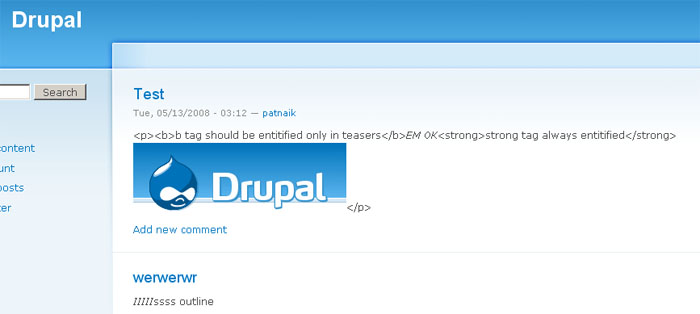
'elements'=>'b, em, img', 'keep_bad'=>1and a RSS-Config. value of'elements'=>'em, img', 'keep_bad'=>1. Have htmLawed checked for both Body and RSS.Then using that input format create a new node (content) for the node-type, and use a text like this:
<b>b tag should be entitified only in teasers</b><em>EM OK</em><strong>strong tag always entitified</strong><img src="http://drupal.org/themes/bluebeach/logos/drupal.org.png" />May be we can glean something from the result.
---
Drupal is new to me. As this post mentions, it is possible that with Views, etc., some text never goes through htmLawed.
Comment #15
Slim Pickens commentedThanks again.
I did as you suggested and in teaser view we get:
<p>b tag should be entitified only in teasersEM OK<strong>strong tag always entitified</strong></p>Emphasis is applied. No image.
In full view we get:
b tag should be entitified only in teasersEM OK<strong>strong tag always entitified</strong>with appropriate bolding and an image.This was done in blog content which is not processed through views as far as I know.
Comment #16
alpha2zee commentedThe full view result is as expected, 'b', 'em' and 'img' passing through and 'strong' getting entitified, but the teaser result is not good -- 'b' is not entitified, and 'img' not only fails to go through but is completely removed, not even entitified. One expects this result (raw HTML; you can try this on the htmLawed demo page):
<b>b tag should be entitified only in teasers</b><em>EM OK</em><strong>strong tag always entitified</strong><img src="http://drupal.org/themes/bluebeach/logos/drupal.org.png" alt="image" />The different result you are getting for teaser suggests that for that node-type for that input format the 'RSS' 'use' and 'Config.' fields are not properly filled (seems impossible) or that there is some conflict somewhere.
If you have time, you can try this to pin-point the issue. I've attached a special htmLawed.module file. Download it, remove the .txt extension and put it in the htmLawed module folder after renaming (temporarily) the original file there to something else. The special module file will cause text to be prefixed with '[x]' every time the module code touches the text (filtering it or not); the 'x' corresponds to the line number in the special file where the 'touching' occurs. With proper setup and filtering the resulting teaser would look like '[407]... [118]... '.
--
With Drupal 5.7 (+Views 1.6 +htmLawed 1.8) running on localhost on Windows XP SP2 with latest PHP/MySQL, the teaser filtering is working OK; I get the expected result (see this Firefox 2 screenshot image). The teaser also appears fine on a simple Views page.
Comment #17
Slim Pickens commentedHow strange!
I created the module file with the code you sent, uploaded it and the filter now works as it should with images in teasers. All the feed items that have been processed with your filter are now displaying correctly.
Food for thought?
Comment #18
Slim Pickens commentedOk - I see what's happened. I went to check the filter configuration and it's not present. On the other hand the filter is still an option on editing feed items.
Comment #19
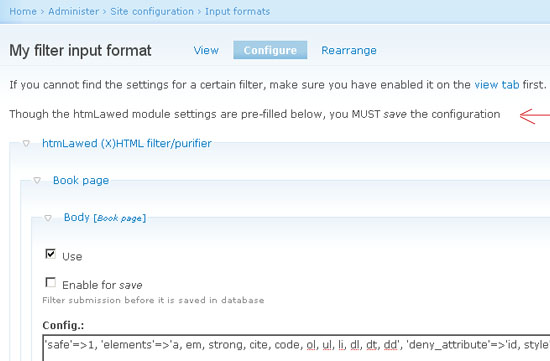
alpha2zee commentedThe module pre-fills the htmLawed settings form ('RSS' is unchecked) but does not save those settings automatically. User has to submit the form. The module shows a message about this when a new format is being configured - see attached image.
Comment #20
alpha2zee commented