

Closed (fixed)
Project:
User Relationships
Version:
6.x-1.0-beta7
Component:
Code
Priority:
Normal
Category:
Bug report
Assigned:
Reporter:
Created:
11 May 2008 at 16:20 UTC
Updated:
14 Jul 2012 at 23:24 UTC
Jump to comment: Most recent file


Comments
Comment #1
Copypast commentedHELP!!!
Comment #2
PhiliW commentedI could need some help on this, too!
I just can't change the settings for the blocks and I really need to :-/
Thanks in advance,
Phil
Comment #3
OneClickVentures commentedbump...rather confused here.
Comment #4
PhiliW commentedI just can't believe we are the only ones with this problem! I think that this (UR) is such a powerful tool and many people will use it. Is the answer to our Problem so simple that nobody wants to help? I will keep on looking into this thread, maybe sometime someone will come... :-)
Comment #5
TheresaM commentedSame issue here and the worst part about it , you can't set the block to set on any particular page without configuring this particular information. therefore rendering this module useless to newer users who don't know what to input into this field.
Comment #6
alex.k commentedConfirmed; the problem exists for everyone i think. Will be looking at it as I can't use most of the blocks because of it, too.
Just that the code is a little cryptic and I'll be working through it as i get a hang of the maintenance duties :)
Comment #7
webslinger commentedSame here. Asterisk doesn't work, and I'm feeling stuck. Please help!
Comment #8
daneyuleb commentedReplace db_write with drupal_write_record in user_relationships_blocks.module and it will get you by the error for now.
Since it still requires you to put something in that field, though, to get past the screen, I pasted the php code from the equivalent window in the All Relationships block's setup window.
Don't know if the above will blow anything up, but until the code is fixed it seems to work for me.
-Daniel
Comment #9
alex.k commentedThank you daneyuleb!
Comment #10
alex.k commentedGave a complete cleanup to user_relationship blocks, and committed to the 6.x branch. This will appear in the -dev release shortly.
- fixed reported issue, that is being able to edit block settings. Also the snippet now supports "blog/%uid" style of URLs.
- improved help descriptions a little, to make it clearer what this snippet is and what blocks do.
- corrected blocks when used with one-way relationships
- improved wording a lot, so that I can make sense of it at least :)
- code style fixes
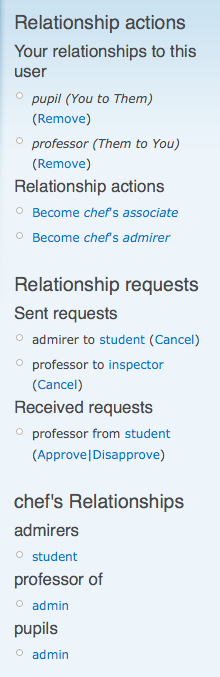
Please try any blocks, and post back with any issues. AJAX links (#327090: AJAX popups for confirmation dialogs) on the relationship actions block work, too. Screenshot shows three most useful blocks. There are quite a few different relationship types to test everything, so it can get busy if you do that.
Comment #11
Anonymous (not verified) commentedAutomatically closed -- issue fixed for two weeks with no activity.