

 Come together with the global Drupal community in Rotterdam, 28 Sept – 1 Oct 2026. Sessions, contribution, connection, and Early Bird savings until 8 June.
Hi. For some reason, FCK Editor starts out with "Centre Justify" as default rather than "Left Justify" as it would seem logical to me. I am using Drupal 6.2.
The problem remains that when I create a new page, for example, the Centre Justify is automatically selected and when I enter text or copy text from Notepad content is centred. I need to highlight and then Left Justify.
Is there somewhere I can go to configure this differnetly?
Thanks.


Comments
Comment #1
Saviour commentedI'm actually experiencing the same issue after installing a new theme. The installation of the theme has caused the FCKEditor to display a "hot pink" text background, as well as the center justify issue you're experiencing. It has also caused the editor menu, above the text box, to expand to three lines instead of the usual two.
I think I'm going to try and disable and then re-enable the editor to see if this fixes the issues I'm having.
I'll keep you posted, because there's no tellin when these support requests will be answered.
Comment #2
jaydub commentedI experienced this when switching to the Marinelli theme. The
solution is to goto your FCKeditor settings in Drupal and
edit the profile (Default or Advanced for example) at
'admin/settings/fckeditor'
In the 'CSS' fieldset, change the value for 'Editor CSS'
from 'use theme CSS' to 'FCKeditor default'.
That should solve both of your problems.
Comment #3
waynedrupal commentedWoo hoo! That did it!!! Thank you so very much. Very easy solution.
Comment #4
waynedrupal commentedUnfortunately, by using the default FCKEditor css, it seems that I cannot see results of the centre or right justify buttons options - html code gets put in and when save can see the results in page, just not in fck editor. Is this normal behavior?
Thanks.
Comment #5
wwalc commentedCreate a sample page in FCKeditor with text aligned to the right. Save it and open in Firefox with Firebug enabled. Right-click with your mouse on this text and choose "Inspect Element" to view HTML source and CSS style of this element.
FCKeditor uses special class to align to the right, you should see there something like "class="rteright".
Let me know what exactly do you see there.
You can also post a link to a sample article on your site where it doesn't work and I'll check this.
Comment #6
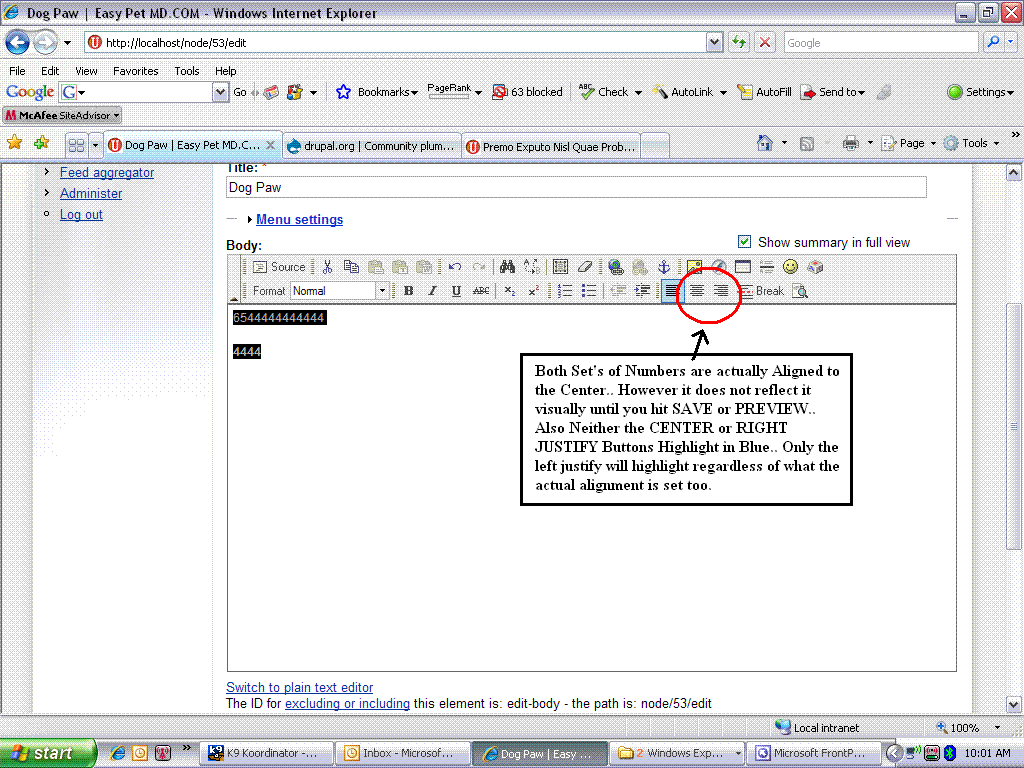
zeroyon commentedSame issue by going to default CSS, when entering content into the FCK Editor it default to left justify which is good. But if you would like to center an image or text.. ie.. highlighting it and selecting center.. the buttons in the FCKEditor that correspond to center or right justify do not highlight and the change is NOT displayed in the editor prior to actually selecting SAVE or PREVIEW>
Thus it become extraordinarily difficult to layout items in a specific manner as you have to save or preview to see how they actually fit...
Screen Shots...
and View Source attached...
Comment #7
wwalc commentedIf you can use Full HTML input format, add this to your FCKeditor profile, in "Advanced options" -> "Custom javascript configuration":
this will force usage of inline styles by FCKeditor when adjusting/indenting text. Note that inline styles are stripped by Drupal Filtered input format. That's why you must use Full HTML input format in such case.
Comment #8
Anonymous (not verified) commentedAutomatically closed -- issue fixed for two weeks with no activity.
Comment #9
CarbonPig commentedGreat Post. This worked for me.
I was editing the fckeditor.config.js file to create custom toolbars for each role, but was having issues getting the justify attributes to work correctly.
I went into the FCK editor setting for the profile that was having trouble and added the code above to the "Custom javascript config" and it worked perfectly.
Thanks! Really helpful!
Comment #10
joergenaj commentedWorked fine also for me to choose to use editors own css. I got the problem with centred text in fck editor only when switching to the chrone theme. Strange that I could find nothin in the theme folder that cortrolled the center.
Comment #11
whan commentedGEART it for me too.
Comment #12
batsonjayAnybody have any idea how this would work using the http://drupal.org/project/wysiwyg module instead of the FCKeditor module? There doesn't seem to be an equivalent link for Advanced Javascript stuff.
Comment #13
allan1015 commentedIn regards to WYSIWYG
I have the centering issue with FCKeditor and CKeditor using Wysiwyg
I am using Vitzo-flex theme
When I selected 'Use Theme CSS' the centering problem was there and it didn't adopt my themes style
When I changed to Define CSS and used the following path %b%t/css/style.css
it worked and adopted my themes style and centering issue went away
True for both FCKeditor and CKeditor