Closed (fixed)
Project:
Node Hierarchy
Version:
5.x-1.0
Component:
Miscellaneous
Priority:
Critical
Category:
Bug report
Assigned:
Unassigned
Reporter:
Created:
13 May 2008 at 16:36 UTC
Updated:
14 Aug 2010 at 14:08 UTC


Hi all,
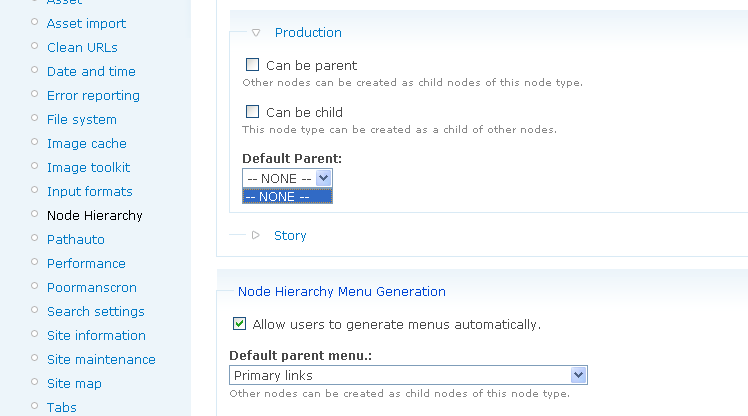
Odd one this as I have used this module in previous projects (although previous to Drupal 5.7) and had no problems. I dont know if it's a 5.7 specific issue but after I install the module, the 'Default Parent' drop down box which is usually populated with my sites folders/hierarchy is empty (well, all it has is "--NONE --"). This is most frustrating and I have no idea why, can anybode help?
I need to make a few content types have a particular parent item.
Ta
| Comment | File | Size | Author |
|---|---|---|---|
| node-hierarchy.gif | 14.77 KB | adrianjacob |

Comments
Comment #1
dgorton commentedSorry about the slow reply!
Can you confirm that you've configured other content types to be parents?
Also - to simply access issues - can you try this with UID 1?
If neither of those solve the problem, the next step is probably to look at the other modules you have installed and try turning them off, one-by-one, to see if there's any sort of conflict somewhere. There may also be some similarity here to http://drupal.org/node/257999.
Comment #2
dgorton commentedComment #3
garyclearbridge commentedHi: I had a similar problem and finally fixed it with a lot of manual work. It drove me crazy and couldn't find anything on it, so I am entering this to save others the frustration that I had.
The source of the problem was that for some mysterious reason, parent rows were lost in the nodehierarchy sql table. The table still had my hierarchy (or most of it) where parent nodes were set to anything but "0", but it lost many top level parent entries, that is, with parent node is set to "0". In our site, most rows didn't have parents because blog posts don't have parents.
If you have a backup of that table, replace the current table with the old version. If you don't have a backup (my backups are weekly and I didn't find out problem until after a week), you can do the following.
The manual fix was:
1. I saved out the existing table from phpMyAdmin as a CSV file to capture site hierarchy that was there (select your drupal database, then the table nodehierarchy, then the Export tab, click CSV up top, and Save as File at bottom).
2. I uninstalled and reinstalled nodeheirarchy module, which recreates the nodehierarchy table with all node set to a parent of zero (note: it does this even for node types not in hierarchy, which is why Site Outliner is useless for sites like ours where we have a thousands of blog posts, which are not hierarchical, and pages of permanent material which is, another gripe...). After you do this, your will see everything as parent again, but your site structure will be lost. Don't worry, we will fix that next.
3. I then edited the saved cvs file in excel. I quickly deleted all rows with parent of zero (last column, means that no hierarchy is set) and rearranged the columns from the tables nid, parent, order_by order to the new order of parent, order_by, nid (explain why in a second). I then inserted columns containing the values "a" "b" "c" "d" before, between, and after these columns (again, will explain why) in all the rows. Then I saved again as a csv file.
Example of initial nid, parent, order_by structure of all rows in table: 1000,2,100
Example of ending structure of same row: a,100,b,2,c,1000,d
4. I then edited the resulting file in a simple text editor (wordpad) in the following way (don't miss the little single quotes that have to surround all values):
a. globally replaced "a," with "UPDATE nodehierarchy SET parent = '"
b. globally replaced ",b," with "', order_by = '"
c. globally replaced ",c," with "' WHERE nid = '"
c. globally replaced ",d" with "';'"
So the final row looks like this:
UPDATE nodehierarchy SET parent = '100', order_by = '2' WHERE nid = '1000';
This means that each row with hierarchy information has been converted from:
This: 1000,2,100
To: a,100,b,2,c,1000,d
To: UPDATE nodehierarchy SET parent = '100', order_by = '2' WHERE nid = '1000';
So you now have a file that is a SQL table update file instead of a data save.
5. Cut the contents of the file and paste into phpMyAdmin under SQL in the box that says, Run SQL query. Hit Go.
This will put all of your site structure information back into the table.
Comment #4
ronan commentedMarking this as a dupe of #257999: Site hierarchy doesn't populate the drop down so this info isn't split up.
Comment #5
dgorton commentedClosing per duplicate status in #4