Closed (fixed)
Project:
DataBase File Manager
Version:
5.x-4.2
Component:
Code
Priority:
Normal
Category:
Feature request
Assigned:
Unassigned
Reporter:
Created:
19 May 2008 at 17:02 UTC
Updated:
5 Jan 2009 at 18:00 UTC


The DBFM Pane seems to only display an image preview after right clicking an image and choosing "Preview image". (And only from the DBFM screen itself. Why not from the Link/Embed popup? ) It would be nice if single clicking the image name would show a preview of it in the DBFM Pane. (Being able to drag the file to the DBFM Pane would be nice too.) Maybe then a series of icons could be enabled to allow an action to be performed on the file.
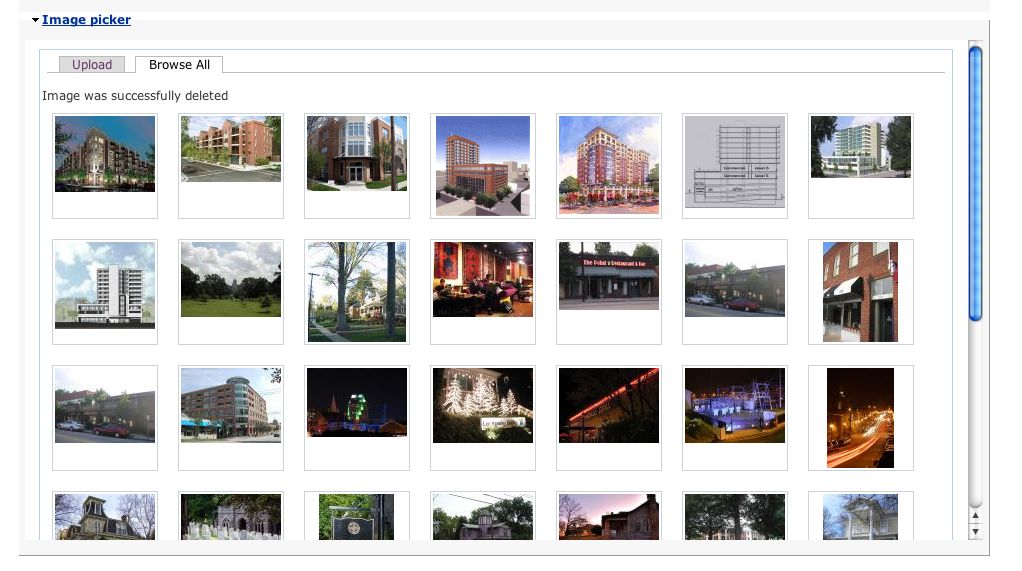
Or even better would be to offer a new view, in addition to the standard table layout view. This view would be a table of just image previews, or generic icons for non image files. Something like: http://www.tonyspencer.com/wp-content/uploads/image-picker-browse.jpg

Comments
Comment #1
rooey commentedWe have mused over this before. I agree the two "modes" of DBFM should be more consistent and I'd like to get more use out of the preview panel.
Given the enormity of the task - I don't think you'll be seeing any fancy icon/preview view in DBFM soon... It'd be nice tho!
lol
M.
Comment #2
geoff_eagles commentedWith the latest release you should be able to preview an image in the link/embed screen.
Single clicking the filename should always open the file in either a new browser tab or window so I won't consider single clicking on the filename to fill in the preview BUT I could fairly easily shove a listener on the icon at the left of the browser entry and whenever the icon is clicked I could populate the preview pane??
I had a look at your image picker browser - it would be a lot of work ... and I don't particularly like it ... so it's unlikely to happen. It would be easier to implement a hover-over preview.
Comment #3
okeedoak commentedIcon clicking for preview would be great (my first choice), as would hover-over preview.
Since this topic relates to the ajax file manipulations in general I wanted to point out a project I accidentally stumbled upon that has the most complete ajax file manipulation interface I've seen: KFM - Kae's File Manager at http://kfm.verens.com/ Impressive stuff!
Comment #4
geoff_eagles commentedI'm impressed. Kae's file manager is SO good! It wouldn't actually take much to translate that to a drupal module ... and improve the layout - that left hand pane is so (unneccesarily) cluttered. I downloaded a copy (in case I ever get time - which seems unlikely!).
Comment #5
rooey commentedPreview pane has been removed - this now appears on hover.
Comment #6
rooey commented