Active
Project:
Time Map
Version:
5.x-1.0
Component:
User interface
Priority:
Critical
Category:
Feature request
Assigned:
Reporter:
Created:
4 Jun 2008 at 11:26 UTC
Updated:
5 Aug 2008 at 12:47 UTC
Jump to comment: Most recent file


Thanks for the promising module, sounds just what I'm looking for!
However, after successfully installing the module, done some global and per user categories and adding some tasks, I faced an error when trying to see the actual timemap (/timemap/map)
Failed to load json data from /index.php?q=timemap/map/serv/1
Not Found
(screenshot attached)
I tried both with and without clean URL's, but the same problem. Also, I tried the "Simile Timeline WebAPI from MIT" as default WebAPI over the Internet, and also tried the library installed locally - no help, same error.
I'm using:
Local Server: Apache/2.2.4 (Ubuntu) PHP/5.2.3-1ubuntu6.3
Mozilla/5.0 (X11; U; Linux i686; en-US; rv:1.9b5) Gecko/2008050509 Firefox/3.0b5
UTF-8,*
MySQL 5.0.45
json support: enabled
json version: 1.2.1
Any ideas?
| Comment | File | Size | Author |
|---|---|---|---|
| #7 | sample.PNG | 24.23 KB | markrei |
| screenshot-timemap-problem.png | 135.05 KB | Abilnet |


Comments
Comment #1
sethfreach commentedHmm, I can see why that is happening, and it's shortsightedness on my part. Your drupal installation is in a subdirectory (drupal-5.7/ in your case) off of the domain root and the .js file is expecting to load from the root of the domain, (at /index.php?q=...).
a temporary quick dirty fix in your case could be to change line 49 of timemap_simile-timeline.js
from:
Timeline.loadJSON("/index.php?q=timemap/map/serv/" + uid, function(json, url) {to:
Timeline.loadJSON("/drupal5-7/index.php?q=timemap/map/serv/" + uid, function(json, url) {The fix will involve determining the path in php and making that an attribute of the <div> container that the widget gets loaded into. The js file will then have to read the attribute from the element and assemble the json url based on that. (Similar to how it is currently handling UID and Timezone) I will fix this in an upcoming release.
Thanks!
Seth
Comment #2
Abilnet commentedYes, that made the trick! (after leaving the slash out before the install directory)
Timeline.loadJSON("drupal5-7/index.php?q=timemap/map/serv/" + uid, function(json, url) {Thanks, all the best from Sunny Spain!
Comment #3
sethfreach commentedGreat! Also, I'd recommend grabbing 5.x-1.1 now too, as the "quit button" will quit on you in 1.0.
yeah... more things to file under "my fault" ;-)
Comment #4
sethfreach commentedComment #5
sethfreach commentedfixed in 1.x-dev and will be part of 1.2
Comment #6
Anonymous (not verified) commentedAutomatically closed -- issue fixed for two weeks with no activity.
Comment #7
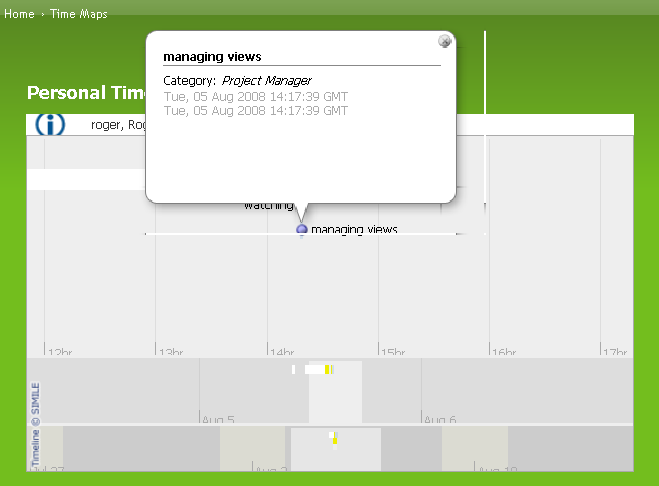
markrei commentedIs there a way to add a detail in time map?
Like putting the total time used.
see attachment.
Comment #8
sethfreach commentedThe info bubble is handled by the SIMILE library, so: Is there a way to easily control the contents of the bubble with an admin interface? No, not at this time.
I could see 2 approaches to achieve this:
1- Download the SIMILE library and install it in the module locally (See README.txt), then change the SIMILE code locally
2- have jQuery code to catch the hover/click event and add more innerHTML content to the element at display time. I would have to look at the SIMILE lib closer to see where on the scale of easy to complicated this would fall though...