

Active
Project:
Imce CCK Image
Version:
6.x-1.x-dev
Component:
Code
Priority:
Normal
Category:
Support request
Assigned:
Unassigned
Reporter:
Created:
24 Jun 2008 at 23:25 UTC
Updated:
10 Nov 2009 at 02:08 UTC
Jump to comment: Most recent file


Comments
Comment #1
pineappleclock commentedComment #2
robbt commentedYes, same problem here. It doesn't want to let me actually add the image, so this module is non-functional as far as I can tell.
Comment #3
robbt commentedYeah I think this is related to imce and not specifically imce cck as even using fckeditor there is no way to pass it back.
I reported it as a bug here http://drupal.org/node/274976 .
Comment #4
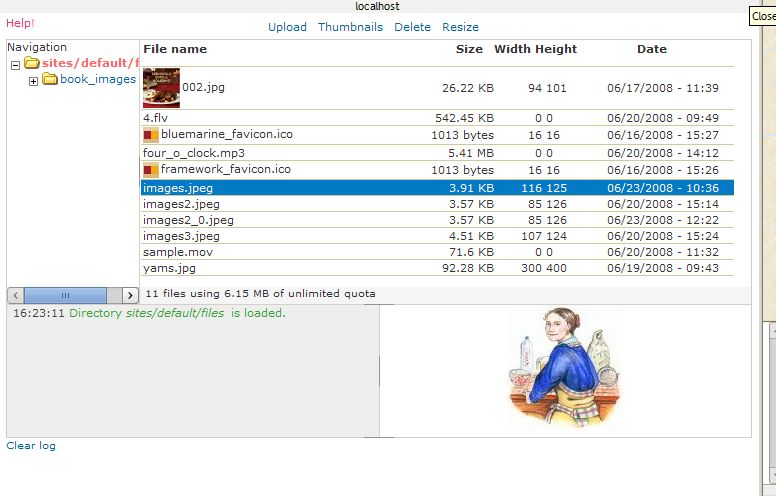
stinky commentedSame problem here. Attached is a screen shot. I can see the files, but there's no way to actually select the file I want to include in the imce cck field.
Comment #5
cybernomad commentedI encounter the same problems. If I disable the stylesheet all the missing buttons and fields are there, however they do not work , my AdminTheme is 'pixture'.
Thanx for any input
Comment #6
panis commentedwhat version of imce and browse and OS?
Comment #7
jvinci commentedI'm experiencing a similar problem. I use Windows XP and tried upgrading to the latest version of Firefox to no avail.
I will say that it was working when I first installed it. I can't remember all I've done that might have put it out of whack.
Attached is a screenshot of the window along with information on what's happening in the code
Comment #8
panis commentedwhat theme? farbtastic.js is the color picker for drupal themes. Looks like it breaks on the imce browser window halting all javascript on it.
Comment #9
jvinci commentedI just tested the following themes and got the same result for each:
Minelli
Zen
Zen Classic
Zen Themer’s Starter Kit
Garland
Pushbutton
Comment #10
-Anti- commented> Yeah I think this is related to imce and not specifically imce cck as even
> using fckeditor there is no way to pass it back.
I agree.
I'm going to do a clean install today to see if it is an imce issue with browsers,
rather than caused by tinymce, fckeditor or imce-ckk-image.
EDIT:
After a clean install, the issue prevailed:
The 'send to...' link disappears completely in Opera 9.5.
The 'send to...' disappears in FF if you refresh the imce browsing window.
Additional symptoms are:
· clicking the image opens it in a new window in opera rather than sending to the text area
· all files are highlighted when the imce browser window loads in opera
· the imce tab doesn't close in FF after selecting and clicking a file, but it is sent to the text area
This seems to be an imce issue with the web browsers.
Comment #11
arhak commentedsubscribing
Comment #12
ssm2017 Binder commentedhello
im confirming :
no button in opera
button dissapears when refreshing page on :
ff3
chrome
msie 6
Comment #13
wmnnd commentedI do experience this problem, too but strangely it doesn't occur always - but frequency has increased recently.
Comment #14
neochief commentedSee this comment for the reason of "Send to.." bug
Comment #15
HeinzS commentedProblem solved.
See this simple workaround
Comment #16
elijah lynnVerified on a Mac with Firefox 3.0.12 and Opera 9.64.
Comment #17
donquixote commentedThe reason is how imceimage.js adds the link to the the popup window.
In Opera (and maybe some other browsers too) the event that would trigger imceOnLoad fires at a time when the value of imceIMage.pop['imceOnLoad'] is empty. I don't know why, but that's what happens.
One solution for that is polling: Instead of waiting for an event to fire, we use setInterval to repeatedly ask the window if it's ready, and when it is, call setSendTo().
(patch to follow)
Comment #18
donquixote commentedAnd here is the patch!
The only problem is that now the button appears in the wrong place - it's now the first button, instead of the last. No idea why that happens.
Comment #19
panis commentedworking on patch to fix this - better option is perhaps to use the upgraded imce integration interface. Will post tomorrow.