Closed (won't fix)
Project:
Panels
Version:
5.x-2.0-beta5
Component:
Panel pages
Priority:
Normal
Category:
Support request
Assigned:
Unassigned
Reporter:
Created:
26 Jun 2008 at 03:24 UTC
Updated:
25 Aug 2010 at 01:59 UTC


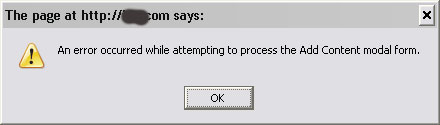
As oppose to error reported here, http://drupal.org/node/267877, I am experiencing this error ;
An error occured while attempting to process add Content Modal form. (as attached). I cleared cache and revert back to beta4, error still occur.

Comments
Comment #1
light-blue commentedI am receiving the same error as of today, using beta5 IE7 and Firefox 3 and Firefox 2.
Comment #2
basby commentedI am having the same problem.
I have updated jquery as suggested somewhere. The only result was a clearer error. It now states
"An error occurred while attempting to process the Add Content modal form".
This error comes from function Drupal.Panels.clickAdd which resides in panels/js/display_editor.js
The error message is displayed inside the ajaxwindow/layer that comes up when I click on the "+" sign. So the window comes up, the system waits for a second and then the message comes up.
Other windows like the cache window (when I clcik on the "Cache settings" button) do come up with the right content in it (i can select the cache method). So I think the problem lies in the part of the software that shows the list of content.
No idea how to fix this. Any help is very much appreciated!!
Comment #3
basby commentedI found the solution to the problem. It is stated in here: http://drupal.org/node/274008. Vidar, thanks a LOT!
I think my problem is we are using php4. If we were using php 5, we would not have had this problem.
Comment #4
najibx commentedi am using php 5 and still have this problem, but only locally via WAMP2.
Comment #5
zbrock commentedI am also receiving this error message with PHP5.
Comment #6
chrisshattuck commentedI am running into this same error, but can narrow down a few of the factors associated with the problem:
On my local Windows machine, everything works fine. On 2 remote matchines, one a mac and one linux, it doesn't.
When I click the plus sign, the ajax page loads fine. When I click a pane link under "Custom", I get the error. The other panes don't cause the error.
When there is an error, firebug turns the line red and adds a '500' at the end of the line (in the Console view). When I expand the line, the response appears the same as it does when there isn't an error.
We tried upgrading to the latest dev version and am still seeing the problem.
I hope that helps narrow the problem down a bit.
Thanks!
Chris
Comment #7
calebgilbert commentedUm...and update to my earlier comment and to stompeers comment (we both work together) - apparently neither one of us did a very good job of reading the KNOWN_ISSUES.txt file, whereby it points out that wysiwyg editors have been known to explode panels. In our case it was tinymce. :p
Sorry for the false alarm...
Comment #8
sdboyer commentedScrewed up subject is drivin me nuts in my email.
Does the wysiwyg issue apply to you, najibx/light-blue? If not, I need to know the pane you're trying to add/edit when you receive this error, or if it's happening on all panes.
Comment #9
sdboyer commentedComment #10
najibx commentedHi sdboyer,
Sorry to cause you trouble and headache :-(
1. The pane i am trying to add/edit is simply from Tab "content", which by right will open up a small window listing down all blocks, views, etc can be added into the pane. I don't see wysiwyg is applied here. However,
2. I tried on another case, I enable wysiwyg to "custom node" text area and this similar error happen, when trying to add custome node. I read somewhere wysiwyg caused this, but I don't think it is applicable in 1).
Comment #11
chrisshattuck commentedA quick update:
As Caleb mentioned, Tinymce was causing the initial problem for us, but we also had a second problem when we installed the securepages module. For some reason mixing http and https causes the same error. So, we disabled any panel related pages from being processed as https and the errors went away.
Thanks!
Chris
Comment #12
pjaol commentedHad the same issue, tracked it down to the Ajax component of add panels
POST /panels/ajax/add-config/2/block-right-block-1
From the logs on my server, add the request was getting blocked with a 501 response code.
This was caused by mod_secure running on Apache, using the standard mod_secure rules.
Folks using DreamHost could be experiencing a similar problem as mod_secure is available as a configurable
option there.
The rule breaking this is a rule checking for valid content types
ModSecurity: Access denied with code 501 (phase 2). Match of "rx (?:^(?:application\\\\/x-www-form-urlencoded(?:;(?:\\\\s?charset\\\\s?=\\\\s?[\\\\w\\\\d\\\\-]{1,18})?)??$|multipart/form-data;)|text/xml)" against "REQUEST_HEADERS:Content-Type" required. [file "/data/apps/apache-2.2.6/conf/modsecurity/modsecurity_crs_30_http_policy.conf"] [line "69"] [id "960010"] [msg "Request content type is not allowed by policy"] [severity "WARNING"] [tag "POLICY/ENCODING_NOT_ALLOWED"] [hostname "xxxxxxxxx"] [uri "/panels/ajax/add-content/2/right"] [unique_id "JuKQ7c57bHkAADphDL4AAAAC"]
With the latest version of mod_secure 2.5 I was able to remove the offending rule in my httpd.conf with:
SecRuleRemoveById 960010
Comment #13
fossie commentedSame error while securepages enabled. Disabled on admin and content popup works like expected.
HTH,
Fossie
Comment #14
burlap commentedIs there any chance to solve this without changing ModSecurity rules? My server admins are reluctant to change anything, so I'm looking for a way to either change POST method to GET or change contents of the message posted (does it include any PHP code?).
Comment #15
sdboyer commented@burlap:
I'm not sufficiently knowledgeable about how mod_secure works to be able to roll a solution to this quickly, but if you, your sysadmins, or anyone else has some ideas, I'd love to hear them. A patch would be amazing, and even better, of course. If that's not possible, some pointers to good documentation related to making ajax work with mod_secure would be good, too. But even if said documentation link is provided, the only way this'll get worked on anytime soon, unfortunately, is if someone else does it - I just don't have the time at present to learn another new thing.
Comment #16
burlap commentedTomorrow I'll try to get Apache logs with detailed information which ModSecurity rules are broken and how. If there is anything useful or if I manage to find a solution, I'll surely post it here.
Comment #17
burlap commentedMy initial observations:
I'll try to investigate more into this.
Comment #18
deanx0r commentedIn my case this was being caused by the Securepages module. I've just disabled the module and am now not receiving the error.
Comment #19
kulfi commentedAlso receiving this error. Don't have either securepages or TinyMCE (or any WYSIWYG) installed.
Comment #20
Saulo commentedIn my case, disabling the ModSecurity (mod_security) of Apache, it worked.
SecFilterEngine Off
SecFilterScanPOST Off
The above entries in the .htaccess will disable the ModSecurity (mod_security) module for the domain.
Comment #21
garyclearbridge commentedRather than take off all security via .htaccess, a quick fix that works on my system is to it just eliminate the "s" on your path. (I use secure pages, but problem is accessing a secure site). That is change:
https://your_site_name/your_drupal_path/?q=admin/panels/panel-mini/your_panel_name/edit/content
to
http://your_site_name/your_drupal_path/?q=admin/panels/panel-mini/your_panel_name/edit/content
Comment #22
miss ferret commentedI am also experiencing this error, and am not using the securepages module or tinyMCE... :(
Comment #23
esmerel commentedNobody's actively maintaining the 5.x panels line at this point.
Comment #24
caw2 commentedI just started to get this error message today with version 5.7. I was going to upgrade to 7 after it's ready but perhaps should upgrade to 6 now?