

Closed (fixed)
Project:
Tiny Tiny MCE
Version:
6.x-1.2
Component:
User interface
Priority:
Critical
Category:
Support request
Assigned:
Reporter:
Created:
30 Jun 2008 at 01:12 UTC
Updated:
23 Jul 2008 at 10:56 UTC
Jump to comment: Most recent file


Comments
Comment #1
fleetcommand commentedA few question...
1. Did you download TinyMCE 3.something from http://tinymce.moxiecode.com/ ? Did you place it _inside_ the tinytinymce module directory? It should be located at /sites/all/modules/tinytinymce/tinymce
2. Did you place the module in /sites/all/modules and not /modules ?
3. Probably you enabled it. That's fine. And provided the right. But what "Doesn't work" mean? Can you access /admin/settings/tinytinymce page as an administrator?
4. Can you see the "rich text editor" link under the textboxes when you want to send a comment or add a new node?
Comment #2
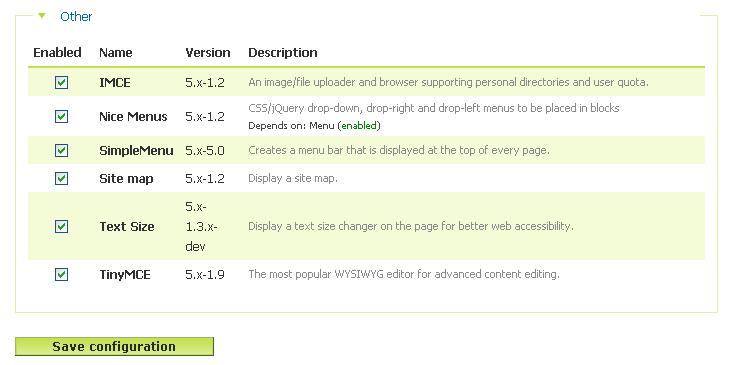
krizty commentedI followed the instruction (same as what you said)and I got the access /admin/settings/tinytinymce page as an administrator...
what i mean "doesn't work" is after i got the access, I do not see "rich text editor" link under the textboxes when I want to send a comment or add a new node
or when I go to Administer › Site configuration > Tiny Tiny MCE, I cannot set up a profile or do any setting, it just indicated:
$Revision: 1.92 $ $Date: 2007/07/31 14:40:36 $
TinyMCE adds what-you-see-is-what-you-get (WYSIWYG) html editing to textareas. This editor can be enabled/disabled without reloading the page by clicking a link below each textarea.
Profiles can be defined based on user roles. A TinyMCE profile can define which pages receive this TinyMCE capability, what buttons or themes are enabled for the editor, how the editor is displayed, and a few other editor functions.
Lastly, only users with the access tinymce permission will be able to use TinyMCE.
Comment #3
fleetcommand commentedErm.. From your screenshot I see you use the "TinyMCE" module, not "TinytinyMCE" :) Probably this will be your problem :)
Btw, for Drupal 6 I also doesn't got any richtextbox switcher when used TinyMCE module. Then I switched to TinyTinyMCE which needs a little bit more reading for configuring properly, but more flexible.
So you need TinyTinyMCE: http://drupal.org/project/tinytinymce :)
The latest versions are 6.x-1.7 and 5.x-1.2 (the latter for 5.x).
Comment #4
Steve Lockwood commentedThanks for dealing with this one and asking all the relevant questions Fleetcommand. I think we can change the status to fixed.
Hope you get sorted out in the tinymce project kritzy - problems with running tinymce in Drupal 6 were what prompted me to write this alternative module - so I know it's tricky.
Regards
Steve
Comment #5
Anonymous (not verified) commentedAutomatically closed -- issue fixed for two weeks with no activity.