Reviewed & tested by the community
Project:
TagTool
Version:
5.x-1.2
Component:
User interface
Priority:
Normal
Category:
Bug report
Assigned:
Unassigned
Reporter:
Created:
30 Jun 2008 at 01:58 UTC
Updated:
20 Oct 2008 at 12:01 UTC


First, thank you for this fantastic module, this is exactly what Drupal needs!
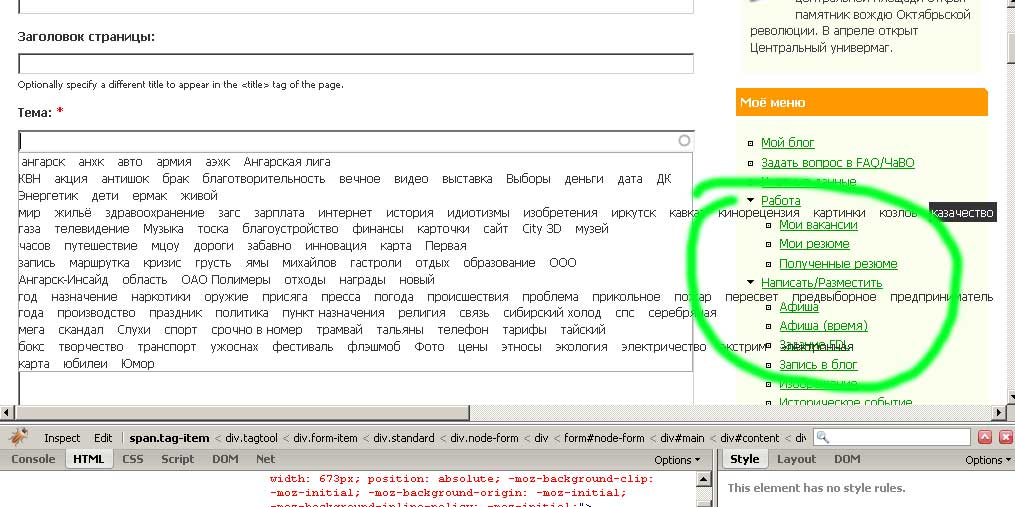
However I found a small annoying bug: i have a free-tagging vocabulary, width about 100 tags in it, and problem is that tags don't break, but stay on the same line, therefore overlapping everything on the page.
So i suggest adding "float:left;" property to the .tag-item in css, so that they would stay in the box
(I've attached screenshot with errorneous behaviour)
Sorry for my bad English

Comments
Comment #1
jimyhuang commentedGreat, got your suggestion.
Commit to nightly build.
Comment #2
Anonymous (not verified) commentedAutomatically closed -- issue fixed for two weeks with no activity.
Comment #3
Taxoman commentedI see the same issue with version 1.2.
In addition, the tags does not render nicely, partly overlapping each other (and/or too close to each other) in Firefox 3.0.1.
Comment #4
jimyhuang commentedSeems display:inline issue.
Will remove in next release, or you can also using snapshot.
Comment #5
kardave commentedSame problem, tag-list makes one long line except a tag contains white-space.
If you take a space between the spans, it woud be nice.
Example:
This all goes in one huge line:
<span>mytag</span><span>mytag</span><span>mytag</span><span>mytag</span>...But this looks nice, making several lines:
<span>mytag</span> <span>mytag</span> <span>mytag</span> <span>mytag</span>I could manage this by editing tagtool.js
I found the line
$(this.popup).append(div);and attached this line:
$(this.popup).append(' ');I hope the next coming release will containt this really tiny cosmetcs ;)
Comment #6
jimyhuang commentedVery good point for my error.
Commit to head.