
Multi block module
MultiBlock module facilitates to create more than one instance of a block in different regions.
Drupal's block module is limited by the fact that a block can only have one instance. Each block has a 1:1 relationship with its region, weight, visibility (and other) settings. This means that it is impossible to have blocks in multiple regions or to have blocks that have different settings on different pages. MultiBlock module solves this problem by allowing you to create multiple Block Instances of already existing blocks. Please read the README for more information.
1. Install MultiBlock module.
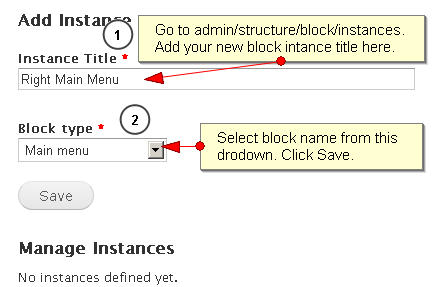
2. Go to Administer->Site building->Block instances. For D7, can directly access /admin/structure/block/instances
3. Add the title of the block and select the block you want more than one instance.
4. Go to Blocks and assign the region to the new block instance.
5. You will see same block in multiple regions.
Using this, we can maintain multiple instances of blocks with different settings but the same implementation. This should not affect block-level caching.
Help improve this page
You can:
- Log in, click Edit, and edit this page
- Log in, click Discuss, update the Page status value, and suggest an improvement
- Log in and create a Documentation issue with your suggestion
