

Closed (won't fix)
Project:
OG Galleries
Version:
5.x-1.7
Component:
User interface
Priority:
Critical
Category:
Support request
Assigned:
Reporter:
Created:
3 Jul 2008 at 15:58 UTC
Updated:
9 Jan 2010 at 15:01 UTC
Jump to comment: Most recent file

Comments
Comment #1
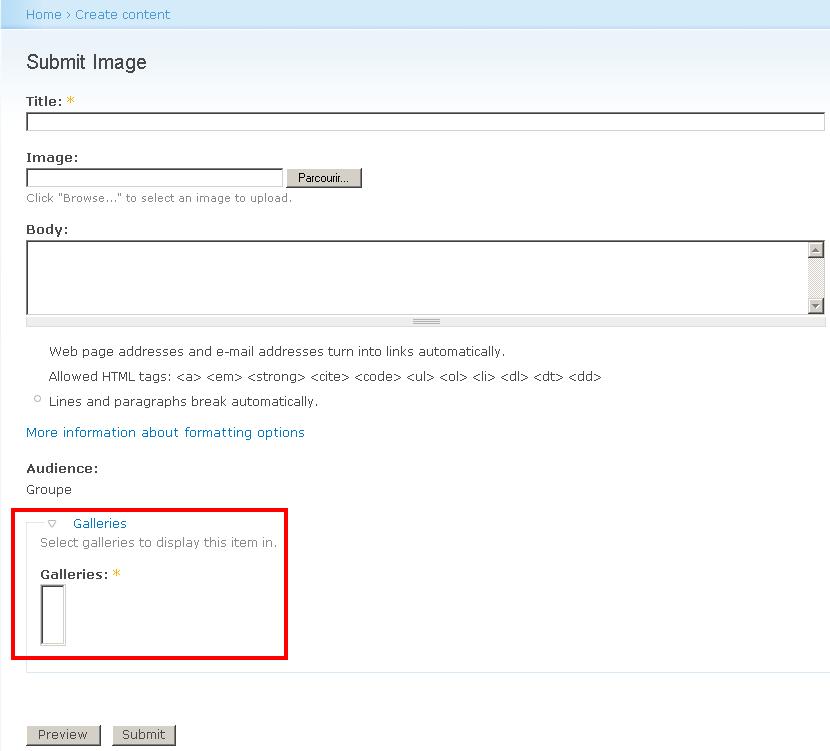
jacobson commentedI am having a similar problem, except that I see only one of the OG galleries that I've created. This is a recent phenomenon on my site since I used to see all the galleries. I believe the problem arose when I tried adding a new gallery.
Additional information. Upon further investigation, it seems that the Select statement for the galleries list on the add node form ignores the first gallery (alphabetically) for each gallery vocabulary.
HAJ
Comment #2
Nicolas_85 commentedThanks but in fact, I've tried another way : http://drupal.org/node/257747 which works quite well.
Regards,
Nicolas
Comment #3
jfietkau commentedI've also run into this problem. For anyone who is interested, here's a quick fix for people using version 5.x-1.7.
DISCLAIMER: I'm not affiliated with the maintainer(s) of OG Galleries and not very familiar with the code. This fix may break other functionality or even harm your data. Very untested! Use at your own risk!
In og_galleries.module at line 303, you'll find this code:
if ($tid > 0) {Change to:
if (($tid === 0) || ($tid > 0)) {This adds a (type safe) check for 0, since it seems the array index for the first gallery is indeed 0. Removing the check altogether gives weird results though, so the explicit check is still necessary.
This works for me. I repeat: Use at your own risk!
Comment #4
jredding commentedProviding a patch for xJulian's code
Comment #5
kims commentedAfter applying this patch, i only get at option called Main, not the actual group galleri, but it is a great improvement, couse before i allso didnt have any options.
Can anyon point me in the right direction, so i can get my og galleries up and running.
Btw. my group node, shows the correct terms, with all the galleries, but it's not the right way, to create a group when i want at image in my group galleri.
Thanks.
Comment #6
karens commentedOld issue. This version is no longer being maintained. We are moving to Views Gallery for D6.