Closed (fixed)
Project:
Light
Version:
6.x-2.x-dev
Component:
Code
Priority:
Normal
Category:
Bug report
Assigned:
Reporter:
Created:
4 Jul 2008 at 16:46 UTC
Updated:
14 Aug 2008 at 08:02 UTC
Jump to comment: Most recent file


Loving your theme... playing with Version 6.... getting read to move a heavily modified version into prod site.
As you know the Tabs for Primary lins are showing the tag in them.
Here is my work around:
// Remove below
//$output .= l(''.$link['title'].'', $link['href'], $link['attributes'], $link['query'], $link['fragment'], FALSE, true);
//Added new method
$link['html'] = TRUE;
$output .= l(''. check_plain($link['title']) .'', $link['href'], $link, $link['query'], $link['fragment'], FALSE, true);
reference: http://drupal.org/node/221382
David McIntosh
| Comment | File | Size | Author |
|---|---|---|---|
| #14 | light.zip | 108.12 KB | nickbits |
| #12 | with hack.jpg | 142.39 KB | nickbits |
| #12 | without hack.jpg | 149.89 KB | nickbits |
| #10 | css-hack.png | 7 KB | neofactor |
| #9 | light.zip | 107.95 KB | nickbits |


Comments
Comment #1
neofactor commentedthe span tags got pulled from the above post... but you know where they go... in the ''. and .'' locations
Comment #2
nickbits commentedHi,
I have been working on the version 6 port, but just not getting too much time for it. I have put some time aside this weekend, will see if I can finish converting it and will also checkout and integrate your patch in to the next release.
Thanks,
Nick
Comment #3
neofactor commentedCool!
I also noticed that the Views2 has some bugs specifically the
In the admin area.. with the "tabs"
* Export
* Clone
* View "Page"
Also.. the same grouping with the Page Path version... that one has the tabs appear on hover...
I look forward to your changes... Love the design.
I have made my version a full width header, with secondary-nav in the upper right corner.
A wish list for me is the main content area... if you turn off the sidebar it would be great if it could span the full width. Still loving the design and all your work!
Let me know if you have an early version you want me to test out... info [at] neofactor.com - David
** UPDATE to above **
The links issue was easliy fixed... Just needed to add the links class to the links.tpl.php file:
<ul class="links">Comment #4
nickbits commentedHi,
I have been attempting to sort this issue today and not getting very far. No matter what I do I cannot get the SPAN tags working. Any chance you can post your altered and working files to a post please?
Cheers,
Nick
Comment #5
neofactor commentedMy template.php is so heavy with other custom functions... I stripped out all the extra stuff....
See attached template file... the snippet posted above is the only real change you need to make to make the span work correctly.
Comment #6
nickbits commentedHi,
I am reviewing the code now. I think you probably have an older version of the code than is on Drupal.org, however, I am integrating the changes and will upload a new copy soon. A side note, in your template file you should not need the regions information for version 6, that should be in the info file.
Nick
Comment #7
nickbits commentedHave checked and integrated the code. Looks fine and appears to work in Firefox, Opera, Safari and IE 7. Still needs further testing. Have uploaded new copy (needs to wait for the dev build to become available on Drupal). Have attached a new copy to this post.
Comment #8
neofactor commentedThanks for the version 6 theme...
My fix above still needs to be applied...
ul class="links" in the links.tpl.php to fix VIEWS menu issue.
Comment #9
nickbits commentedHi,
I have attached an updated zip of the theme with the requested change. I have not yet committed it as I am unsure what the problem was. Without the requested change and with the change I see exactly the same thing in the views admin area. Could you provide a screenshot of the problem?
Cheers,
Nick
Comment #10
neofactor commentedSure...
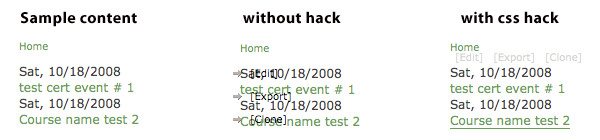
I put them together... before/after ... see attached image. (Mac - firefox3 and safari3)
Also.... I suggest a few other CSS be added for visual improvement...
Comment #11
nickbits commentedHi,
I will take a look at the other enhancements shortly. I do not get what you have shown on the Views2 screen, with or without the hack. I will take a screen shot for comparison when I am next at my dev. machine. Obviously I need to look at this in more detail, and if pos. reproduce the problem. Can you tell me:
1. What browser(s) you are using?
2. Do you have any other modules installed? (I have tested with only Views2 installed, jstools for example may cause conflicts).
Thanks for your patience and help.
Nick
Comment #12
nickbits commentedHi
I have attached screen shots of my Views2 screen with and without the ahck applied. They look identical and different to yours. This maybe me getting the wrong end of the stick, but I assume the Views module you are talking about is Views 6.x-2.0-rc1 (http://drupal.org/project/views)?
Like I said, this may well be me missing something, I am still sorting out what Views 2 can do, especially with the upgrade to Drupal 6.
Cheers,
Nick
Comment #13
neofactor commentedThe issue is NOT on the views admin page.. but rather on a Page or Block rendered from a view.
The screenshots I gave you was pointing to an example render... you should be able to see the same thing through the preview on the bottom of views.
You are looking up at the top.. that is not the issue... it is the on-hover menu that gets put over the results of a view.
Comment #14
nickbits commentedHi,
Okay, knew I would be doing something dumb. Anyway, I still cannot replicate the problem as with or without the hack any view I generate looks fine both in the preview and the final page. I will do some more extensive testing on this as I would like to be able to replicate the problem.
I have left the hack in for the moment, have also integrated the other elements which I must admit do make the tables easier to read. Have attached another version, will commit to Drupal soon.
Cheers,
Nick
Comment #15
nickbits commentedThe last patch (zip) should ahve corrected all of the problems. I will release a new update later along with other fixes. Please let me know if this remains an issue.