I've tried both tinymce and tinytinymce -- with little luck either way.
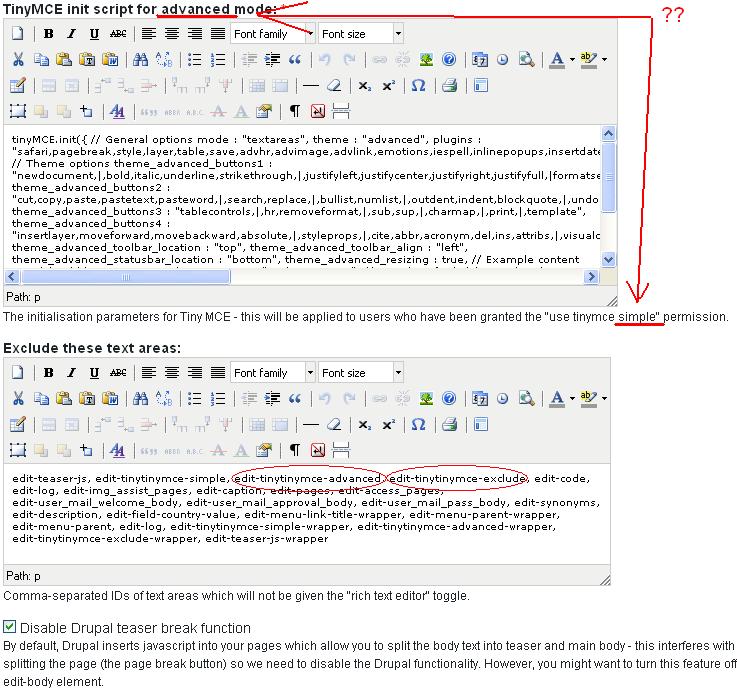
My biggest issue with tinytinymce at this time? Check out the screen shot. The "Exclude these text areas" function is being ignored.
I've gone so far in my testing to the strip out all of the edit-* text entries, leaving only the three directly related to tinytinymce administration. Yet the editor still shows up! This is bad for many reasons, primarily since having the editor insert
tags at the front and end of the TinyMCE Init Scripts breaks it for any future content submissions!
Yes, I've cleared my cache. I've even disabled Cacheing. I've uninstalled and re-installed tinytinymce several times (but apparently these entries are now embedded into the database, since changes I made pre-uninstall stick around once I re-install again).
Have only tried pairing TinyTinyMCE 6.x-1.7 with TinyMCE revs 3.1.0.1 and 3.0.5 so far. Is there some magic combination out there that folks have had good results with?
Also......., there is a typo on the tinytinymce admin screen, relating to the line "...users who have been granted the "use tinymce simple" permission". Should read "...users who have been granted the "use tinymce advanced" permission, no?
Cheers,
//TB
http://brewreview.info/beer/images/tinytinymce_issue.JPG


Comments
Comment #1
EyeChartBrew commentedComment #2
EyeChartBrew commentedTo clarify, it would be soooooooooooooooo much easier to not filter by Element, but use the same mechanism that is used everywhere else in Drupal:
"Show TinyMCE on specific pages:
Show on every page except the listed pages.
Show on only the listed pages.
Show if the following PHP code returns TRUE (PHP-mode, experts only)." etc etc etc....
If further fine-tuning (down the individual Elements per page) is needed, that should be an Advanced option.
As it stands right now, it seems like you have to manually figure out what each and every Admin page has in terms of Element(s), and add them one-by-one to the TinyTinyMCE's page. No wildcards work here.
A lot of work when I *ONLY* want TinyMCE for adding and editing Nodes....
//TB
Comment #3
Steve Lockwood commentedHi Todd,
Looking at the screenshot I notice that the init string contains mode: "textareas". This needs to be mode: "exact" for the exclusion list to work. The latest version has also fixed the simple/advanced typo.
The best thing would be to upgrade to the latest version. Once you have done that you will need to go into the admin screen and click "Reset to defaults" to get the latest settings. Alternatively you could adjust the settings manually.
I'll have a think about changing the exclusion list to the "Drupal way".
Steve
Comment #4
EyeChartBrew commentedSteve:
Thank you very much for the quick response!
Cleaning everything out and upgrading to the very latest rev. solved my issues.
I tend to think that I was also seeing some conflict issues with one (if not both) other Javascript-heavy modules I was running at the same time: Super NAV, and QuickTabs. Might experiment with going back to these apps, but considering that I have a content-heavy site, making sure TinyTinyMCE is my priority. :-)
Thanks again for the world-class support!
Cheers!
//TB
Comment #5
Anonymous (not verified) commentedAutomatically closed -- issue fixed for two weeks with no activity.